HackTheBox - MonitorsFour
Recon
Port Scanning / Subdomain Enumeration / Directory Scanning
1 | |
從Port Scanning / Subdomain Enumeration / Directory Scanning等等操作可以知道80 port然後有一個cacti的subdomain
Cacti 是一套「網路監控系統(Network Monitoring Tool)」,主要用來:收集設備數據 → 畫成圖表 → 讓管理員看系統狀態
找CVE和Exploit
像這種第三方的產品,就要上網看一下有沒有CVE可以利用,可以從cvedetails中找到CVE-2025-24367 - Cacti allows Arbitrary File Creation leading to RCE
Cacti is an open source performance and fault management framework. An authenticated Cacti user can abuse graph creation and graph template functionality to create arbitrary PHP scripts in the web root of the application, leading to remote code execution on the server. This vulnerability is fixed in 1.2.29.
再找一下有沒有現成的exploit可以用,在Github找到TheCyberGeek/CVE-2025-24367-Cacti-PoC,所以現在的目標是找到authenticated cacti user
在上述的測試中知道/user這個path,並且需要token這個parameter
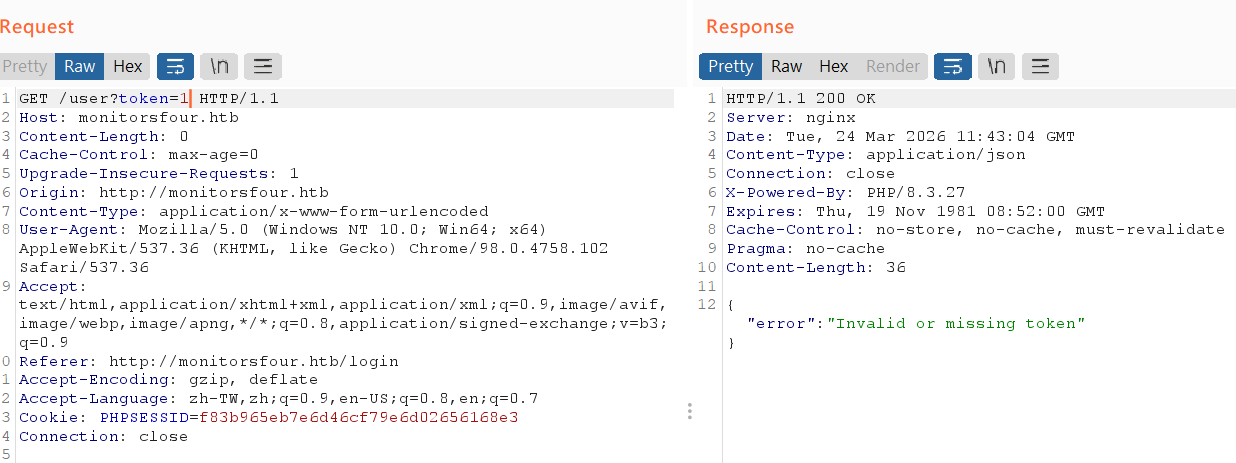
IDOR
如果出現可以指定resource的狀態就要懷疑可不可以利用
1 | |
那這些就很有可能會有IDOR(Insecure Direct Object Reference)的問題,如果request/user?token=0會怎麼樣呢
1 | |
1 | |
看到admin帳號,然後32byte就要想到MD5 hash透過線上的unhash嘗試破解,終於找到cacti的foothold
- Username:
Marcus - Password:
wonderful1
所以到目前為止的流程是
- nmap → 找到80 port → 找到IDOR → 找到foothold
- 透過fuzz subdomain → 找到cacti → 找CVE → 利用現成的exploit拿到RCE
實際拿到RCE
建議在同一個環境下建立,例如nc和exploit都在windows或是都在kali,而不是nc在windows,exploit在wsl,這樣會crash
1 | |
在另外一個terminal建立$ ncat -lvnp 9001
1 | |
現在我們拿到user.txt的flag,那麼下一步就是提權拿到root.txt
找漏洞提權
首先,從一些recon可以得知我們是在WSL當中的container中,821fbd6a43fa這個hostname看起來就是container然後uname又有提到WSL
1 | |
所以現在的結構大概如下,我們要拿到的root.txt可能在WSL中而不是在docker中,畢竟這樣的提權沒有意義
1 | |
現在最重要的事情是
- 我能不能用container控制host
- 我想要知道docker的版本是多少,只要確定版本就有機會知道用什麼方法escape container
我先找到在reddit上的post: Quick Guide: How to control a Docker Host from inside a container
So how does it work then?
A Docker host can provide a API over TCP. This can be enabled for the Docker daemon by editing the file /etc/docker/daemon.json like this:
2
3{ "hosts": ["unix:///var/run/docker.sock", "tcp://0.0.0.0:2375"] }Restart the Docker daemon and then it should be listening on TCP port 2375.
If you dont want to, or cannot, modify your Docker daemon like this, i will mention a alternative further down below.
Now what?
Now you can send commands to the API, hopefully the target container image that sends those commands has curl, wget or something similar available.
curl http://{docker-host-IP}:2375/containers/jsonwill for example print a list of running containers, equal to using docker ps.
- To stop a container: curl http://{docker-host-IP}:2375/containers/{id}/stop
- To start a container: curl http://{docker-host-IP}:2375/containers/{id}/start
(Replace id with either the container id, or the container name)
也就是我需要先知道docker host ip才可以控制到host或者是如果他有建立docker-socket-proxy也可以,但關鍵性的file也沒看到
1 | |
我在CSDN上看到host.docker.internal這東西(Docker中存取宿主機器:host.docker.internal)
host.docker.internal是 Docker 提供的一個特殊DNS名稱,用於在 Docker容器 內部解析為宿主機的內部 IP 地址。這項特性在Docker版本18.03以上版本中可用,它允許容器內的應用程式透過此網域來存取宿主機上執行的服務或資源。
host.docker.internal確實解析為宿主機的 IP位址 。不過,這裡所說的「本機」指的是運行Docker容器的宿主機,而不是容器本身。由於Docker容器預設透過橋接方式與宿主機共享網絡,但容器內部有自己的網絡 堆疊 和IP位址空間,因此需要一個特殊的方式來讓容器能夠存取宿主機。 host.docker.internal正是為此目的而設計的。
1 | |
發現192.168.65.254應該就是這個DNS IP,那有沒有其他的IP,反正就try & error,發現192.168.65.7:2375開著
1 | |
那代表這應該就是和host溝通的IP,而且也得到version: 28.3.2,如下
1 | |
以AI的回應
Docker container escape vulnerabilities (CVEs) allow attackers to break isolation and gain host-level access. Major 2024–2025 CVEs include CVE-2025-31133 (runc maskedPaths abuse), CVE-2025-9074 (Docker Desktop API access), and CVE-2024-21626 (runc file descriptor leak). This NIST page tracks many of these risks. Mitigation requires updating to the latest Docker Engine/Desktop.
Notable Docker Container Escape CVEs (2024–2025)
- CVE-2025-9074 (Critical): Affects Docker Desktop on Windows and macOS. It is a server-side request forgery (SSRF)-like vulnerability that allows containers to access the Docker Engine API, enabling full host control. Fixed in version 4.44.3.
- CVE-2025-31133 (runc Vulnerability): Affects runc by abusing maskedPaths, allowing attackers to access sensitive host files that should be hidden. Fixed in runc 1.2.8, 1.3.3, and 1.4.0-rc.3.
- CVE-2024-21626 (Leaky Vessels): A high-severity vulnerability in runc allowing container escape during image build or startup by leaking file descriptors to the host filesystem. Fixed in runc v1.1.12.
- CVE-2025-23266 (NVIDIA Container Toolkit): A critical vulnerability in CDI mode affecting NVIDIA tools, which could lead to container escapes.
感覺CVE-2025-9074比較符合現況,詳細看了資安人的post(Docker 修補 CVE-2025-9074 嚴重容器逃脫漏洞,CVSS 風險評分達 9.3)
資安研究員 Felix Boulet 深入分析發現,此漏洞源自容器能直接連接到 Docker Engine API(位址:192.168.65.7:2375),且完全無需身份驗證。具有特權的容器可透過掛載 C:\ 磁碟機,取得底層主機的完整存取權限。 … 在 Windows 系統上,由於 Docker Engine 透過 WSL2 執行,攻擊者能以管理員權限掛載整個檔案系統,不僅可讀取敏感資料,更能覆寫系統 DLL 檔案來提升權限。
難怪不需要socket並且關鍵字WSL也有看到,是一個標準的SSRF
提權
按照作者的POC如下( When a SSRF is enough: Full Docker Escape on Windows Docker Desktop (CVE-2025-9074) )
1 | |
最主要的流程是:
- 透過
192.168.65.7:2375向host請求create一個新的container並且告訴這個container要做的事情(CMD)同時bind主機當中的/mnt/host/c→/host_root - 實際start這個container,那他就會去執行前面定義的CMD,那麼
$ echo pwned > /host_root/pwn.txt=$ echo pwned > /mnt/host/c/pwn.txt
所以我們也依樣畫葫蘆
1 | |
現在我們拿到兩個Flag
- User Flag:
2266054595f947ade8583fc1eccc70bb - Root Flag:
4b1537ae546aff7ca81ee94cfaec9a96